
 Sign in to Mod The Sims
 Shutters - Open and Partially Closed Versions
 Shutters - Open and Partially Closed Versions


HL-wellwishershutter.jpg - width=600 height=343
HL-OpenMeshutter.jpg - width=600 height=343
HL-Lafenetreshutter.jpg - width=600 height=343
HL-IndExpshutter.jpg - width=600 height=343
HL-Euroshutter.jpg - width=600 height=343
HL-DblHungshutter.jpg - width=600 height=343

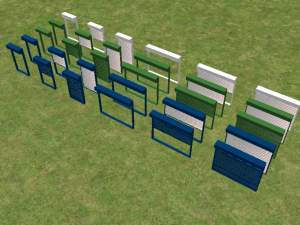
Includes straight and diagonals, and single and double width where appropriate for window type.
Window Type
- Well Wisher - Base
- Double Hung - Base
- Lafenetre - Base
- Independent Expressions - Base
- Open Me - NL
- Euro - OFB
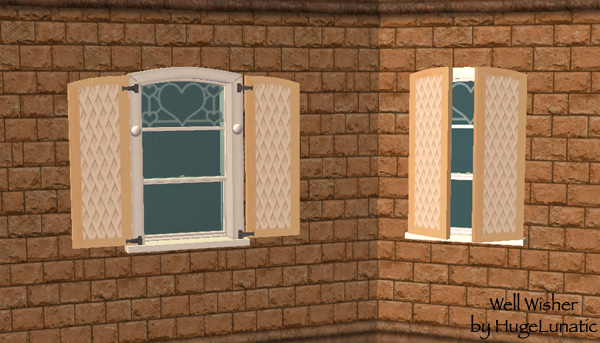
UVMaps are included, there are two, one for the open version and one for the closed. All are mapped identical.
Each one has been added to the collection file that the windows are in, but there is a separate collection file as well for all shutters.
Polygon Counts:
Polys - 306 open, 56 closed
Additional Credits:
Thanks to all who contributed to SimPE otherwise I wouldn't have all these cute little matching items for my sims.
This is a new mesh, and means that it's a brand new self contained object that usually does not require a specific Pack (although this is possible depending on the type). It may have Recolours hosted on MTS - check below for more information.
|
HL_Shutters.zip
Download
Uploaded: 6th Jan 2011, 2.29 MB.
2,046 downloads.
|
||||||||
| For a detailed look at individual files, see the Information tab. | ||||||||
Install Instructions
1. Download: Click the download link to save the .rar or .zip file(s) to your computer.
2. Extract the zip, rar, or 7z file.
3. Place in Downloads Folder: Cut and paste the .package file(s) into your Downloads folder:
- Origin (Ultimate Collection): Users\(Current User Account)\Documents\EA Games\The Sims™ 2 Ultimate Collection\Downloads\
- Non-Origin, Windows Vista/7/8/10: Users\(Current User Account)\Documents\EA Games\The Sims 2\Downloads\
- Non-Origin, Windows XP: Documents and Settings\(Current User Account)\My Documents\EA Games\The Sims 2\Downloads\
- Mac: Users\(Current User Account)\Documents\EA Games\The Sims 2\Downloads
- Mac x64: /Library/Containers/com.aspyr.sims2.appstore/Data/Library/Application Support/Aspyr/The Sims 2/Downloads
- For a full, complete guide to downloading complete with pictures and more information, see: Game Help: Downloading for Fracking Idiots.
- Custom content not showing up in the game? See: Game Help: Getting Custom Content to Show Up.
- If you don't have a Downloads folder, just make one. See instructions at: Game Help: No Downloads Folder.
Loading comments, please wait...


Uploaded: 22nd Aug 2008 at 1:20 PM
Updated: 6th Jan 2011 at 11:26 PM
-
by Ailias 8th Aug 2005 at 7:33pm
 32
56.6k
95
32
56.6k
95
-
by Ailias 12th Aug 2005 at 5:47pm
28
54.9k
81
-
More recolours of Xmsims curtains (open and closed)
by discordkitty 12th Jul 2006 at 1:23am
10
27.1k
17
-
Window shutters - open/closed/partially open
by annevs 25th Feb 2007 at 11:27pm
+4 packs
7 11k 3 University
 Nightlife
 Open for Business
 Pets
Pets
-
Cafe Shutters - Indoor Window Coverings - New Meshes
by khakidoo 28th Feb 2007 at 6:44am
24
57.7k
88
-
-
by SPOILEDROTTEN165 30th Mar 2007 at 11:02pm
3
15.7k
21
-
by khakidoo 29th Sep 2007 at 2:11pm
11
29.8k
40
-
by kim-simpearls 21st Jan 2008 at 5:48pm
2
19.1k
18
-
by ninipupucea 26th Aug 2008 at 7:17pm
+15 packs
1 3.9k 1 Happy Holiday
 Family Fun
University
Family Fun
University
 Glamour Life
Nightlife
Glamour Life
Nightlife
 Celebration
Open for Business
Pets
Celebration
Open for Business
Pets
 H&M Fashion
 Teen Style
 Seasons
 Kitchen & Bath
 Bon Voyage
 Free Time
 Ikea Home


-
by HugeLunatic 27th Nov 2012 at 5:34am
This enables the clear glass that is on the existing white texture. more...
11
22.1k
45
-
OFB International Window Extras - Part I Single Tile
by HugeLunatic 30th Apr 2009 at 2:38pm
My favorite house and decorating style is modern, and I was thrilled when OFB included these very simple windows. more...
+1 packs
37 60k 108 Open for Business
-
by HugeLunatic 10th Mar 2018 at 2:42pm
A collection of EA bookcases emptied, slots added, and repo'd to their original counterparts. more...
13
15.6k
49
-
by HugeLunatic 19th Sep 2009 at 8:29pm
**Updated 27-Oct-09** Fixed Club desk in the HL_base_1TileDesks.rar. more...
174
363.3k
1.1k
By Function » Surfaces » Desks
-


by HugeLunatic updated 6th Apr 2026 at 12:35pm
+1 packs
2 1.3k 5 Open for Business
-

by HugeLunatic 27th Mar 2019 at 6:57pm
Was wondering why I had no recolors for this, apparently it wasn't recolorable? :bunny: Now the frame is more...
+1 packs
3 7.9k 14 Free Time
-
by HugeLunatic 8th Dec 2013 at 9:12pm
While I'm on a LACK and Atomic color scheme, I thought I'd do a few more doors. more...
+1 packs
8 16.8k 50 Bon Voyage
-


by HugeLunatic 4th Oct 2019 at 4:53pm
The electronics from The Sim 3 Store Atomic set. more...
+1 packs
12 8.3k 31 Apartment Life
-
Recolor Your Stairs!! *Updated*
by HugeLunatic 15th Oct 2009 at 9:33pm
Updated Oct-16 - Fixed issue with Sims not using the stair properly. Non-recolorable stairs...what a giant step backwards. more...
 41
64.2k
107
41
64.2k
107
-
by HugeLunatic 23rd Nov 2007 at 2:32pm
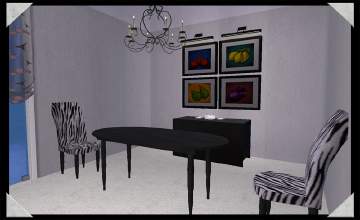
A recolor of EarthGoddess54 Essence Dining Room. A must have set for any sim with discerning tastes. more...


About Me
Pet Stories || Dog Agility Items? || Castaway Stories || Holy Simoly Extras
4esf Archive || Holy Simoly Archive || CEP-Extras List || Buyable Game Objects
lunie content from GoS/s2a
 Installation of CEP Extras
-the package with pfiles appended to the name will go into your cep extras folder where your game is installed (typically c drive, you do you)
-the other goes in CEP extra folder in documents.
The following locations are what I am aware of, beyond that you'll have to do some searching.
Downloads Folder:
C:\Users\<user>\Documents\EA Games\The Sims 2 Legacy
C:\Users\<user>\Documents\EA Games\The Sims 2 Ultimate Collection
With multiple launchers, the location for your game install will vary.
C:\Program Files\EA GAMES\The Sims 2 Legacy\TSData\Res\Catalog\zCEP-EXTRA
C:\Program Files\EA GAMES\The Sims 2\TSData\Res\Catalog\zCEP-EXTRA
C:\Program Files (x86)\EA GAMES\The Sims 2\TSData\Res\Catalog\zCEP-EXTRA