
 Sign in to Mod The Sims
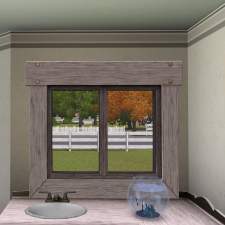
 EA Match Mission Window at Counter Height
 EA Match Mission Window at Counter Height


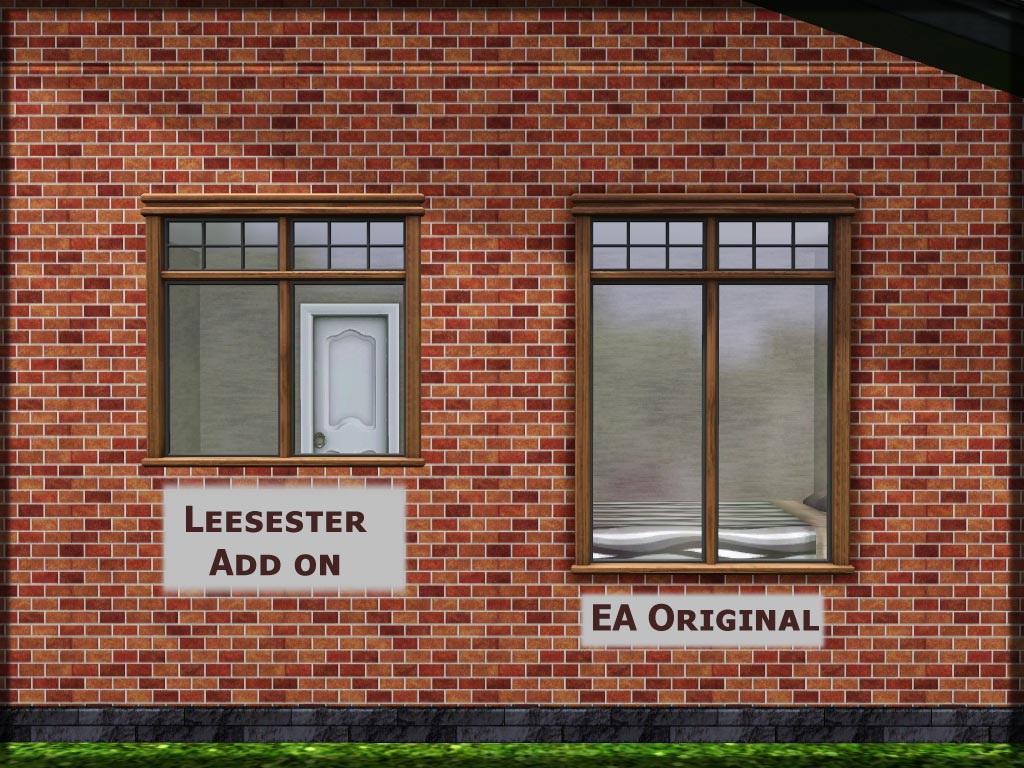
window-upload.jpg - width=1024 height=768
Exterior view next to original for comparison
interior.jpg - width=1024 height=768
Interior view above counter
catalog.jpg - width=560 height=297
Catalog info
interior.jpg - width=1024 height=768
FIXED.jpg - width=495 height=462

Here it is: my first window for TS3. I am so proud of it, and I hope you like it. I intend to make a full set of these, but here is number one. I was gonna call this the Wes Howe window, but instead I kept it vanilla. It is HIS window though, THANK YOU WES
Its a shortened version of the EA Mission window on two tiles, it works on straight and diagonal walls
Price and recolours
165 simoleons and fully recolourable using the CAS tool
FIXED There were reports that this window caused blue lots. I have fixed this. My sincere apologies to anyone who may have lost a favourite sim or anything due to blue lots caused by this window.
Polygon Counts:
MODL = 592
LOD = 1160
Both are the same as the EA window
Additional Credits:
Wes H for the mesh tool
Peter and Inge Jones for S3OC and S3PE Murano for the wallmask tutorial
MTS for giving a place to share my stuff
All the people in the chat rooms on MTS who dried my tears of rage and frustration and encouraged me to carry on
This is a new mesh, and means that it's a brand new self contained object that usually does not require a specific Pack (although this is possible depending on the type). It may have Recolours hosted on MTS - check below for more information.
|
Leesester_WindowMissionCounter Height.rar
Download
Uploaded: 9th Aug 2009, 822.5 KB.
19,632 downloads.
|
||||||||
| For a detailed look at individual files, see the Information tab. | ||||||||
Install Instructions
1. Click the download button, or the filename, to download the file to your computer.
2. Extract the zip, rar, or 7z file. Now you will have either a .package or a .sims3pack file.
For Package files:
1. Cut and paste the file into your Documents\Electronic Arts\The Sims 3\Mods\Packages folder. If you do not already have this folder, you should read the full guide to Package files first: Sims 3:Installing Package Fileswiki, so you can make sure your game is fully patched and you have the correct Resource.cfg file.
2. Run the game, and find your content where the creator said it would be (build mode, buy mode, Create-a-Sim, etc.).
For Sims3Pack files:
1. Cut and paste it into your Documents\Electronic Arts\The Sims 3\Downloads folder. If you do not have this folder yet, it is recommended that you open the game and then close it again so that this folder will be automatically created. Then you can place the .sims3pack into your Downloads folder.
2. Load the game's Launcher, and click on the Downloads tab. Find the item in the list and tick the box beside it. Then press the Install button below the list.
3. Wait for the installer to load, and it will install the content to the game. You will get a message letting you know when it's done.
4. Run the game, and find your content where the creator said it would be (build mode, buy mode, Create-a-Sim, etc.).
Extracting from RAR, ZIP, or 7z: You will need a special program for this. For Windows, we recommend 7-Zip and for Mac OSX, we recommend Keka. Both are free and safe to use.
Need more help?
If you need more info, see:
- For package files: Sims 3:Installing Package Fileswiki
- For Sims3pack files: Game Help:Installing TS3 Packswiki
Loading comments, please wait...



Uploaded: 9th Aug 2009 at 10:27 PM
Updated: 8th Apr 2011 at 6:20 AM by leesester - added diagonal info
-
by leefish 16th Oct 2009 at 3:56pm
 38
43.7k
68
38
43.7k
68
-
-
by Hekate999 updated 14th Apr 2011 at 11:43am
18
65.5k
166
-
by HugeLunatic 26th Feb 2011 at 8:12pm
77
109.2k
315
-
-
-
-
-
-
by heaven 24th Oct 2015 at 7:42pm
4
13.5k
43


-
Medieval Lighting - Ye Olde Kingdom of Pudding
by The Merrye Makers 11th Dec 2011 at 2:49pm
A collection of medieval lanterns made by Hekate999 for The Merrye Makers. Includes floor, wall, and table lanterns. more...
8
45.2k
134
-
Half size Colonial Windows Maxis Match
by leefish 14th Feb 2009 at 3:16pm
I have been trying to build houses with dormers and I was getting annoyed that all the windows were too more...
 25
30.3k
65
25
30.3k
65
-
Base Game Colonial Arches + Bonus Arch
by leefish 2nd Jun 2009 at 3:18pm
I had a couple of requests for these, this is the base game Colonial OakTowne Interior Door remeshed to an more...
32
56.1k
112
-
Medieval Pants for Boys and Girls CAS - Ye Olde Kingdom of Pudding. Now as outerwear too
by The Merrye Makers 14th Jul 2013 at 5:52pm
Soon winter will come ... and our boys and girls can not walk through the kingdom with bare legs. So, our tailors rushed to sew pants to warm them. more...
22
49.8k
155
-
-
Medieval Kids Furniture Part 2 - Ye Olde Kingdom of Pudding
by The Merrye Makers 16th Jan 2012 at 2:02pm
A medieval noble's crib and two medieval cribs (one large, one small) made by Hekate999 for The Merrye Makers. more...
31
104.6k
277
-
-
-
Small La Fenêtre Window on 2 tiles Maxis Match
by leefish 11th Dec 2008 at 4:41pm
This window was requested by Harry_Tristan_Harding and as it sort of goes with my other uploads I made it to more...
11
30.6k
65
-
Wooden Door Centred on Two Tiles
by leefish updated 17th Apr 2010 at 7:28pm
Well, here is my first entry for the Medieval Challenge. more...
16
33.8k
82


About Me
In addition to all the things I have uploaded to MTS I also have a site of my own, leefish.nl. We have free downloads from various creators and accept Sims related uploads from members. Click on the link below to visit the site.
www.leefish.nl
Extra Policy Information
Please feel free to use my meshes in your lots as long as you give me credit for it and please do not share elsewhere as your own work.
The only exception to my policy for uploading with lots is the milk bottle door changer, which should not be uploaded in a lot.
Feel free to include any of my meshes in mesh packs etc in your uploads EXCEPT for on Pay Sites.
If you use my items I would love to know about it, but you don't have to tell me if you don't want to.