
 Sign in to Mod The Sims
 Si non confectus, non reficiat - Lord Havelock Vetinari
 Si non confectus, non reficiat - Lord Havelock Vetinari


200px-Lord_Vetinari.jpg - width=200 height=273
lord-havelock-vetinari.jpg - width=200 height=321
Vetinari20Wallpaper20pseudo.jpg - width=800 height=640
WufflesNHavelock.jpg - width=258 height=390
vetibody.jpg - width=345 height=878
Havelock Vetinari.jpg - width=549 height=798
vetihead.jpg - width=1094 height=862
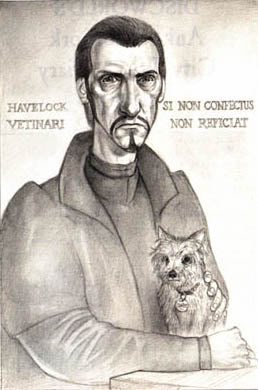
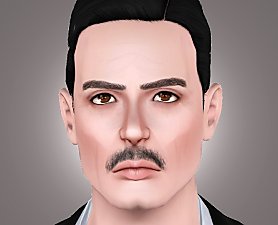
Lord Havelock Vetinari is the Patrician of Ankh-Morpork, the head of the fictional city state of Ankh-Morpork in Terry Pratchett's Discworld series.
As the ruler of the largest city in Discworld, he is a expert on diplomacy and politics. Like his predecessors, Vetinari keeps his role as "tyrant" and dictator of Ankh-Morpork, but unlike the others, he has not been killed for it nor has he lost his mind to power. The people of Ankh-Morpork, both Vetinari's supporters and enemies, reluctantly admit that the world is a better place with him alive instead of dead.
His family motto; Si non confectus, non reficiat means "If it ain't broken, don't fix it".
Lord Vetinari is such a complex character that I doubt I'll be able to tell you everything about his without confusing you all, so here is a link to his wikipedia page: http://en.wikipedia.org/wiki/Vetinari
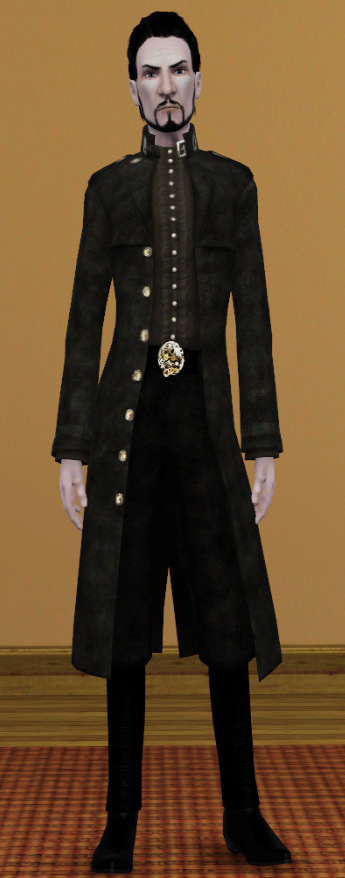
A very big thank you to everyone who helped me in the Feedback forum, especially to EsmeraldaF who made the hair and the beard I used:
http://www.modthesims.info/download.php?t=374285
http://www.modthesims.info/download.php?t=373483
The outfit I used for his casual and formal outfit is a EA store item.
It is the outfit from the Steampunk Savvy set called Gentleman First and can be found here: http://store.thesims3.com/productDe...=male&startAt=0
|
Havelock_Vetinari.zip
Download
Uploaded: 6th Nov 2009, 361.6 KB.
2,964 downloads.
|
||||||||
| For a detailed look at individual files, see the Information tab. | ||||||||
Install Instructions
1. Click the filename or the download button to download the sim to your computer.
2. Extract the zip, rar, or 7z file.
2. Select the .sim file you got from extracting.
3. Cut and paste it into your Documents\Electronic Arts\The Sims 3\SavedSims folder. If you do not have this folder yet, it is recommended that you open the game, enter Create-a-Sim, and save a sim to the sim bin to create this folder, rather than doing so manually. After that you can close the game and put the .sim file in SavedSims
4. Once the .sim file is in SavedSims, you can load the game, and look for your sim in the premade sims bin in Create-a-Sim.
Extracting from RAR, ZIP, or 7z: You will need a special program for this. For Windows, we recommend 7-Zip and for Mac OSX, we recommend Keka. Both are free and safe to use.
Need more help?
If you need more info, see Game Help:Installing TS3 Simswiki for a full, detailed step-by-step guide! Special Installation Instructions
- If you get an error that says "This content requires expansion pack data that is not installed", please use Clean Installer to install this sim.
Loading comments, please wait...

Uploaded: 6th Nov 2009 at 12:43 AM
-
by amvalvo 14th Jul 2009 at 6:23am
 90
105.1k
133
90
105.1k
133
-
by amvalvo 15th Jul 2009 at 9:20pm
56
57.6k
62
-
-
by Esmeralda 21st Feb 2010 at 8:19pm
247
202.5k
208
-

by adybatch 30th Jul 2011 at 9:16am
41
62.6k
102
-
by adybatch 10th Aug 2011 at 10:49am
78
151.1k
249
-

-
-
by Nemiga 26th Jul 2014 at 8:16pm
11
25.1k
60
-

by yarengunel 12th Nov 2025 at 10:16am
6
3.2k
4


-
Unseen Academical Athletic T-shirts
by MaidenM 6th Nov 2009 at 4:26pm
Hello! more...
13
15.3k
7
Male » Everyday » Young Adult
-

