
 Sign in to Mod The Sims
 The Regal
 The Regal


Screenshot.jpg - width=640 height=398
Screenshot-3.jpg - width=640 height=398
Screenshot-4.jpg - width=640 height=398
Screenshot-14.jpg - width=640 height=398
Screenshot-15.jpg - width=640 height=398
Screenshot-2.jpg - width=640 height=398
Screenshot-16.jpg - width=640 height=398

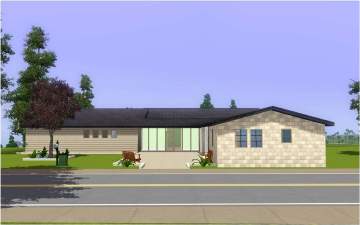
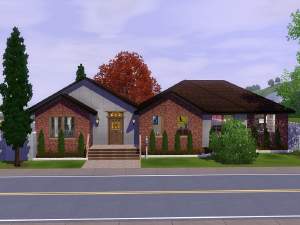
This is a 2 bdrm with a study/optional 3 bdrm home with 1.5 bth. It has a nice patio for parties and a garden for those who grow their own food.
Lot Size: 3x3
Lot Price: Unfurnished-$36,305 Furnished-$60,985
I am playing this home and it works great!
|
The Regal_PK1980.rar
Download
Uploaded: 8th Jan 2010, 1.39 MB.
1,001 downloads.
|
||||||||
| For a detailed look at individual files, see the Information tab. | ||||||||
Install Instructions
1. Click the filename or the download button to download the file to your computer.
2. Extract the zip, rar, or 7z file.
2. Select the .sims3pack file you got from extracting.
3. Cut and paste it into your Documents\Electronic Arts\The Sims 3\Downloads folder. If you do not have this folder yet, it is recommended that you open the game and then close it again so that this folder will be automatically created. Then you can place the .sims3pack into your Downloads folder.
5. Load the game's Launcher, and click on the Downloads tab. Select the house icon, find the lot in the list, and tick the box next to it. Then press the Install button below the list.
6. Wait for the installer to load, and it will install the lot to the game. You will get a message letting you know when it's done.
7. Run the game, and find your lot in Edit Town, in the premade lots bin.
Extracting from RAR, ZIP, or 7z: You will need a special program for this. For Windows, we recommend 7-Zip and for Mac OSX, we recommend Keka. Both are free and safe to use.
Need more help?
If you need more info, see Game Help:Installing TS3 Packswiki for a full, detailed step-by-step guide!
Loading comments, please wait...
Uploaded: 8th Jan 2010 at 3:05 AM
Updated: 8th Jan 2010 at 5:01 PM - made changes to pics and lot price
-
-
-
-
-
-
by PiperK1980 22nd Apr 2010 at 8:40pm
 +1 packs
2 6.5k 1
+1 packs
2 6.5k 1 World Adventures
-
-
-
by Beccapixie10 18th Sep 2013 at 7:48pm
+4 packs
3 8.5k 23 High-End Loft Stuff
 Ambitions
 Late Night
 Generations
-


-
by PiperK1980 6th May 2007 at 10:17pm
This Faircourt Lane home includes an office/study downtstairs and 1 bath. more...
 +7 packs
6k
+7 packs
6k Family Fun
 University
 Glamour Life
 Nightlife
 Open for Business
 Pets
Pets
 Seasons
-

Train Your Dog Faster *Latest Patch*
by PiperK1980 updated 13th Nov 2011 at 10:25pm
These mods will decrease the amount of time it takes to teach your dog tricks. Faster just means it takes LESS time to train the "Fast" flavor. more...
+1 packs
42 56.3k 195 Pets
Pets
-

Slower and No Decay for Werewolf Clubs
by PiperK1980 updated 27th Mar 2025 at 11:08am
I hated how fast my sim was "in trouble" with the pack just because my sim was off living their best life. more...
 +1 packs
4 2.7k 8
+1 packs
4 2.7k 8 Werewolves
-


Jennifer Darling *Heartbreaker* UPDATED! 3/3/07
by PiperK1980 updated 3rd Mar 2007 at 10:25pm
Jennifer Darling is a model. Of course, that's not what she really wanted to do with her life. more...
-
-
by PiperK1980 16th Apr 2007 at 4:14am
This charming semi-starter home sits on a 3x3 lot. more...
+7 packs
1 5.9k Family Fun
University
Glamour Life
Nightlife
Open for Business
Pets
Seasons
-

No More "Exciting Thing Nearby!" Reactions
by PiperK1980 6th Apr 2025 at 1:51pm
+1 packs
2 1.8k 3 Life and Death
-
by PiperK1980 20th Apr 2007 at 7:06am
Did you just get a promotion? Are you in the market for a new house? Then look no more. more...
+7 packs
6.1k Family Fun
University
Glamour Life
Nightlife
Open for Business
Pets
Seasons
-
by PiperK1980 27th Jan 2007 at 9:45am
Ok, this is my first lot upload and this took me quite some time. more...
+3 packs
5.9k 1 University
Nightlife
Open for Business
-
by PiperK1980 22nd Apr 2010 at 8:40pm
This a 3brm/2.5bth home with an optional study/bdrm upstairs. more...
+1 packs
2 6.5k 1 World Adventures


About Me
I used to just make houses.
Then The Sims 3 came out and I found I can make minor mods.
Then The Sims 4 came out and well, I know my way around a computer but coding is really beyond me.
Then I saw that I could make mods without Python. Goodie! I mostly like to make mods that alter minor annoyances.
I like to keep it simple. I'm a simple modder. A SIMmodder.....:rofl: :wtf: No? Ok. *sees herself out*