
 Sign in to Mod The Sims
 Mocha ~ Eyeshadow
 Mocha ~ Eyeshadow


mocha_thumb.png - width=256 height=256
CAS Thumbnail
mocha_smal.jpg - width=400 height=564
Examples
Here's a classy eyeshadow for you. I called it mocha because of the colours I used in the cas thumbnail. They made me want to go make a coffee.

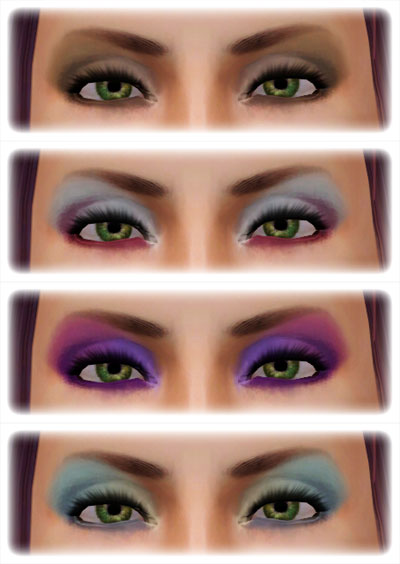
You can see the three channels in the examples above. It's for males and females from teen to elder.
I hope you like it!
<3
COLOURS
Brown
109, 84, 69
214, 168, 124
241, 202, 180
Purples
87, 0, 137
231, 114, 166
185, 137, 255
Aquas
126, 147, 171
200, 241, 236
255, 245, 203
The second one is just whites and a darkish maroon colour
Additional Credits:
Eyebrows by Subaxi
Replacement Multifoiled Eyes by aikea guinea
Skin is my Naughty & Nice
|
LadyFrontbum_Mocha_Eyeshadow_FIX.rar
Download
Uploaded: 9th May 2010, 753.9 KB.
27,825 downloads.
|
||||||||
| For a detailed look at individual files, see the Information tab. | ||||||||
Install Instructions
1. Click the download button, or the filename, to download the file to your computer.
2. Extract the zip, rar, or 7z file. Now you will have either a .package or a .sims3pack file.
For Package files:
1. Cut and paste the file into your Documents\Electronic Arts\The Sims 3\Mods\Packages folder. If you do not already have this folder, you should read the full guide to Package files first: Sims 3:Installing Package Fileswiki, so you can make sure your game is fully patched and you have the correct Resource.cfg file.
2. Run the game, and find your content where the creator said it would be (build mode, buy mode, Create-a-Sim, etc.).
For Sims3Pack files:
1. Cut and paste it into your Documents\Electronic Arts\The Sims 3\Downloads folder. If you do not have this folder yet, it is recommended that you open the game and then close it again so that this folder will be automatically created. Then you can place the .sims3pack into your Downloads folder.
2. Load the game's Launcher, and click on the Downloads tab. Find the item in the list and tick the box beside it. Then press the Install button below the list.
3. Wait for the installer to load, and it will install the content to the game. You will get a message letting you know when it's done.
4. Run the game, and find your content where the creator said it would be (build mode, buy mode, Create-a-Sim, etc.).
Extracting from RAR, ZIP, or 7z: You will need a special program for this. For Windows, we recommend 7-Zip and for Mac OSX, we recommend Keka. Both are free and safe to use.
Need more help?
If you need more info, see:
- For package files: Sims 3:Installing Package Fileswiki
- For Sims3pack files: Game Help:Installing TS3 Packswiki
Loading comments, please wait...
Uploaded: 9th May 2010 at 8:15 AM
-
-
-
by G-Kristina 19th Nov 2009 at 1:01pm
-
by LadyFrontbum 13th Jan 2010 at 1:40pm
-
by LadyFrontbum 9th May 2010 at 2:37am
-
Disco Dal & Disco DaVinci - Eyeshadow Duo
by LadyFrontbum 9th May 2010 at 2:39am
-
by LadyFrontbum 9th May 2010 at 4:19am
-
-
by LadyFrontbum 8th Jul 2010 at 12:00pm
-

-
Stitched Up - Non-Default Frankenstein Skin for Females
by LadyFrontbum 31st Mar 2010 at 5:17am
Stitched Up I made this 'stitches' file a while back, it was originally a body makeup that took up more...
-
Busty St. Claire - more voluptuous version of my skins.
by LadyFrontbum 2nd May 2010 at 1:58am
Busty St. more...
-
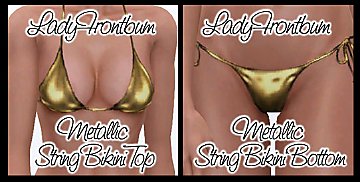
by LadyFrontbum updated 11th Feb 2010 at 3:01am
UPDATE 11th Feb: Added another file, it includes Teen to Elder. more...
 34
176.3k
224
34
176.3k
224
-
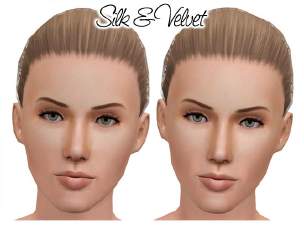
Silk & Velvet - Female Face Skins
by LadyFrontbum 28th Jun 2010 at 10:10pm
Silk & Velvet Hey guys, here are the new faces I’ve been working on. more...
-
by LadyFrontbum 26th Mar 2010 at 3:48pm
Naughty & Nice Well it took forever but my female skin is finally done. more...
-
by LadyFrontbum 3rd Jan 2010 at 12:30pm
I decided to make some freckles for my sims faces and came up with a trio to share. more...
38
115.1k
323
-
Eyeshadow Duo - Cheetah & Leopard
by LadyFrontbum 3rd Jan 2010 at 12:28pm
I wanted to create some eyeshadow that would look good on the fantasy sims I plan on making in the more...
-
by LadyFrontbum 30th Jan 2010 at 10:20am
Update 9th Feb: Fixed the hair link. more...
-
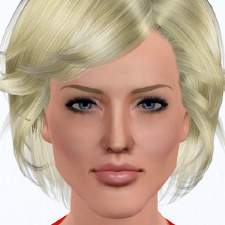
Battlestar Galactica's Six, played by Tricia Helfer
by LadyFrontbum 10th Jan 2010 at 2:11am
Sexy Cylon from Battlestar Galactica more...
-
Disco Dal & Disco DaVinci - Eyeshadow Duo
by LadyFrontbum 9th May 2010 at 2:39am
Disco DaVinci & Disco Dal Here are some funky new eyeshadows for you. Hopefully just the first of many. more...
About Me
If uploading sims to freesites - you may package my makeup / clothing with the sim. Just credit and link back where possible.
If uploading sims to paysites - don't package the makeup / clothing with the sim, instead take your screenshots then remove the makeup before uploading. Be sure to credit and link back.
You may share all of my creations on free sites. Again, just remember to credit me and link back where possible.
SIMS
You may use my sims as models for your custom content or in movies etc. But only on freesites and just be sure to credit me. :)
REQUESTS
While I don't usually take requests because of the time frame involved in making sims etc, I am happy to take suggestions. This just means I will add the celebrity/character/item to my list and will try creating them at some stage. Could be tomorrow, could be 6 months from now. Sometimes I make them, sometimes I fail miserably... just keep that in mind. :D