
 Sign in to Mod The Sims
 Pool Set, seven new meshes
 Pool Set, seven new meshes


aa.jpg - width=1000 height=683
bb.jpg - width=1000 height=933
cc.jpg - width=998 height=813
dd.jpg - width=1000 height=606
family view.jpg - width=1000 height=607
seahorse fish crab.jpg - width=800 height=551
ZZ.jpg - width=997 height=745

This is my new set for the family around the pool:
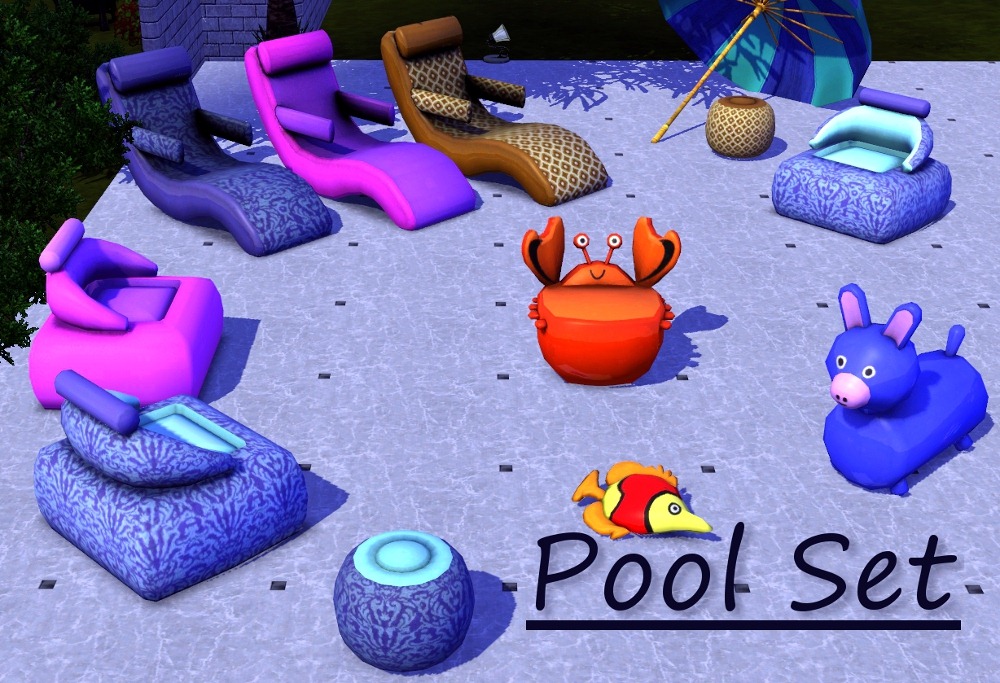
It contains seven new meshes.
 Updated for patch1.7
The lounge chair:
Price: 100§
Catalog location: Comfort/Recliner
Recolourable channels:2
The inflatable chair:
Price: 89§
Catalog location: Comfort/Misc
Recolourable channels: 3
The ottoman:
Price: 75§
Catalog location: Comfort/Misc
Recolourable channels: 2
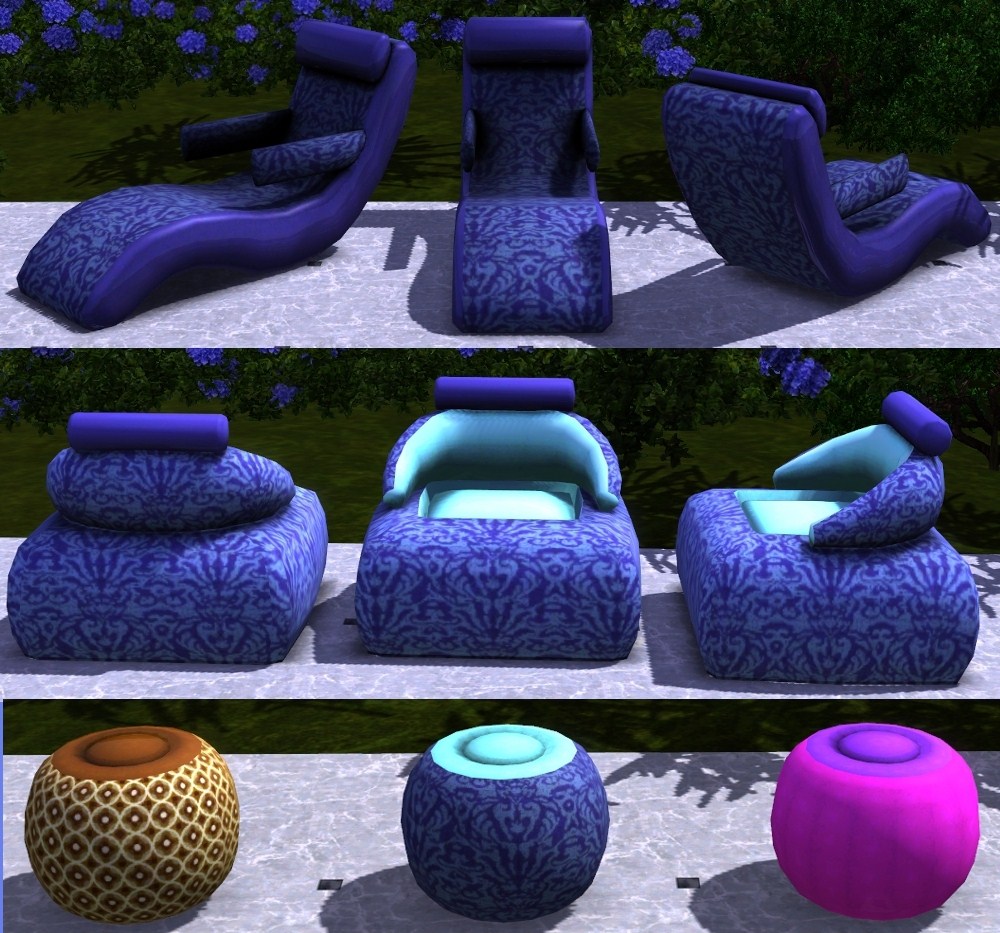
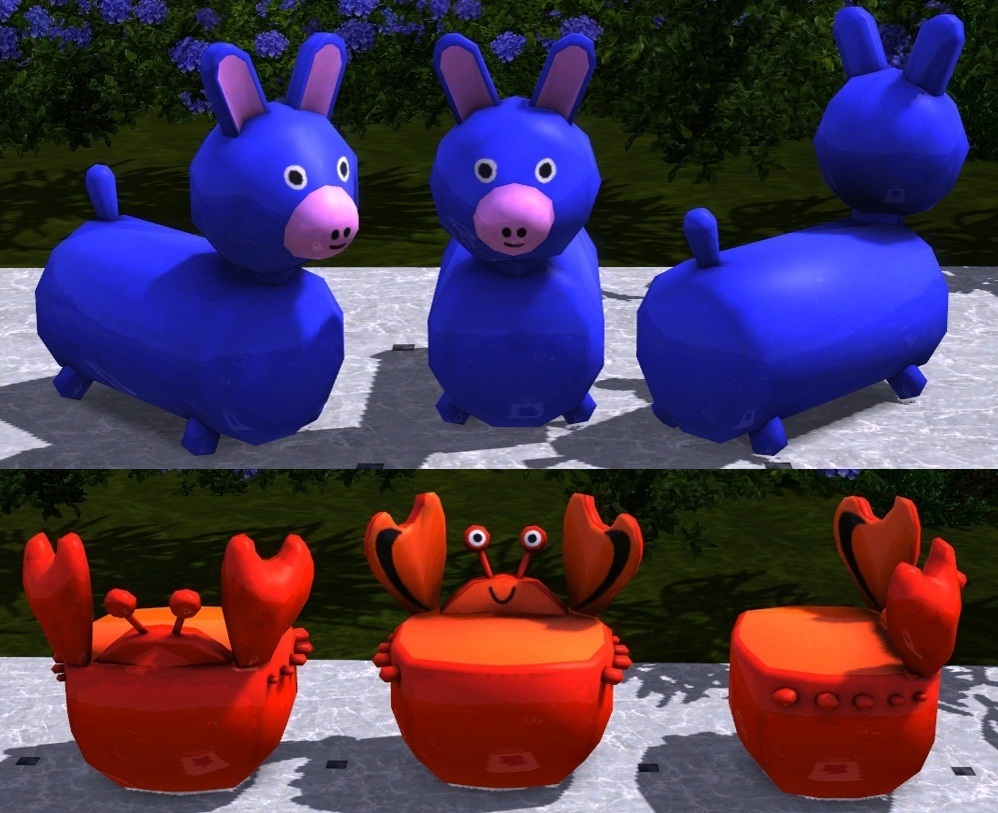
The crab chair:
Price: 35§
Catalog location: Comfort/Misc
Recolourable channels: 2
The donkey:
Price: 52§
Catalog location: Comfort/Misc
Recolourable channels: 2
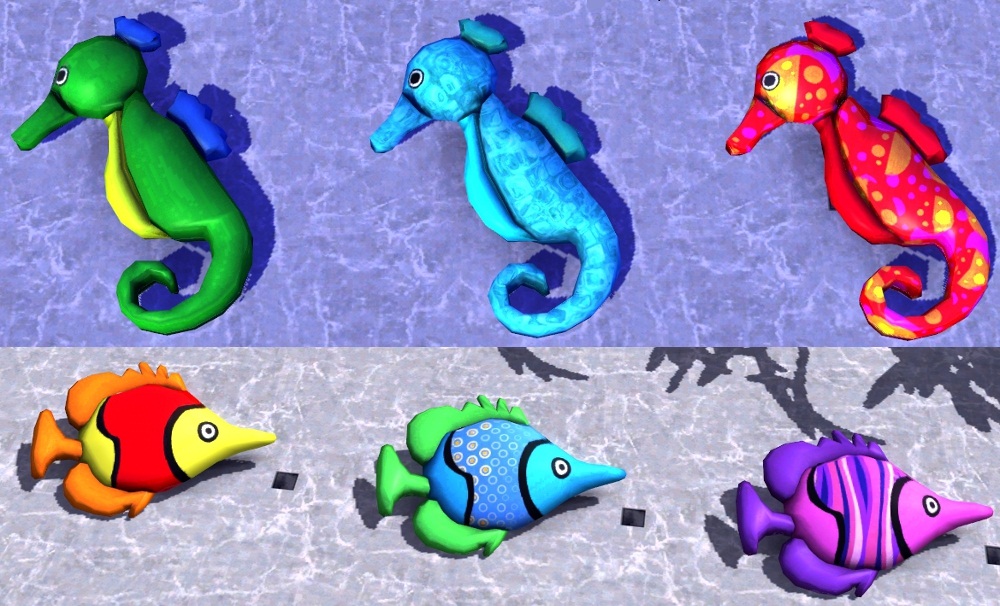
And two decorative animals:
The fish:
Price: 29§
Catalog location: Decor/Misc
Recolourable channels: 3
The seahorse:
Price: 29§
Catalog location: Decor/Misc
Recolourable channels: 3
Maylin

Polygon Counts:
Faces: High/Low polycount
Lounge chair: 538/222
Inflatable chair: 648/474
Ottoman: 706/413
Crab chair: 922/660
Donkey: 535/328
Fish: 530/406
Seahorse: 582/464
Additional Credits:
Created with Blender, TSRW and The Gimp.
Based on real items found on the net.
This is a new mesh, and means that it's a brand new self contained object that usually does not require a specific Pack (although this is possible depending on the type). It may have Recolours hosted on MTS - check below for more information.
|
ottoman.zip
Download
Uploaded: 5th Aug 2010, 456.2 KB.
25,607 downloads.
|
||||||||
|
lounge chair.zip
Download
Uploaded: 5th Aug 2010, 556.7 KB.
29,067 downloads.
|
||||||||
|
Inflatable chair.zip
Download
Uploaded: 5th Aug 2010, 417.9 KB.
29,203 downloads.
|
||||||||
|
Donkey.zip
Download
Uploaded: 5th Aug 2010, 180.2 KB.
23,883 downloads.
|
||||||||
|
Deco Seahorse.zip
Download
Uploaded: 5th Aug 2010, 115.9 KB.
23,971 downloads.
|
||||||||
|
Deco Fish.zip
Download
Uploaded: 5th Aug 2010, 202.1 KB.
23,946 downloads.
|
||||||||
|
Crab Chair.zip
Download
Uploaded: 5th Aug 2010, 216.6 KB.
27,722 downloads.
|
||||||||
| For a detailed look at individual files, see the Information tab. | ||||||||
Install Instructions
1. Click the download button, or the filename, to download the file to your computer.
2. Extract the zip, rar, or 7z file. Now you will have either a .package or a .sims3pack file.
For Package files:
1. Cut and paste the file into your Documents\Electronic Arts\The Sims 3\Mods\Packages folder. If you do not already have this folder, you should read the full guide to Package files first: Sims 3:Installing Package Fileswiki, so you can make sure your game is fully patched and you have the correct Resource.cfg file.
2. Run the game, and find your content where the creator said it would be (build mode, buy mode, Create-a-Sim, etc.).
For Sims3Pack files:
1. Cut and paste it into your Documents\Electronic Arts\The Sims 3\Downloads folder. If you do not have this folder yet, it is recommended that you open the game and then close it again so that this folder will be automatically created. Then you can place the .sims3pack into your Downloads folder.
2. Load the game's Launcher, and click on the Downloads tab. Find the item in the list and tick the box beside it. Then press the Install button below the list.
3. Wait for the installer to load, and it will install the content to the game. You will get a message letting you know when it's done.
4. Run the game, and find your content where the creator said it would be (build mode, buy mode, Create-a-Sim, etc.).
Extracting from RAR, ZIP, or 7z: You will need a special program for this. For Windows, we recommend 7-Zip and for Mac OSX, we recommend Keka. Both are free and safe to use.
Need more help?
If you need more info, see:
- For package files: Sims 3:Installing Package Fileswiki
- For Sims3pack files: Game Help:Installing TS3 Packswiki
Loading comments, please wait...



Uploaded: 5th Aug 2010 at 10:25 PM
Updated: 20th Oct 2011 at 9:59 PM
#Outdoor, #pool, #inflatable, #chair, #lounge chair, #fish, #seahorse, #plastic
-
-
by -Maylin- 30th May 2010 at 12:57pm
-
-
Request: British Phone Booth and British Mailbox
by Hekate999 updated 14th Apr 2011 at 11:49am
-
by Lisen801 21st Jan 2011 at 6:02pm
 27
58.7k
129
27
58.7k
129
-
by Cloudburst 20th May 2011 at 6:10pm
-
-
-
by Wojtek 16th Feb 2017 at 10:19am
24
19.9k
55
-
by enable_llamas 1st Aug 2020 at 8:29pm
21
24.1k
75


-
-
-
"Pop Seventies" Dining Set and a special "floating" version for Aliens!!!
by -Maylin- 4th May 2008 at 2:51pm
Hi all, I have created a dining part for the "Pop Seventies" set (that can be found here:) requested more...
-
Luxury Nursery Set : 4 new meshes + 3 recolours
by -Maylin- 18th Nov 2006 at 1:22pm
Hi everybody, Here my new Nursery set: It contains 4 new meshes: -The crib more...
 40
132k
63
40
132k
63
-
Naila Design: New Living Room Set
by -Maylin- 30th Sep 2009 at 4:56pm
Hi all, Here is my new modern living room set: It contains six new meshes more...
-
Sailor Bedroom set: 13 new meshes (and 2 recolors)!
by -Maylin- 3rd Feb 2007 at 11:21am
Hi all, Today I upload a complete bedroom set for our sims boys:the Sailor Bedroom set. more...
-
*Updated 28/02*Fantasy Mirror : New Mesh and Version 2
by -Maylin- updated 14th Mar 2009 at 7:41am
Hi all This is just a new mirror for your simmies but in Fantasy style: more...
29
38.2k
53
-
New mesh: R2D2 TV for children or Aliens....
by -Maylin- 2nd Dec 2006 at 7:06pm
Hi everybody, Hey, I have created this TV : Faces 2624 Vertices 1799 In more...
66
118.7k
102
-
Country Kitchen Set: Recolor in Natural Wood
by -Maylin- 13th Jun 2006 at 6:50am
Natural wood recolor for the country kitchen set you can find here : Hope you like it too. more...
-
Antique Cooking Fireplace: New mesh & 2 recolors *Update 09/12* FIXED
by -Maylin- 6th Jun 2007 at 10:08pm
Hi all, As requested by Patul, I have created this fireplace which can be used only for cooking (not more...
58
130.5k
225

