
 Sign in to Mod The Sims
 Cast Iron Stair and matching Fence
 Cast Iron Stair and matching Fence


StairTexture.jpg - width=560 height=558
Cast Iron Stair Color Channels and Texture tiling
BaseGameFence.jpg - width=726 height=561
Different high for DV and BaseGame Fence
CastIronIndex.jpg - width=900 height=561
Introduction Picture, Cast Iron Staircase and Fence
CastIronStair.jpg - width=900 height=561
ColorTextureFence.jpg - width=600 height=683
Color Channels for Fence
Fence.jpg - width=700 height=479
Fence and Stair delivery Color - glavanized
FenceoGate.jpg - width=900 height=561
The EA matching Gate
Cornerfilling.jpg - width=800 height=407
Corner filling for floors
 Updated for Pets and patch and tested in game
 There is now a small corner filling you can use if you build a balcony and have the round corner. It have three color channels so you can match it with your floor.
When placing the stairs don't use automatic railings or you will get a wooden railing!
First place the stairs and then the suitable railing
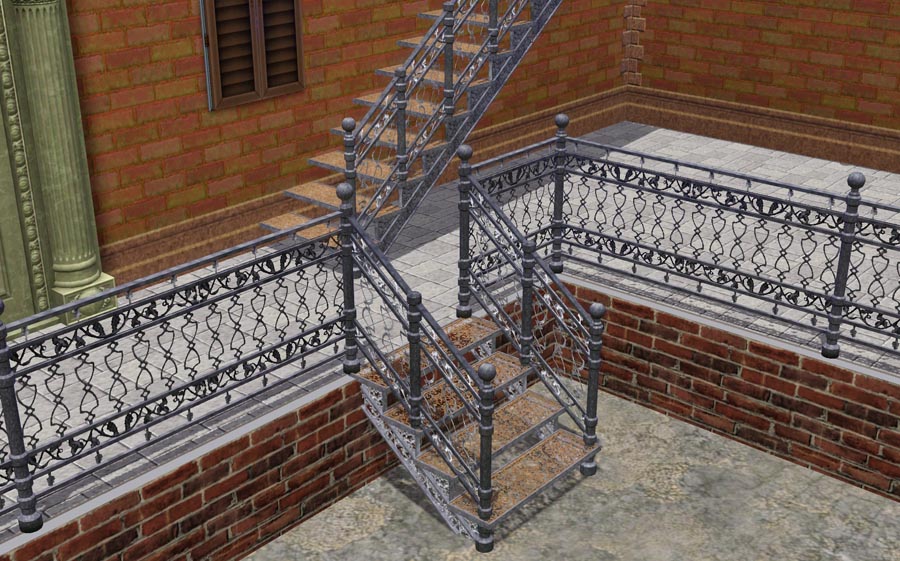
I have no cast-iron staircase that was in Sims1 and sims2 and was therefore forced to make one myrself. Unfortunately I can not make a spiral staircase which I also miss alot. When I was at it I also made a matching railing and fence of the same design.
All three have three color channels. At delivery, all in galvanized so I encourage you to color sets in an appropriate manner.
Fences are in a version for the Base Game.
You muct not have World Adventure to use this set. The difference is that the height do not correctly match so if you want to place a lamps on the poles it will be a small gap.
There is a EA-gate matching the fence.
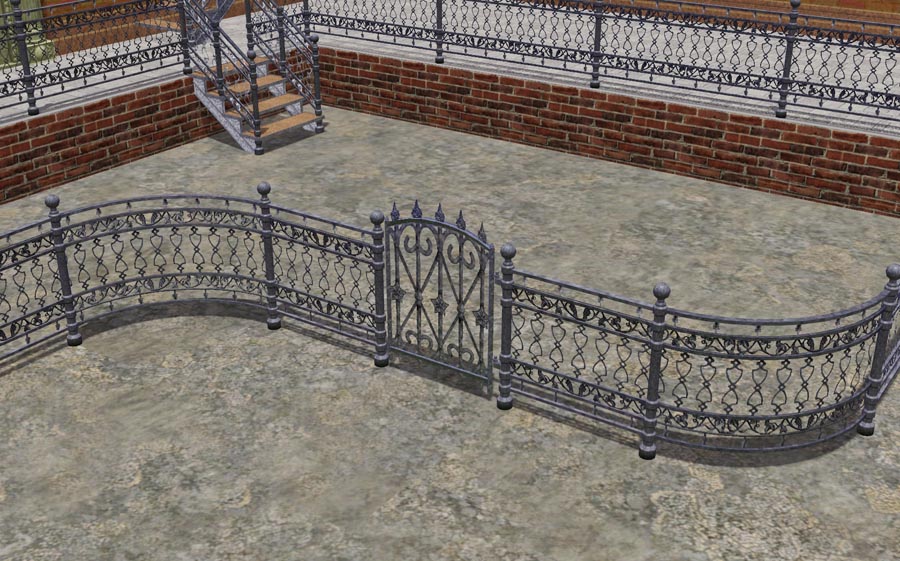
The staircase cost $ 60 and the fence $ 30. For some reason I do not understand, the railing costs nothing. The corner filling cost $ 10 and you can find it among the statues in the decoration directory.
Polygon Counts:
Staircase: 560 vertices and 356 faces
Railing: 222 vertices and 126 faces
Fence: 108 vertices and 54 faces
Corner filling: 34 vertices and 24 faces
Additional Credits:
As always I first of all thanks EA for this marvellous game, the developers of the tools for creating, the autors of tutorials here and there and all the helpful folks on the forums.
This is a new mesh, and means that it's a brand new self contained object that usually does not require a specific Pack (although this is possible depending on the type). It may have Recolours hosted on MTS - check below for more information.
|
Lisen_CastIronStairoFence.7z
Download
Uploaded: 27th May 2012, 1.20 MB.
12,931 downloads.
|
||||||||
| For a detailed look at individual files, see the Information tab. | ||||||||
Install Instructions
1. Click the download button, or the filename, to download the file to your computer.
2. Extract the zip, rar, or 7z file. Now you will have either a .package or a .sims3pack file.
For Package files:
1. Cut and paste the file into your Documents\Electronic Arts\The Sims 3\Mods\Packages folder. If you do not already have this folder, you should read the full guide to Package files first: Sims 3:Installing Package Fileswiki, so you can make sure your game is fully patched and you have the correct Resource.cfg file.
2. Run the game, and find your content where the creator said it would be (build mode, buy mode, Create-a-Sim, etc.).
For Sims3Pack files:
1. Cut and paste it into your Documents\Electronic Arts\The Sims 3\Downloads folder. If you do not have this folder yet, it is recommended that you open the game and then close it again so that this folder will be automatically created. Then you can place the .sims3pack into your Downloads folder.
2. Load the game's Launcher, and click on the Downloads tab. Find the item in the list and tick the box beside it. Then press the Install button below the list.
3. Wait for the installer to load, and it will install the content to the game. You will get a message letting you know when it's done.
4. Run the game, and find your content where the creator said it would be (build mode, buy mode, Create-a-Sim, etc.).
Extracting from RAR, ZIP, or 7z: You will need a special program for this. For Windows, we recommend 7-Zip and for Mac OSX, we recommend Keka. Both are free and safe to use.
Need more help?
If you need more info, see:
- For package files: Sims 3:Installing Package Fileswiki
- For Sims3pack files: Game Help:Installing TS3 Packswiki
Loading comments, please wait...



-
**Outdated**: 5 new Recolours of the Picket Fence (with matching Gates included in package)
by Yogi-Tea 18th Aug 2009 at 9:50pm
 19
31k
25
19
31k
25
-
**Outdated**: Set of 12 Stair Recolours *linked* with matching Railings, Fences, Walls and Floors
by Yogi-Tea updated 21st Sep 2009 at 7:39pm
28
52.4k
39
-
2 hidden fences for the fence category - "Good Fence" & "Kosie Interior Fencing"
by Yogi-Tea updated 25th Apr 2010 at 2:08pm
29
52.2k
66
-

3 New Fences - Wrought Iron Fence - Updated 7th Mar, Now CASTable
by Flabaliki 16th Oct 2009 at 1:12am
40
104.6k
229
-

by Flabaliki 10th Apr 2010 at 11:42pm
14
39.2k
78
-
Typical Swedish? Buildset for the swedish patriot.
by Lisen801 4th Jul 2010 at 5:26pm
+1 packs
19 35k 26 World Adventures
-
-
-
by Hekate999 5th Jan 2011 at 10:57am
115
228.6k
508
-


-
-
-
-
The Social Child and Adoption Center
by Lisen801 17th Jun 2005 at 7:44pm
Here's the Social Child and adoption Center in my Sim Community ! more...
 20
26.4k
13
20
26.4k
13
-
-
-
-
-


-
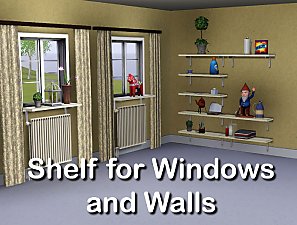
Shiftable shelf for Windows and Walls
by Lisen801 13th Jun 2012 at 4:54pm
This is just a small shelf created for making it possible to place objects in the window but also a module shelf for walls. more...
+1 packs
25 78k 387 Generations


Packs Needed
| Expansion Pack | |
|---|---|
 | World Adventures |
About Me
Credit is nice but not mandatory.