
 Sign in to Mod The Sims
 Fireplaces - Recolorable
 Fireplaces - Recolorable


bohemian.jpg - width=512 height=512
mountain.jpg - width=512 height=512
fireplacePets.jpg - width=321 height=512

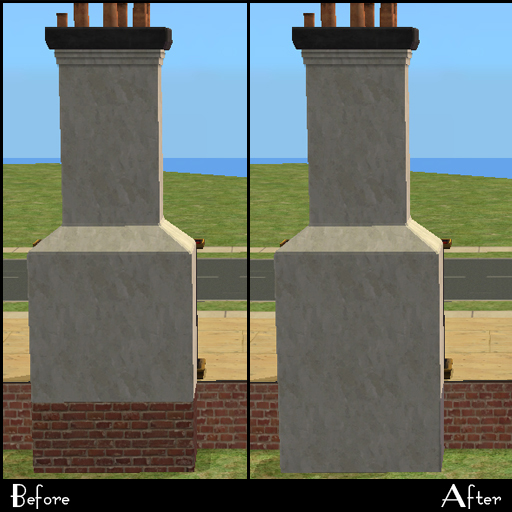
LaBoheme Fireplace- Requires AL
This fireplace is an oddity. It has it's own chimney, with it's own texture, but it uses the foundation chimney piece from base game fireplaces. So this has been modified to have it's own base piece that is slaved to this fireplaces chimney, which is now recolorable. I have also made the top small pieces and the top cap have two recolorable parts, one for the chimney and one for the cap/decorative bits.
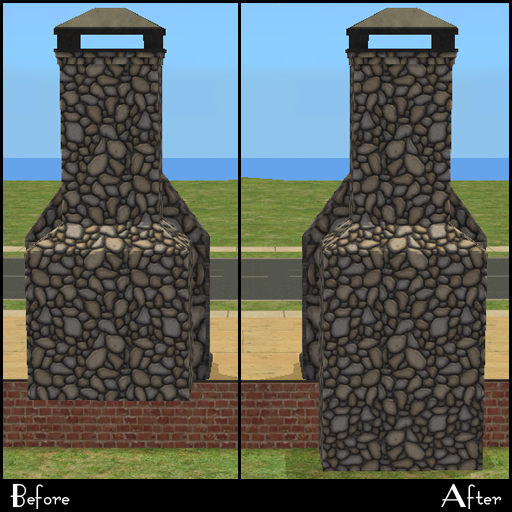
Mountain Fireplace - Requires BV
This one really made me go wtf EA? This one also has it's own chimney, but there was no base with this one! So I added a foundation base to this one and slaved it to the fireplaces chimney, which is also recolorable.
Ignito Fireplace - Requires Pets
This fireplace just had the default chimney pieces so I slave them to the body of the fireplace instead. Any recolors of the fireplace will automatically be available to the chimney pieces. The package includes two of the original textures included that have been modified to fit the mapping of the long chimney piece, otherwise it had an invisible spot.
[see pic below]
Recolor Notes:
I noticed when making test recolors that SimPE was incredibly slow pulling all the recolor files, so please just be patient with it if your system is less than spectacular. Also when you recolor it will pull ALL recolorable parts and not just the chimney. Just tick/untick what you want to recolor.
Installation:
Place in your zCEP-EXTRA folder.
Additional Credits:
Numenor for paving the way to recolorable fireplaces and a whole lot more.
Updates
8-June-2011
Recoloring in SimPE
Apparently recoloring these requires some srs voodoo/ritual/raindance shiz.

I found that if you open the _HL_CEP_FireplaceXX.package file before recoloring, then SimPE will load the required textures just fine. You MUST open the CEP file for the specific fireplace you want to recolor first. This puts it in the cache for SimPE which is letting the OW read the files. I have no idea why it's doing this, and I have no idea how to get SimPE to read this properly otherwise.
NOTE: My tests were done with SimPE v 0.72.1 for AL with the M&G update. SimPE v 0.72.1 and M&G Update
|
HL_CEP_Fireplace.rar
Download
Uploaded: 21st Feb 2011, 814.2 KB.
10,811 downloads.
|
||||||||
| For a detailed look at individual files, see the Information tab. | ||||||||
Install Instructions
1. Download: Click the download link to save the .rar or .zip file(s) to your computer.
2. Extract the zip, rar, or 7z file.
3. Place in Downloads Folder: Cut and paste the .package file(s) into your Downloads folder:
- Origin (Ultimate Collection): Users\(Current User Account)\Documents\EA Games\The Sims™ 2 Ultimate Collection\Downloads\
- Non-Origin, Windows Vista/7/8/10: Users\(Current User Account)\Documents\EA Games\The Sims 2\Downloads\
- Non-Origin, Windows XP: Documents and Settings\(Current User Account)\My Documents\EA Games\The Sims 2\Downloads\
- Mac: Users\(Current User Account)\Documents\EA Games\The Sims 2\Downloads
- Mac x64: /Library/Containers/com.aspyr.sims2.appstore/Data/Library/Application Support/Aspyr/The Sims 2/Downloads
- For a full, complete guide to downloading complete with pictures and more information, see: Game Help: Downloading for Fracking Idiots.
- Custom content not showing up in the game? See: Game Help: Getting Custom Content to Show Up.
- If you don't have a Downloads folder, just make one. See instructions at: Game Help: No Downloads Folder.
Loading comments, please wait...


Uploaded: 21st Feb 2011 at 12:52 AM
Updated: 13th Jul 2011 at 4:37 PM
-
by christianlov 14th Jun 2008 at 5:24am
 82
221.7k
237
82
221.7k
237
-
by christianlov 19th Jul 2008 at 3:08am
35
108.1k
110
-
-
by kestrellyn updated 28th Feb 2026 at 7:08am
23
9.5k
38
-
-
by Nullsuke updated 28th Feb 2025 at 12:57pm
8
5.6k
17
-



-
by HugeLunatic updated 17th Sep 2019 at 8:48pm
The original Espresso Machine had the counter base and counter top as the two recolorable subsets so that it could more...
+1 packs
8 11.9k 36 University
-


by HugeLunatic 31st May 2015 at 10:00pm
Five recolors of the Obstacle Course Career Reward. more...
8
8.2k
8
-
by HugeLunatic 19th Jun 2017 at 4:17pm
This makes the bowl and fruit separately recolorable. more...
4
14.2k
22
-
by HugeLunatic updated 14th Sep 2024 at 11:25pm
+1 packs
8 11.1k 18 Nightlife
-
by HugeLunatic 8th Oct 2021 at 4:23pm
This is the sectional sofa, ChocoSofa, from The Sims 3 70s, 80s, & 90s Stuff. more...
+1 packs
2 2.8k 12 Nightlife
-
by HugeLunatic 20th Apr 2013 at 11:01pm
Description This small, compact fridge is good for more than just snacking! more...
+1 packs
18 29.5k 75 University
-
by HugeLunatic 23rd Sep 2012 at 9:20pm
Minimaal Gate This gate matches the fences that came with OFB, the small red and black ones. more...
37
38.1k
90
-
by HugeLunatic 14th Feb 2014 at 9:26pm
Boomerang is a new map I made in sc4, with the intent of using this as the base for my more...
13
8.6k
20
-
Hydroponic Plant Pot [CEP-EXTRA]
by HugeLunatic 9th Dec 2012 at 9:55pm
This is the flowerpot that you get when harvesting plants from the "Aquagreen Hydroponic Garden". more...
5
29.1k
49
-
Maxis "Lost & Found" IKEA Pictures
by HugeLunatic 1st Dec 2012 at 5:01am
Another very old project - several lost paintings from the IKEA stuff pack. more...
+1 packs
13 25k 44 Ikea Home


About Me
Pet Stories || Dog Agility Items? || Castaway Stories || Holy Simoly Extras
4esf Archive || Holy Simoly Archive || CEP-Extras List || Buyable Game Objects
lunie content from GoS/s2a
 Installation of CEP Extras
-the package with pfiles appended to the name will go into your cep extras folder where your game is installed (typically c drive, you do you)
-the other goes in CEP extra folder in documents.
The following locations are what I am aware of, beyond that you'll have to do some searching.
Downloads Folder:
C:\Users\<user>\Documents\EA Games\The Sims 2 Legacy
C:\Users\<user>\Documents\EA Games\The Sims 2 Ultimate Collection
With multiple launchers, the location for your game install will vary.
C:\Program Files\EA GAMES\The Sims 2 Legacy\TSData\Res\Catalog\zCEP-EXTRA
C:\Program Files\EA GAMES\The Sims 2\TSData\Res\Catalog\zCEP-EXTRA
C:\Program Files (x86)\EA GAMES\The Sims 2\TSData\Res\Catalog\zCEP-EXTRA