
 Sign in to Mod The Sims
 Sienna Lane
 Sienna Lane


siennaLane01.jpg - width=1024 height=640
siennaLane02.jpg - width=1024 height=640
siennaLane03.jpg - width=1024 height=640
siennaLane04.jpg - width=1024 height=640
siennaLane05.jpg - width=1024 height=640
siennaLane06.jpg - width=1024 height=640
siennaFront.jpg - width=512 height=413

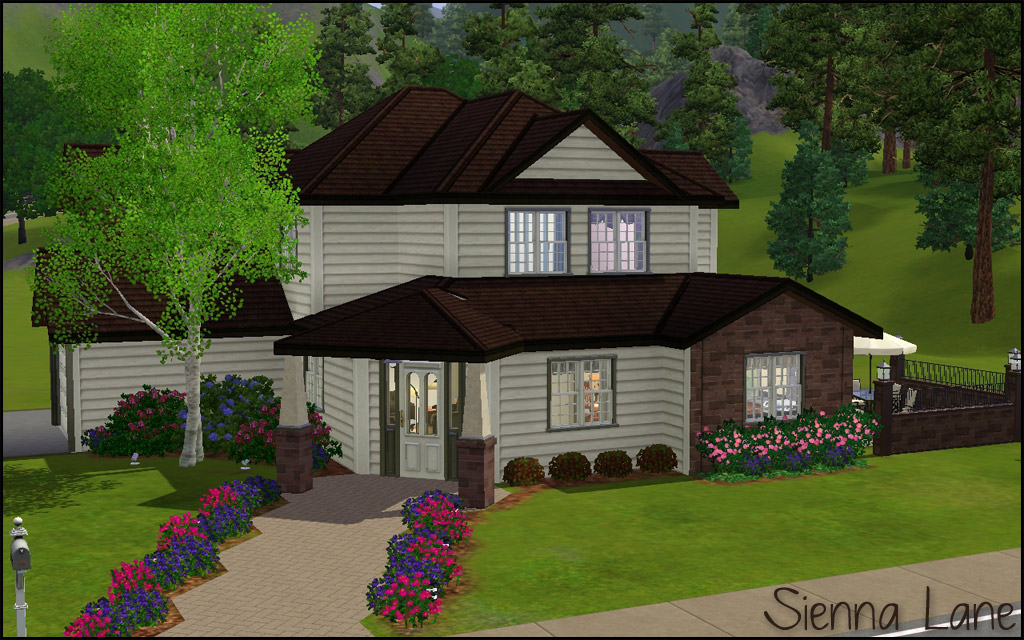
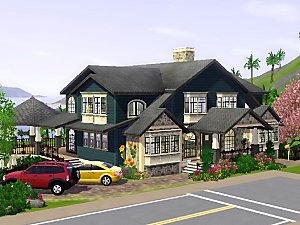
The backyard is large and ready for a pool or play area for the kids. There is a door off the side patio as well as off the back of the house via the hallway. Two car garage has one parking space inside (large side) and one space outside (small side), just ready for the family auto.
Compatibility
I've used build/buy from most EPs but the fence and patio set is from OLS. If you don't have one of the EPs the game will just replace with something else as long as your game is patched current.
CC Shown but Not Included:(both by me)
The Smaller Closure Door
Insta-Door with Mullions
Lot Size: 3x4
Lot Price: §64,362/§39,217
|
HL_Sienna Lane.rar
Download
Uploaded: 6th Mar 2011, 1.36 MB.
2,252 downloads.
|
||||||||
| For a detailed look at individual files, see the Information tab. | ||||||||
Install Instructions
1. Click the filename or the download button to download the file to your computer.
2. Extract the zip, rar, or 7z file.
2. Select the .sims3pack file you got from extracting.
3. Cut and paste it into your Documents\Electronic Arts\The Sims 3\Downloads folder. If you do not have this folder yet, it is recommended that you open the game and then close it again so that this folder will be automatically created. Then you can place the .sims3pack into your Downloads folder.
5. Load the game's Launcher, and click on the Downloads tab. Select the house icon, find the lot in the list, and tick the box next to it. Then press the Install button below the list.
6. Wait for the installer to load, and it will install the lot to the game. You will get a message letting you know when it's done.
7. Run the game, and find your lot in Edit Town, in the premade lots bin.
Extracting from RAR, ZIP, or 7z: You will need a special program for this. For Windows, we recommend 7-Zip and for Mac OSX, we recommend Keka. Both are free and safe to use.
Need more help?
If you need more info, see Game Help:Installing TS3 Packswiki for a full, detailed step-by-step guide!
Loading comments, please wait...


 View with Names
Uploaded: 6th Mar 2011 at 2:33 AM
-
-
-
by karlik-nos updated 20th Apr 2013 at 3:42pm
 2
9.5k
7
2
9.5k
7
-
-
by EsTevMille33 18th Apr 2010 at 8:35pm
+1 packs
4 4.4k 3 World Adventures
-
by HugeLunatic 24th Mar 2011 at 6:26pm
+3 packs
5 15.3k 9 World Adventures
 Ambitions
 Fast Lane Stuff
-
-
-
by Mlle-Kohaku 9th Dec 2013 at 7:17am
+3 packs
1 6.9k 20 Ambitions
 Generations
 Supernatural
-
by Asmodeuseswife 4th Sep 2014 at 5:28pm
+17 packs
3 6.7k 20 World Adventures
 High-End Loft Stuff
Ambitions
Fast Lane Stuff
High-End Loft Stuff
Ambitions
Fast Lane Stuff
 Late Night
 Outdoor Living Stuff
Generations
Outdoor Living Stuff
Generations
 Town Life Stuff
 Master Suite Stuff
 Pets
Pets
 Showtime
Supernatural
Showtime
Supernatural
 70s, 80s and 90s Stuff
 Seasons
 University Life
 Island Paradise
 Into the Future


-
by HugeLunatic 14th Feb 2010 at 1:16am
I love the new crib that plasticbox made, the Little Sister crib because I love simple furniture and more...
94
162.6k
402
-
by HugeLunatic 21st Nov 2021 at 6:34pm
Okay, so not exclusively pirate themed. These mesh bits came from the BV pirate ship. more...
 10
9.3k
45
10
9.3k
45
-
by HugeLunatic 10th Dec 2010 at 2:31am
This is a very old set of mine, my very first mesh set that I shared. more...
20
57.6k
119
-
by Hood Building Group 31st Aug 2015 at 10:42pm
Hello everyone! Yes! We did it again! more...
69
89.5k
176
Miscellaneous » Neighborhoods & CAS Screens » Neighbourhoods and Worlds
-
-
by HugeLunatic 24th Feb 2018 at 6:49pm
Sometimes you need something a little bit less formal for your sims dining out experience. more...
+1 packs
15 9.6k 37 Nightlife
-
Garden Heights (aka Best in Show): Neighborhood Recreation - No CC *Update! (V2)* (04/22/2024)
by Hood Building Group updated 22nd Apr 2024 at 12:04am
Garden Heights (aka Best in Show), a Sims Pets Stories neighborhood recreated for TS2 more...
57
74.1k
148
Miscellaneous » Neighborhoods & CAS Screens » Neighbourhoods and Worlds
-
by HugeLunatic 30th Mar 2022 at 2:13pm
I really liked Loudini’s Chamber of Sprinkles, because...sprinkles. more...
+2 packs
4 4.3k 25 Glamour Life
 Seasons
-


by HugeLunatic 19th Sep 2020 at 3:55pm
Recolors of the hobby plaques. There is a basic white/black wood recolor that isn't too dark or bright white. more...
+1 packs
1 3.9k 24 Free Time
-
by HugeLunatic 20th Sep 2012 at 7:06pm
It looks like Maxis once had originally intended for parts of the Adirondack seating set to be slaved, but never more...
17
42.3k
85




Packs Needed
| Expansion Pack | |
|---|---|
| World Adventures |
| Ambitions |
| Late Night |
About Me
Pet Stories || Dog Agility Items? || Castaway Stories || Holy Simoly Extras
4esf Archive || Holy Simoly Archive || CEP-Extras List || Buyable Game Objects
lunie content from GoS/s2a
 Installation of CEP Extras
-the package with pfiles appended to the name will go into your cep extras folder where your game is installed (typically c drive, you do you)
-the other goes in CEP extra folder in documents.
The following locations are what I am aware of, beyond that you'll have to do some searching.
Downloads Folder:
C:\Users\<user>\Documents\EA Games\The Sims 2 Legacy
C:\Users\<user>\Documents\EA Games\The Sims 2 Ultimate Collection
With multiple launchers, the location for your game install will vary.
C:\Program Files\EA GAMES\The Sims 2 Legacy\TSData\Res\Catalog\zCEP-EXTRA
C:\Program Files\EA GAMES\The Sims 2\TSData\Res\Catalog\zCEP-EXTRA
C:\Program Files (x86)\EA GAMES\The Sims 2\TSData\Res\Catalog\zCEP-EXTRA