
 Sign in to Mod The Sims
 WA Worlds with Routing Fix applied (updated 2014.01.28)
 WA Worlds with Routing Fix applied (updated 2014.01.28)

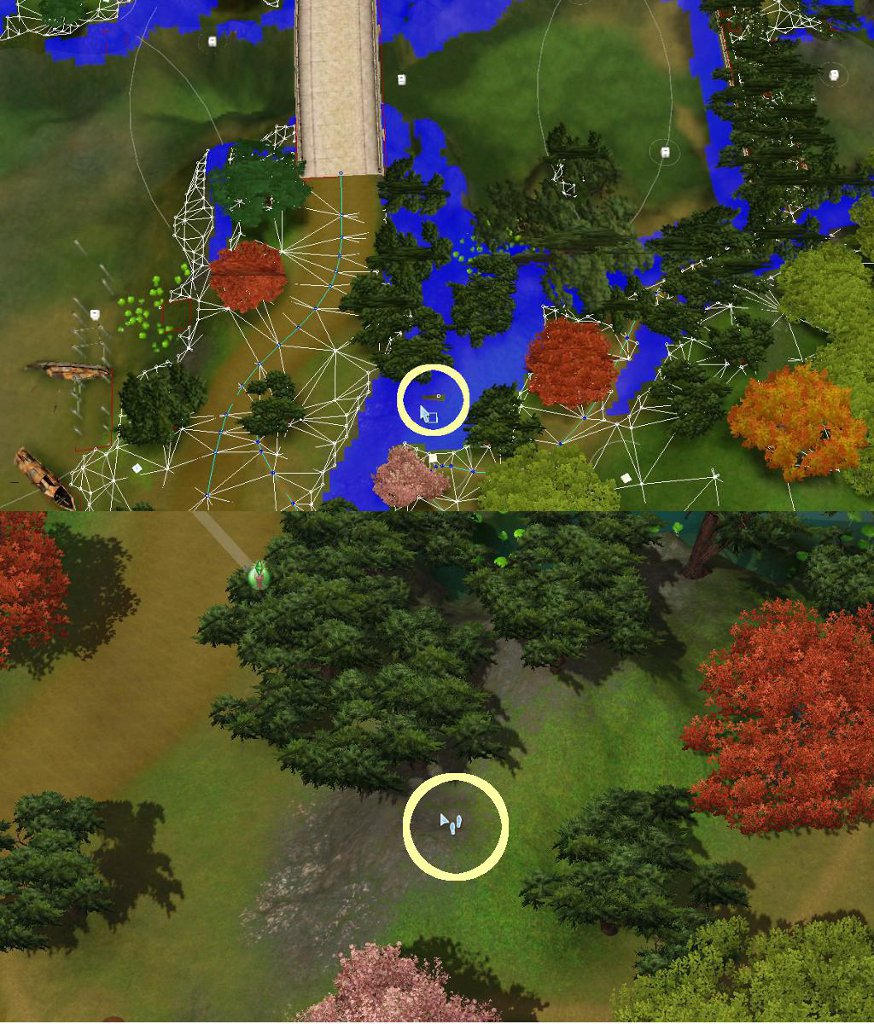
a spot in China.jpg - width=874 height=1024
potential to get stuck in that yellow circle
.gif?cb=1661174550)
WAThumbs(W).gif - width=256 height=256
I offer you the World!
Well, just these 3 for World Adventure destinations.
 These .world files have had the Resources imported from this download thread [In Testing]Resources for WA Worlds' Routing Fix. Since no one has yet to complain of blown up worlds, I thought it is safe to offer up the .worlds.
See image of China with one of the spots highlighted in the yellow circle - top is in CAW, bottom in-game. Once Sims gets stuck there, they can't find a way out because the white dot in those blank squares is disconnect from any other routing. The blank squares mean Sims can enter that spot, and the white, disconnected dot means Sims cannot leave that spot. Each time the game engine stops to recalculate on how to get the Sims out, the game lags. So imagine if there are these various spots in your worlds and have stuck Sims in there that the game is trying to recalculate routing algorithms for all the Sims individually.
Doesn't that explains all the lags we've been having?
For the Full Instructions on how to get the downloads in-game, read Game Help:World Routing Lagswiki. A summary is below.
Backup!
Heed that backup instructions, really! You've been warned!
How to install?
- Download all parts of the world you want and rename them to get rid of the "MTS_ellacharm3d_<numbers>_" portion. See Game Help:DFDD4 Download the File#Content with Multi-part fileswiki with pretty pictures.
- Right-click on the file with "part1" in its name and "Extract here", or whatever command your program uses. See Game Help:DFDD5 Extract from Archive#Multi-part fileswiki with pretty pictures.
- Place the extracted & joined .world file in this path and replace the default version. (You have backup, right?)
Code:\Program Files (x86)\Electronic Arts\The Sims 3 World Adventures\GameData\Shared\NonPackaged\Worlds\
- Delete caches before starting game.
How to remove?
- Go to the above path.
- Delete the *.world file.
- Rename the "*.orig" copy by removing the .orig extension (or from whatever you have renamed it to).
- Delete caches before starting game.
Notes & Changelog:
 Jan 28, 2014 update:
 - Fixed issue with a Lot that disappeared as reported by @glitch who commented on http://ellacharmed.wordpress.com/2013/12/25/france/ .
- Jan 10, 2014 update:
- Fixed broken routing inadvertently caused by fixing the steep terrain at the mouth of the Dragon's Maw; as reported by @GalenZ & @pirate34.
- Dec 25, 2013 update:
- Click me for full list of updates
- If you have problems dealing with multi-parts, the full .world files are also available: @ellacharmed.wordpress.com
 Jan 28, 2014 update:
 FAQs
Q: Do I need to have/buy the World Adventures EP for this to work?
A: Well, yes. The fixed world(s) won't work on its own. There has to be something to replace, after all.

Q: When I try to download, I get a 403 error.
A: This tells me the wiki to the multi-part files weren't clicked on and read, as at the bottom of the DFDD4 page states:
| If you get a 403 or 503 error, means that you're downloading too many files at one time and are using up all the download slots. There's a limit of 3 files at a time or 3 chunks per file per downloader to give other members a chance. You'll have to wait for six hours when the server reset its caches for you to be able to download again. |
Q: When I try to extract, I get an error.
A: Have you read the DFFD5 wiki? Have the files been renamed? If yes, to both questions, post with the filenames after the rename action and the exact error message, please. And also state what archiver program you use?
Q: Why don't you upload it as a single file, and avoid all that hassle?
A: There's a file size limitation onsite. The full world files are uploaded to Google Share, linked from my blog.
Additional Credits:
The Jones' for S3PE and the usual suspects.
Note from the Creator:
Download just the parts for the .world you want, or download all files to get all 3 worlds.
|
China.part6.rar
Download
Uploaded: 25th Dec 2013, 6.79 MB.
26,988 downloads.
|
||||||||
|
France.part6.rar
Download
Uploaded: 1st Aug 2011, 4.58 MB.
30,407 downloads.
|
||||||||
|
France.part5.rar
Download
Uploaded: 1st Aug 2011, 9.66 MB.
30,949 downloads.
|
||||||||
|
France.part4.rar
Download
Uploaded: 1st Aug 2011, 9.66 MB.
30,510 downloads.
|
||||||||
|
France.part3.rar
Download
Uploaded: 1st Aug 2011, 9.66 MB.
30,216 downloads.
|
||||||||
|
France.part2.rar
Download
Uploaded: 1st Aug 2011, 9.66 MB.
29,941 downloads.
|
||||||||
|
France.part1.rar
| Download all SIX (6) parts, rename and extract to get France.world
Download
Uploaded: 1st Aug 2011, 9.66 MB.
30,363 downloads.
|
||||||||
|
Egypt.part6.rar
Download
Uploaded: 1st Aug 2011, 9.09 MB.
30,909 downloads.
|
||||||||
|
Egypt.part5.rar
Download
Uploaded: 1st Aug 2011, 9.66 MB.
30,043 downloads.
|
||||||||
|
Egypt.part4.rar
Download
Uploaded: 1st Aug 2011, 9.66 MB.
30,227 downloads.
|
||||||||
|
Egypt.part3.rar
Download
Uploaded: 1st Aug 2011, 9.66 MB.
30,241 downloads.
|
||||||||
|
Egypt.part2.rar
Download
Uploaded: 1st Aug 2011, 9.66 MB.
30,309 downloads.
|
||||||||
|
Egypt.part1.rar
| Download all SIX (6) parts, rename and extract to get Egypt.world
Download
Uploaded: 1st Aug 2011, 9.66 MB.
31,392 downloads.
|
||||||||
|
China.part5.rar
Download
Uploaded: 1st Aug 2011, 9.66 MB.
31,920 downloads.
|
||||||||
|
China.part4.rar
Download
Uploaded: 1st Aug 2011, 9.66 MB.
32,453 downloads.
|
||||||||
|
China.part3.rar
Download
Uploaded: 1st Aug 2011, 9.66 MB.
32,374 downloads.
|
||||||||
|
China.part2.rar
Download
Uploaded: 1st Aug 2011, 9.66 MB.
32,501 downloads.
|
||||||||
|
China.part1.rar
| Download all SIX (6) parts, rename and extract to get China.world
Download
Uploaded: 1st Aug 2011, 9.66 MB.
34,360 downloads.
|
||||||||
| For a detailed look at individual files, see the Information tab. | ||||||||
Install Instructions
1. Click the download button, or the filename, to download the file to your computer.
2. Extract the zip, rar, or 7z file. Now you will have either a .package or a .sims3pack file.
For Package files:
1. Cut and paste the file into your Documents\Electronic Arts\The Sims 3\Mods\Packages folder. If you do not already have this folder, you should read the full guide to Package files first: Sims 3:Installing Package Fileswiki, so you can make sure your game is fully patched and you have the correct Resource.cfg file.
2. Run the game, and find your content where the creator said it would be (build mode, buy mode, Create-a-Sim, etc.).
For Sims3Pack files:
1. Cut and paste it into your Documents\Electronic Arts\The Sims 3\Downloads folder. If you do not have this folder yet, it is recommended that you open the game and then close it again so that this folder will be automatically created. Then you can place the .sims3pack into your Downloads folder.
2. Load the game's Launcher, and click on the Downloads tab. Find the item in the list and tick the box beside it. Then press the Install button below the list.
3. Wait for the installer to load, and it will install the content to the game. You will get a message letting you know when it's done.
4. Run the game, and find your content where the creator said it would be (build mode, buy mode, Create-a-Sim, etc.).
Extracting from RAR, ZIP, or 7z: You will need a special program for this. For Windows, we recommend 7-Zip and for Mac OSX, we recommend Keka. Both are free and safe to use.
Need more help?
If you need more info, see:
- For package files: Sims 3:Installing Package Fileswiki
- For Sims3pack files: Game Help:Installing TS3 Packswiki
Loading comments, please wait...

 View with Names
Uploaded: 1st Aug 2011 at 6:22 PM
Updated: 27th Jan 2014 at 4:37 PM - France's disapearing lot fix
-
.gif?cbt=1661179140)
Resources for WA Worlds' Routing Fix (updated 2014.01.28)
by ellacharmed 20th Jul 2011 at 10:57am
-
Sunset Valley.world with Routing Fixes applied [update 2013.01.17]
by ellacharmed 11th Aug 2011 at 5:56pm
 88
204.4k
347
88
204.4k
347
Miscellaneous » Neighborhoods & CAS Screens » Neighbourhoods and Worlds
-
Bridgeport.world with Routing Fixes applied
by ellacharmed 18th Aug 2011 at 4:44pm
+1 packs
111 183.1k 294 Late Night
Miscellaneous » Neighborhoods & CAS Screens » Neighbourhoods and Worlds
-
Twinbrook.world with Fixes applied
by ellacharmed 25th Sep 2011 at 4:24pm
+1 packs
40 105.5k 220 Ambitions
Miscellaneous » Neighborhoods & CAS Screens » Neighbourhoods and Worlds
-
AppaloosaPlains.world with Fixes applied
by ellacharmed 22nd Nov 2011 at 6:53am
+1 packs
46 129.6k 236 Pets
Pets
Miscellaneous » Neighborhoods & CAS Screens » Neighbourhoods and Worlds
-
Starlight Shores.world with Fixes applied
by ellacharmed 30th Jul 2012 at 7:43pm
+1 packs
34 123.8k 181 Showtime
Miscellaneous » Neighborhoods & CAS Screens » Neighbourhoods and Worlds
-
Moonlight Falls.world with Fixes applied
by ellacharmed 14th Oct 2012 at 2:51pm
+1 packs
72 136.7k 247 Supernatural
Miscellaneous » Neighborhoods & CAS Screens » Neighbourhoods and Worlds
-
Monte Vista.world with Fixes applied
by ellacharmed 13th Dec 2013 at 11:51am
32
123.4k
194
Miscellaneous » Neighborhoods & CAS Screens » Neighbourhoods and Worlds
-
SimsUniversity.world with Fixes imported (updated 2014.01.10)
by ellacharmed 3rd Jan 2014 at 11:56am
+1 packs
37 126.3k 231 University Life
Miscellaneous » Neighborhoods & CAS Screens » Neighbourhoods and Worlds
-
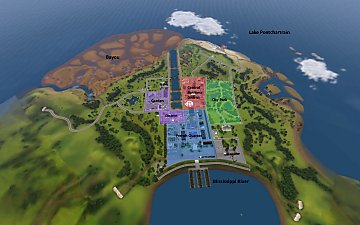
by darkflwrs 15th Oct 2018 at 12:07am
42
68.7k
111
Miscellaneous » Neighborhoods & CAS Screens » Neighbourhoods and Worlds
.gif?cbt=1661179140)


-

-
Starlight Shores.world with Fixes applied
by ellacharmed 30th Jul 2012 at 7:43pm
Fixed Starlight Shores.world. This world has had the resources updated with the Routing Fixes, including Intersection corrections. more...
+1 packs
34 123.9k 183 Showtime
Miscellaneous » Neighborhoods & CAS Screens » Neighbourhoods and Worlds
-
Moonlight Falls.world with Fixes applied
by ellacharmed 14th Oct 2012 at 2:51pm
Fixed Moonlight Falls.world. This world has had the resources updated with the Routing Fixes, including Intersection corrections. more...
+1 packs
72 136.9k 249 Supernatural
Miscellaneous » Neighborhoods & CAS Screens » Neighbourhoods and Worlds
-
Resources for IslaParadiso.world's various Fixes [update 2013.12.01]
by ellacharmed updated 1st Dec 2013 at 2:43pm
If you have the Island Paradise EP, you're going to need this download. As everyone who has played the Isla Paradiso World for more than a SimWeek knows, the lags are pretty bad in this one. more...
-
.png)
Lunar Lakes.world with Fixes applied
by ellacharmed 13th Dec 2013 at 5:09pm
As it says on the tin, in this download is the LunarLakes.world file where the fixes offered in the linked Resources thread has been imported. more...
12
89.5k
146
Miscellaneous » Neighborhoods & CAS Screens » Neighbourhoods and Worlds
-
Thumb.png)
Sunset Valley.world with Routing Fixes applied [update 2013.01.17]
by ellacharmed 11th Aug 2011 at 5:56pm
Fixed Sunset Valley.world. This world has had the resources updated with the Routing Fixes. more...
88
204.7k
349
Miscellaneous » Neighborhoods & CAS Screens » Neighbourhoods and Worlds
-
Thumb.png)
Resources for SunsetValley.world Routing Fix [update 2013.01.17]
by ellacharmed updated 18th Jan 2013 at 5:28pm
The routing resources to fix Sunset Valley. [update] Now with repaired Intersections! more...
-
Resources for Moonlight Falls.world's various Fixes
by ellacharmed 15th Sep 2012 at 9:29pm
The routing resources for Moonlight Falls, the world in Supernatural. With optional Intersections. more...
-
.png)
Resources for Hidden Springs's various Fixes
by ellacharmed 21st Dec 2013 at 6:16am
Routing, intersections and steepness...Oh MY! Those are the main fixes done in for Hidden Springs. more...
-
.png)
Monte Vista.world with Fixes applied
by ellacharmed 13th Dec 2013 at 11:51am
What is this? This is the download with the resources from the other download thread imported and uploaded as a more...
32
123.6k
196
Miscellaneous » Neighborhoods & CAS Screens » Neighbourhoods and Worlds

Packs Needed
| Expansion Pack | |
|---|---|
| World Adventures |