
 Sign in to Mod The Sims
 Huge bodybuilder skins - V2.0,V2.1[ND bodies]
 Huge bodybuilder skins - V2.0,V2.1[ND bodies]


ELDER HBB skin.jpg - width=1280 height=723
TEEN HBB skin.jpg - width=1280 height=723
YA HBB skin 1.jpg - width=1280 height=723
YA HBB skin 2.jpg - width=1280 height=723
recolors2.jpg - width=307 height=1024
YA HBB skin 3.jpg - width=1280 height=723
main screen.jpg - width=1280 height=723
in details.jpg - width=1280 height=853
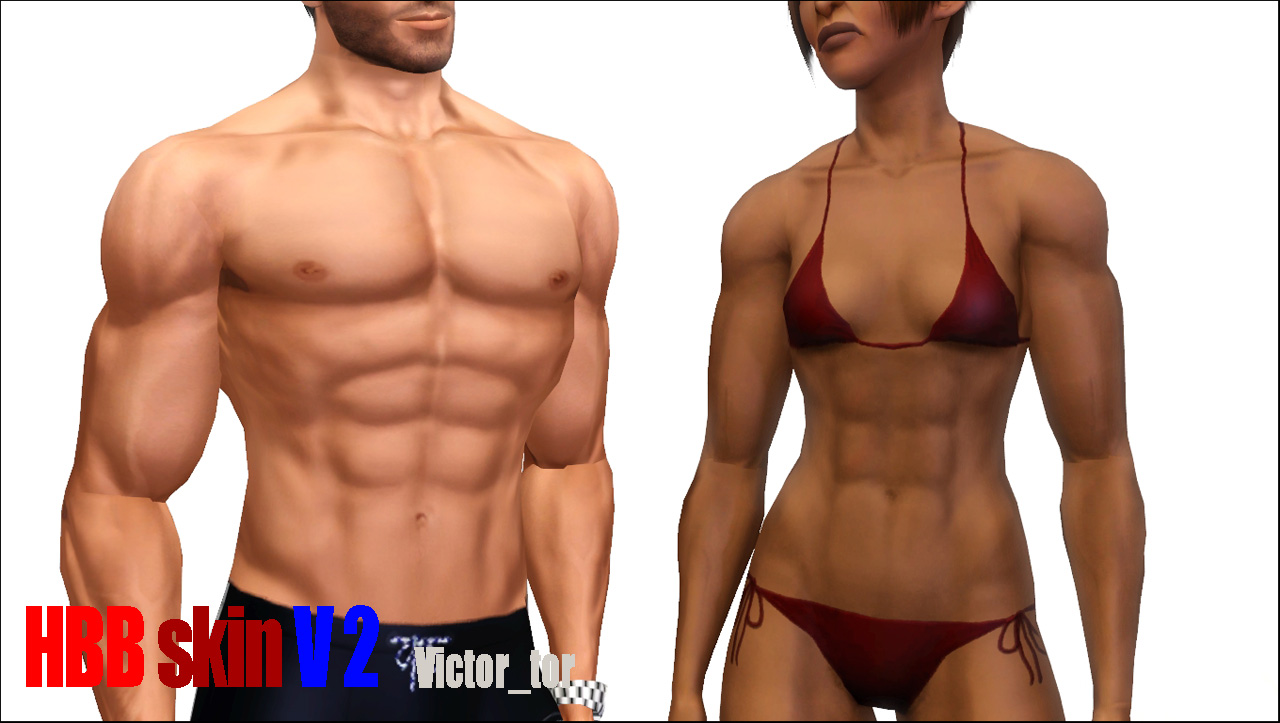
Hi there! There are skins made by me for bodybuilders. Male and female.
I inspired by Beosboxboy`s skins for sims 2. I think there are perfect. And I decided to make something like his one for sims 3.
This is NON DEFAULT skintone for females and males from teen to elder. I made just bodies to let you use your own default faces.
It`s matching any default faces without any seams so fell free to choose or leave it maxis.
It has a bloombase sexy feet matching too and looks very pretty with Alex Stanton`s pectoral tops from TSR.
Finally you can use Johna`s body sliders to make it look like they are on my first screen in this topic.
In details:
- Muscules - I made muscules on legs, hands, chests and ABS to make this skin look athletic
- Nipples - female and male skins has natural-looking nipples. BTW all another parts are babie. This means it has not any natural body hair at all.
- Highlights - skintone is having very contrast surface to make visual bulge muscules. That`s why skin is a bit darker than others.
- ABS - I made additional highlights and shadows on ABS for female and male to make it look more realistic when you put the muscle slider up. But this effect means this skin WILL LOOK BAD FOR FAT SIMS.
- Veins - you can see it on legs and hands.
- Back - Back has bulgy muscules too
Actually it look not good for teens and elder sims. =\ But maybe you decided to make elder bodybuilder. Who knows.
I made two versions of this skin: Female and Male and for males only. Second one is marked [MALE] in uploaded .rar files
Pack has two versions V2.0 and V2.1 that various just with colors. You can see it at attached screenshot.
 24.11.11 UPD Updated for PETS. Hope it`ll work cause I can`t test it and still haven`t my game updated. Old version files moved to attached files in comments (11 post)
Installing:
Extract the contents of the rar files you have chosen to download. Then extract rar archive and past the package files in your folder "D:\games\Electronic Arts\The Sims 3\Mods\packages"
It will apears in your game with blue buttons in custom skintones list.
Additional Credits:
Thanks to Max7 for feedback,
to Aikea Guinea for the tutorial
and Cmar for his awesome skininator.

|
HBB_Skin-V2.1[MALE].rar
| three custom natural ramps: from pale to sunburned
Download
Uploaded: 24th Nov 2011, 1.99 MB.
39,052 downloads.
|
||||||||
|
HBB_Skin-V2.1.rar
| three custom natural ramps: from pale to sunburned
Download
Uploaded: 24th Nov 2011, 3.29 MB.
30,942 downloads.
|
||||||||
|
HBB_Skin-V2.0[MALE].rar
| three base game natural ramps: red, yellow and default tone
Download
Uploaded: 24th Nov 2011, 2.01 MB.
26,329 downloads.
|
||||||||
|
HBB_Skin-V2.0.rar
| three base game natural ramps: red, yellow and default tone
Download
Uploaded: 24th Nov 2011, 3.30 MB.
24,299 downloads.
|
||||||||
| For a detailed look at individual files, see the Information tab. | ||||||||
Install Instructions
1. Click the download button, or the filename, to download the file to your computer.
2. Extract the zip, rar, or 7z file. Now you will have either a .package or a .sims3pack file.
For Package files:
1. Cut and paste the file into your Documents\Electronic Arts\The Sims 3\Mods\Packages folder. If you do not already have this folder, you should read the full guide to Package files first: Sims 3:Installing Package Fileswiki, so you can make sure your game is fully patched and you have the correct Resource.cfg file.
2. Run the game, and find your content where the creator said it would be (build mode, buy mode, Create-a-Sim, etc.).
For Sims3Pack files:
1. Cut and paste it into your Documents\Electronic Arts\The Sims 3\Downloads folder. If you do not have this folder yet, it is recommended that you open the game and then close it again so that this folder will be automatically created. Then you can place the .sims3pack into your Downloads folder.
2. Load the game's Launcher, and click on the Downloads tab. Find the item in the list and tick the box beside it. Then press the Install button below the list.
3. Wait for the installer to load, and it will install the content to the game. You will get a message letting you know when it's done.
4. Run the game, and find your content where the creator said it would be (build mode, buy mode, Create-a-Sim, etc.).
Extracting from RAR, ZIP, or 7z: You will need a special program for this. For Windows, we recommend 7-Zip and for Mac OSX, we recommend Keka. Both are free and safe to use.
Need more help?
If you need more info, see:
- For package files: Sims 3:Installing Package Fileswiki
- For Sims3pack files: Game Help:Installing TS3 Packswiki
Loading comments, please wait...

Uploaded: 23rd Nov 2011 at 2:38 PM
Updated: 26th Nov 2011 at 9:53 AM - Pets UPD
-
by LadyFrontbum 26th Mar 2010 at 3:48pm
-
by lastrie updated 12th Apr 2010 at 10:11pm
-
by LadyFrontbum 17th May 2010 at 3:34am
-
F-IN01 TS3 female default skin replacement MTS v2
by Navetsea 15th Feb 2011 at 8:31pm
-
F-IN01 TS3 default replacement FULL FAMILY v2
by Navetsea 6th Mar 2011 at 5:36pm
-
by -Mallow- updated 15th Jul 2012 at 6:44pm
-
by Strappys updated 4th Dec 2014 at 12:28pm
-
Face- In TS3 revised non default Wild Edition V2
by Navetsea 30th Jul 2012 at 2:17pm
-
by Navetsea 29th Dec 2012 at 5:44am
-

-
by Victor_tor updated 8th Apr 2020 at 11:25pm
One lot to make your sims Riverview living more... hmm... polluted more...
 +1 packs
3 4.7k 12
+1 packs
3 4.7k 12 Ambitions
-
Wall sign and board sign stickers
by Victor_tor 18th May 2019 at 12:01am
2-tile stickers suits C&D board signs, 1-tile stickers are for C&D wall signs. Perfect for shops and hobby stores more...
 +1 packs
2 6.5k 20
+1 packs
2 6.5k 20 Cats and Dogs
-
Southern Heritage: The Haven - 4+BR 3.5BA (2.08.22 UPD)
by Victor_tor updated 2nd Aug 2022 at 8:47am
Seems like this one is usual estate that was made according to real life US southern suburban house plans. more...
 +2 packs
8 3.7k 10
+2 packs
8 3.7k 10 Nightlife
 Mansion and Garden
-
Trio Lake Sights: Regal Sequence
by Victor_tor 20th Jul 2023 at 8:30pm
+17 packs
2 1.9k 2 Happy Holiday
 Family Fun
 University
 Glamour Life
Nightlife
Glamour Life
Nightlife
 Celebration
 Open for Business
 Pets
Pets
 H&M Fashion
 Teen Style
 Seasons
 Kitchen & Bath
 Bon Voyage
 Free Time
 Ikea Home
 Apartment Life
Mansion and Garden
Apartment Life
Mansion and Garden
-
by Victor_tor 5th Jun 2019 at 11:33pm
Dated with wood carving country styled shelves. "Reznoye" means "wood carved" in russian language. more...
3
5.9k
19
-
by Victor_tor 17th Oct 2019 at 8:01pm
Halloween 2019. Starter house for your vampire sim more...
+4 packs
5 7.4k 15 Get Together
 City Living
 Seasons
 Vampires
-
by Victor_tor 23rd Feb 2019 at 11:13pm
The ruins of two temples foundation in the deep forest is still sorrounded with a lot of mystic... more...
+3 packs
3 11k 28 Get Together
Vampires
 Jungle Adventure
-
by Victor_tor 4th Dec 2011 at 3:08am
40 greek themed patterns. Tile, marble, paint for exterior, interior and art. All you ever needed to make your sims look more as greek) more...
14
33k
73
-
Riverview water treatment unit (14.06.20 UPD)
by Victor_tor updated 14th Jun 2020 at 6:42pm
One lot to make your sims Riverview living more... hmm... hazardous more...
10
5.9k
15
-
Southern Heritage: The Heritage - 3BR 2.5BA
by Victor_tor 10th Apr 2021 at 8:17pm
Seems like this one is usual estate that was made according to real life US southern suburban house plans. more...
+2 packs
6 3.4k 11 Nightlife
Mansion and Garden


About Me
Everything I am creating for group projects, other brands and labels that different from mine is respecting their policy and guidelines, not mine.
Currently I participated just one project in Prosims Creative Group, and any from their site made by me is available for private use only. Please do not redistribute any items, fully or in part, modified insagnificantly, or repainted/recoloured from those site. They did not allow this. My forum threads from there are not part of project.
Other stuff that don't need custom meshes, has been made by myself from scratch, all the buildings and stuff I share here or brought from exchange, from Sims 4 gallery, from Prosims forum threads, are having very simple policy:
DO WHATEVER U WANT WITH MY CREATIONS.
Feel free to use&share my textures, attach my meshes to recolours, rebuild houses etc. until you don't make it for profit.
For Blogspot, TSR, Prosims forum creations it's all the same.
Still any questions?
Leave me alone.