Sign in to Mod The Sims
 Idola3
 Idola3


Group-MTS.jpg - width=1600 height=896
Group-Ladies-Front-MTS.jpg - width=896 height=896
Group-Ladies-Back-MTS.jpg - width=896 height=896
Group-Guys-Front-MTS.jpg - width=896 height=896
Group-Guys-Back-MTS.jpg - width=896 height=896
Female-Front-MTS.jpg - width=806 height=1440
Female-Back-MTS.jpg - width=806 height=1440
FemaleHands-MTS.jpg - width=1600 height=896
FemaleTorso-MTS.jpg - width=896 height=896
KneesandFeet.jpg - width=806 height=1440
Feet.jpg - width=895 height=895
Male-Front-MTS.jpg - width=806 height=1440
Male-Back-MTS.jpg - width=806 height=1440
MaleTorso.jpg - width=1600 height=896
MaleHand1.jpg - width=1600 height=896
MaleHand2.jpg - width=1600 height=896
Face1.jpg - width=1600 height=896
Face2.jpg - width=1600 height=896
Face3.jpg - width=1600 height=896
Face4.jpg - width=1600 height=896
Face5.jpg - width=1600 height=896
Face6.jpg - width=1600 height=896
Face7.jpg - width=1600 height=896
Face8.jpg - width=1600 height=896
Face9.jpg - width=1600 height=896
Face10.jpg - width=1600 height=896
SkinRamp.jpg - width=295 height=181


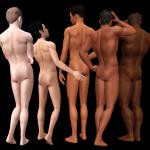


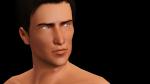



This skintone is an attempt at approximating my "Idolatry" skintones for Sims 2 - detailed without being photorealistic, simmish without being dull, complex without being overly-shiny.
This works for teen, young adult, and adult only as those are the only age groups I ever play. If you would like them for other age groups, feel free to convert. This is currently a non-default only. Due to the way this skin is made, it's not ideal as a default.
The tone ramp goes from lighter-than-EA-default in a very pale tone to quite dark, and varies somewhat between tones, from olive to pinkish, more saturated and less saturated, so you can get a wide range of tones with a single addition to your custom skintones. The tone ramp is labelled "HP Idola3" and the skintone "spot" shows up teal, so you should be able to find it easily.
Sims in the screenshots are shown completely without makeup, though this skin is meant to be used with S-Club's 3D eyelashes (there is an overlay included that mostly removes the EA eyelashes). Screenshots are completely unedited (except for necessary blurring of nipples/genitals/buttcrack, rotating images, and a little bit of resizing) - no filtering or actions applied whatsoever. What you see is exactly as they look in my game.
Important Info - MUST READ!
This skintone is made with 2x size (2048x2048) face and body textures. It is made to be used with an HQ mod to allow for higher texture rendering. If you have a weak computer, please don't download this - it probably won't make your graphics card explode, but it's not good for it, and it won't look as pretty as my screenshots.
Strongly recommended:
The screenshots are shown with certain mods which are intended for use with this skintone. If you download the skin but do not get all of these additional items, the skin will not look the same in your game as in mine.
- AWT's HQ Mod - I use the maximum settings.
- Buhudain's You Are Real - Adds realism to the normal map. If you get nothing else recommended here, get this!
- Bloom's Sexy Feet - Feet shown are these, and textures are painted to match. Toes may look odd if you use Maxis block-feet instead.
- S-Club Eyelash Remover - Removes the EA 3D eyelashes so that you can use the S-Club ones instead. My skin includes an alpha modification to mostly remove the eyelashes on its own, but to remove them entirely you need this mod.
Anatomically correct?
The version uploaded here includes nipples for both genders, but no genital textures. If you would like the fully anatomically correct version (including penis and vulva textures), you can download them from My Simblr (Tumblr).
Credits/Thanks:
Parts of this skintone use modified textures by ILTS, Nika V, Joedy76/Buffybot, IN3S, Buhudain, Kurasoberina, and Ladyfrontbum. Massive thanks to all of those creators for their beautiful work!

Also, big thanks to k2m1too, spladoum, and linuslover30 for testing, and of course, to CmarNYC for the fabulous Skininator.
|
HP-Skin-Idola3-v1-Barbie-NonDefault.7z
Download
Uploaded: 24th Dec 2013, 6.37 MB.
65,303 downloads.
|
||||||||
| For a detailed look at individual files, see the Information tab. | ||||||||
Install Instructions
1. Click the download button, or the filename, to download the file to your computer.
2. Extract the zip, rar, or 7z file. Now you will have either a .package or a .sims3pack file.
For Package files:
1. Cut and paste the file into your Documents\Electronic Arts\The Sims 3\Mods\Packages folder. If you do not already have this folder, you should read the full guide to Package files first: Sims 3:Installing Package Fileswiki, so you can make sure your game is fully patched and you have the correct Resource.cfg file.
2. Run the game, and find your content where the creator said it would be (build mode, buy mode, Create-a-Sim, etc.).
For Sims3Pack files:
1. Cut and paste it into your Documents\Electronic Arts\The Sims 3\Downloads folder. If you do not have this folder yet, it is recommended that you open the game and then close it again so that this folder will be automatically created. Then you can place the .sims3pack into your Downloads folder.
2. Load the game's Launcher, and click on the Downloads tab. Find the item in the list and tick the box beside it. Then press the Install button below the list.
3. Wait for the installer to load, and it will install the content to the game. You will get a message letting you know when it's done.
4. Run the game, and find your content where the creator said it would be (build mode, buy mode, Create-a-Sim, etc.).
Extracting from RAR, ZIP, or 7z: You will need a special program for this. For Windows, we recommend 7-Zip and for Mac OSX, we recommend Keka. Both are free and safe to use.
Need more help?
If you need more info, see:
- For package files: Sims 3:Installing Package Fileswiki
- For Sims3pack files: Game Help:Installing TS3 Packswiki
Loading comments, please wait...



Uploaded: 24th Dec 2013 at 2:55 PM
Updated: 24th Dec 2013 at 6:52 PM
-
Moonlight Skin - All Ages included
by kanno updated 12th Sep 2009 at 3:49pm
-
by lastrie updated 12th Apr 2010 at 10:11pm
-
Satin Skin Default replacement by GE
by Goldeneyes updated 7th Feb 2011 at 3:33am
-
F-IN01 TS3 female default skin replacement MTS v2
by Navetsea 15th Feb 2011 at 8:31pm
-
F-IN01 TS3 default replacement FULL FAMILY v2
by Navetsea 6th Mar 2011 at 5:36pm
-
by Strappys updated 4th Dec 2014 at 12:28pm
-
Face- In TS3 revised non default Wild Edition V2
by Navetsea 30th Jul 2012 at 2:17pm
-
F-IN 01 TSI/ asian edition revised TS3 nondefault
by Navetsea 1st Oct 2012 at 3:00am
-
Face- In TS3 SEXY edition MTS version
by Navetsea 2nd Nov 2012 at 10:47pm
-
by Navetsea 29th Dec 2012 at 5:44am

-
-
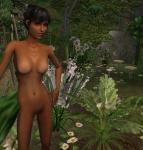
Natural Beauty: Idolatry of Flesh Skintones - UPDATED 03-Mar-07
by HystericalParoxysm updated 3rd Mar 2007 at 10:30am
Idolatry of Flesh: At long last, I am extremely pleased to give you my "ultimate" skintone pack. more...
-

by HystericalParoxysm 13th Nov 2010 at 11:53am
This tiny texture mod removes the red and pink heart confetti that appears when sims woohoo. more...
-
by HystericalParoxysm 13th Jun 2009 at 2:54pm
What does this do? This is a small, simple texture replacer mod for the cartoony musical notes that will more...
-
Whipped Cream Lipstick (Fixed 16 Dec 09)
by HystericalParoxysm 31st Oct 2009 at 8:31pm
Because what's a better topping for pudding than whipped cream? I wanted a nice detailed lip for TS3 that more...
-
Highlighted OfB "Emo Hair" Recolours
by HystericalParoxysm 9th Mar 2006 at 10:46am
Certainly one of my favourite parts of the new expansion, the "emo" hairstyle for women immediately struck me as needing more...
-
Increased Texture Detail & Shine - TS3 Skin Replacements
by HystericalParoxysm 5th Jun 2009 at 7:21pm
What do these do? This is a set of mix-and-match packages that will allow you to independently change three more...
-
Idolatry of Foliage - Plantsim Default Replacement
by HystericalParoxysm 13th Mar 2007 at 8:59am
Partially because it was incredibly easy to do since there are so few textures for them (just adult male and more...
-

Asylum Challenge: Whitebrook Mental Health Center
by HystericalParoxysm 10th Jul 2008 at 7:28pm
:here: Whitebrook - For Mind, Body, and Spirit: Whitebrook Mental Health Center is a inpatient treatment center for sims more...
 +14 packs
9 33.4k 18
+14 packs
9 33.4k 18 Family Fun
 University
 Glamour Life
 Nightlife
 Celebration
 Open for Business
 Pets
Pets
 H&M Fashion
 Teen Style
 Seasons
 Kitchen & Bath
 Bon Voyage
 Free Time
 Ikea Home
-
by HystericalParoxysm 5th Mar 2008 at 5:27pm
:here: Groomed Brows: Okay, so, I've actually had two of these sets (Intrigued and Devious) kicking more...
31
82.3k
179