Sign in to Mod The Sims
 Well Groomed Brows
 Well Groomed Brows


1.jpg - width=733 height=759

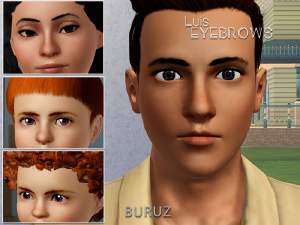
welcome to my first Eyebrow creation for TS3 =)
I was always searching for natural looking brows for the Male Sims and just found many too "lady like" looking Brows or only Fat Lines without any Details out there. So i had to do something and this is my result
 I hope you like them, they are available for Teens trough Elder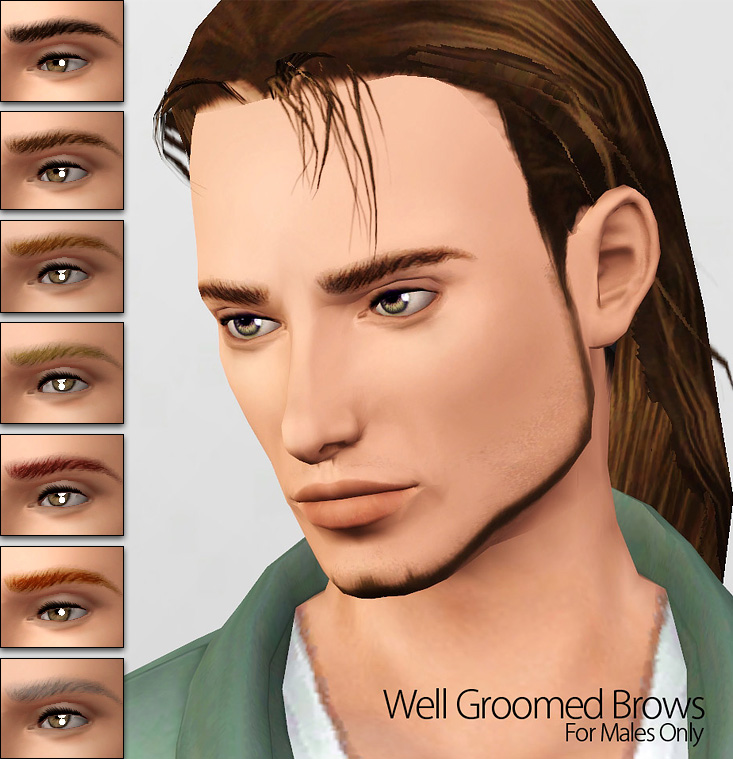
Credits:
hair by Rose
|
Well-groomed-brows.rar
| Male Version
Download
Uploaded: 20th Jan 2012, 44.2 KB.
73,788 downloads.
|
||||||||
| For a detailed look at individual files, see the Information tab. | ||||||||
Install Instructions
1. Click the download button, or the filename, to download the file to your computer.
2. Extract the zip, rar, or 7z file. Now you will have either a .package or a .sims3pack file.
For Package files:
1. Cut and paste the file into your Documents\Electronic Arts\The Sims 3\Mods\Packages folder. If you do not already have this folder, you should read the full guide to Package files first: Sims 3:Installing Package Fileswiki, so you can make sure your game is fully patched and you have the correct Resource.cfg file.
2. Run the game, and find your content where the creator said it would be (build mode, buy mode, Create-a-Sim, etc.).
For Sims3Pack files:
1. Cut and paste it into your Documents\Electronic Arts\The Sims 3\Downloads folder. If you do not have this folder yet, it is recommended that you open the game and then close it again so that this folder will be automatically created. Then you can place the .sims3pack into your Downloads folder.
2. Load the game's Launcher, and click on the Downloads tab. Find the item in the list and tick the box beside it. Then press the Install button below the list.
3. Wait for the installer to load, and it will install the content to the game. You will get a message letting you know when it's done.
4. Run the game, and find your content where the creator said it would be (build mode, buy mode, Create-a-Sim, etc.).
Extracting from RAR, ZIP, or 7z: You will need a special program for this. For Windows, we recommend 7-Zip and for Mac OSX, we recommend Keka. Both are free and safe to use.
Need more help?
If you need more info, see:
- For package files: Sims 3:Installing Package Fileswiki
- For Sims3pack files: Game Help:Installing TS3 Packswiki
Loading comments, please wait...


-
by daluved1 7th Aug 2009 at 9:52pm
 20
25.1k
27
20
25.1k
27
-
-
by daluved1 31st Aug 2009 at 1:39am
29
966.8k
162
-
The Family That Grooms Together: Brows for All (Almost)
by daluved1 15th Sep 2009 at 9:14am
8
30k
21
-
-
-
-
"Bare Naturals" - Vibrant Eyebrows for Females (Teen to Elder)
by Elexis 16th Dec 2011 at 11:27pm
90
273.3k
743
-
by Cassandra145 18th Dec 2012 at 12:43pm
14
25.8k
54
-
by Buruz 1st Mar 2021 at 3:29pm
+20 packs
1 4.4k 4 World Adventures
 High-End Loft Stuff
 Ambitions
 Fast Lane Stuff
 Late Night
 Outdoor Living Stuff
 Generations
 Town Life Stuff
 Master Suite Stuff
 Pets
Pets
 Katy Perry Stuff
 Showtime
 Diesel Stuff
 Supernatural
 70s, 80s and 90s Stuff
 Seasons
 Movie Stuff
 University Life
 Island Paradise
 Into the Future



-
-
-
-
Behind the Junkyard - habitable hole
by -Shady- 27th Nov 2009 at 12:23am
Hey, welcome to my first Lot ever that I built since ts3 ;) With Word Adventures there are a more...
+1 packs
44 60.5k 113 World Adventures
-
-
-
-
Matt Default Replacement Skintone + Face Overlay UPDATED
by -Shady- updated 19th Nov 2010 at 2:10pm
Hey folks =) First it was not my purpose ever creating a another Skintone For the sims, but because more...