
 Sign in to Mod The Sims
 Garden Variety
 Garden Variety


gardenvariety_00.jpg - width=1340 height=1020
gardenvariety_original.jpg - width=1340 height=1020
gardenvariety_override.jpg - width=1340 height=1020
gardenvariety_onion_normal.jpg - width=1040 height=800
gardenvariety_spinach_normal.jpg - width=1040 height=800
gardenvariety_basil_normal.jpg - width=1040 height=800
gardenvariety_sage_normal.jpg - width=1040 height=800
gardenvariety_tomato_normal.jpg - width=1040 height=800
gardenvariety_parsley_normal.jpg - width=1040 height=800
gardenvariety_lemontree.jpg - width=1040 height=800
gardenvariety_parsley_dry.jpg - width=1040 height=800
gardenvariety_onion_dry.jpg - width=1040 height=800
gardenvariety_tomato_dry.jpg - width=1040 height=800
gardenvariety_sage_dry.jpg - width=1040 height=800
gardenvariety_basil_dry.jpg - width=1040 height=800
gardenplants_potted.jpg - width=1040 height=800


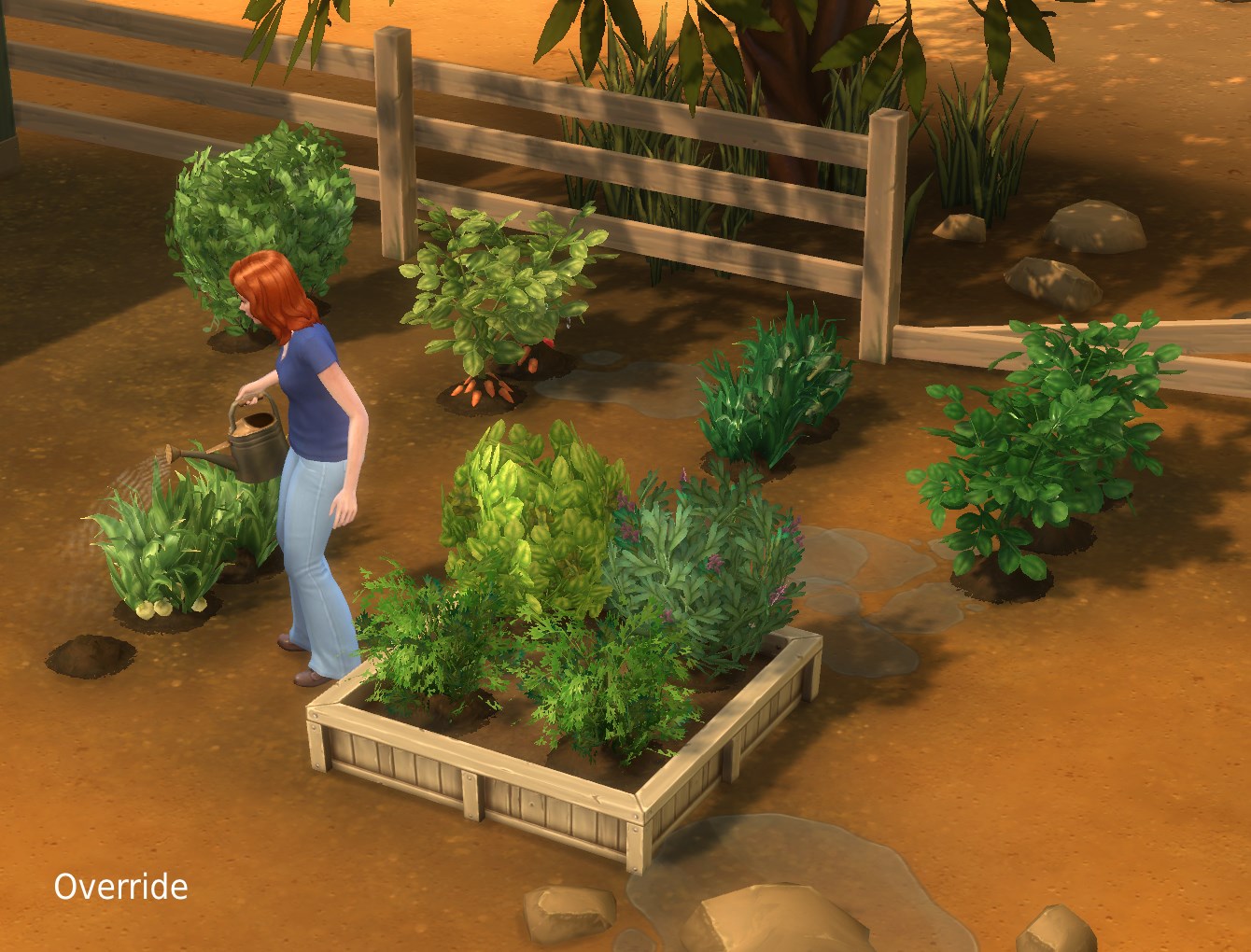
I haven’t yet managed to make actual custom meshes for plants without breaking the states, so this will have to do for now ‒ these are all using various existing meshes that are edited to use different textures. I am also not aiming at botanical correctness here; the point is simply that one can look at a plant and tell what it is when they’re not looking all the same any more.
Contents:
- Basil ‒ mesh is identical with original (small shrub), texture is custom
- Sage ‒ mesh is identical with original (small shrub), texture is custom (made from the sage harvestable so it makes a little bit of sense now)
- Parsley ‒ uses a smaller (flower) mesh with a different texture (similar to the original but darker)
- Onion ‒ uses the lily/snapdragon mesh and textures, rig is still the unchanged onion one
- Spinach ‒ uses a smaller (flower) mesh with customised texture and the flower rig
- Tomato ‒ uses the potato/carrot mesh with customised texture, custom rig
- Lemon Tree ‒ texure override (same texture but darker and thus more citrus-like)
- Generic Herbs ‒ texure override for anything that would still use the default neon green herb texture otherwise (dunno what exactly, this is basically a pre-emptive measure); this is the same green as the (customised) parsley
Known issues:
- The parsley texture is a bit weak on the mipmaps as it is relatively flimsy, leading to disappearance attempts when zooming (pretty far) out. I may or may not make a new texture with larger leaves at some point to combat that effect.
- The tomatos have a changed rig which will only take effect after the plant has been harvested and new tomatos are growing. Until then, the tomatos still think they are on the old (tall) shrub so some of them will levitate. The new rig is also not particularly great because it took me a little while to understand that thing about the re-growing, so I kept editing it relative to the original
 .. and right now I don’t feel like editing it for the 15th time. It is not a total disaster, just a bit funky with some of the tomatos sitting on top of stems and clipping through leaves; see the “dry” screenshot (this is less funky than the original tall-shrub one).
 .. and right now I don’t feel like editing it for the 15th time. It is not a total disaster, just a bit funky with some of the tomatos sitting on top of stems and clipping through leaves; see the “dry” screenshot (this is less funky than the original tall-shrub one).
I forgot to take a close-up screenshot of the dry spinach, but that is included as well. Also note that some of the plants on the dry screenshots are in their harvestable state, which is why they seem to have non-dry parts (that’s the harvestables .. they only come in one variant).
Garden plants can also be put in custom (non-planter) pots such as the garden pots from here / here, by the way, which probably makes more sense when they look nicer (I didn’t even realise until just now that that Just Works ‒ I thought I would need to make another mod for that).
“Black harvestables” issue: Some of the harvestables (e.g. sage, daisies) showing up nearly black on the shrubs is an issue with the 1.10 patch, it’ll happen no matter whether or not you use this mod. The screenshots in this post were all taken in 1.9 which is why the harvestables still look normal on them. This has been fixed in 1.10.63.
This overrides the following resources:
OBJD 0x000000000000BB1B -- Basil
OBJD 0x000000000000BB35 -- Onion
OBJD 0x000000000000BB39 -- Tomato
OBJD 0x000000000000BB3A -- Sage
OBJD 0x000000000000BB3B -- Spinach
OBJD 0x000000000000BB3C -- Parsley
OBJD 0x000000000000BC55 -- Spinach, public gardens
OBJD 0x000000000000BC57 -- Tomato, public gardens
OBJD 0x000000000000C2C0 -- Onion, public gardens
OBJD 0x000000000000C2C2 -- Parsley, public gardens
OBJD 0x000000000000C2C3 -- Basil, public gardens
OBJD 0x000000000000C2C4 -- Sage, public gardens
_IMG 0x9806F34066245153 -- generic herb texture, healthy
_IMG 0x6560FDB2E4DF370F -- Lemon Tree texture, healthy
_IMG 0x324084A4241946FD -- Lemon Tree texture, dry
Paint.net/Aorta, s4pe, TSRW.
|
pbox_gardenvariety.zip
Download
Uploaded: 2nd Aug 2015, 704.8 KB.
23,198 downloads.
|
||||||||
| For a detailed look at individual files, see the Information tab. | ||||||||
Install Instructions
1. Download: Click the File tab to see the download link. Click the link to save the .rar or .zip file(s) to your computer.
Read the upload description for installation instructions. If nothing else is specified, do the following:
2. Extract: Use WinRAR (Windows) to extract the .package file(s) (if included, ts4script as well) from the .rar or .zip file(s).
3. Cut and paste the .package file(s) (if included, ts4script as well) into your Mods folder
- Windows XP: Documents and Settings\(Current User Account)\My Documents\Electronic Arts\The Sims 4\Mods\
- Windows Vista/7/8/8.1: Users\(Current User Account)\Documents\Electronic Arts\The Sims 4\Mods\
Need more information?
- Anyone can use both .rar and .zip files easily! On Windows, use WinRAR.
- If you don't have a Mods folder, just make one.
- Mod still not working? Make sure you have script mods enabled

Loading comments, please wait...


Uploaded: 2nd Aug 2015 at 5:33 PM
Updated: 14th Sep 2015 at 10:27 PM
-
by plasticbox updated 17th Dec 2014 at 1:29am
-
by plasticbox updated 16th Dec 2014 at 11:00pm
-
by plasticbox 30th Apr 2015 at 12:49pm
-
by plasticbox updated 3rd May 2015 at 2:43am
-
by plasticbox 24th Aug 2015 at 2:00am
-
by plasticbox 22nd Sep 2015 at 2:11am
-
by plasticbox 3rd Oct 2015 at 3:34am
-

by SimMattically 9th Jun 2021 at 10:10pm
-
by Enkidu updated 8th Dec 2023 at 2:19pm
 19
61.1k
92
19
61.1k
92
-
by DeadRevolution 28th Jul 2024 at 3:08pm


-
Sim-realistic paintings: Watercolours – Seaside
by plasticbox 30th Mar 2009 at 5:13pm
Some more sim-realistic paintings, this time of buildings and landmarks. more...
 10
20.8k
33
10
20.8k
33
-
by plasticbox updated 7th Jul 2015 at 8:43pm
Three additional versions of the Maxis “Double Hung” window: one that fits over end tables and desks, one that fits more...
9
50.2k
121
-
Wee Barnoid #25 (under 20.000§) – No CC
by plasticbox 22nd Mar 2010 at 6:33pm
This is a small two-story house with fireplace and a covered porch on the yard side. more...
 18
28.3k
21
18
28.3k
21
-

Galleon Bed Frame (Texture-Referencing)
by plasticbox 2nd Jan 2016 at 12:46pm
This is a frame-only version of the Maxis “Princess Cordelia’s Galleon Bed” that gets its textures from the game files, more...
4
18k
79
-

by plasticbox 5th Oct 2015 at 1:37am
This is a bay window to complement the Maxis “Classic Casement”. more...
8
24.7k
96
-
Newbie Road 48 [NL] - Under 10.000
by plasticbox 5th Mar 2006 at 6:29pm
Title: Newbie Road 48 [NL] - Under 10.000 Category: Lots & Housing > Residential > Starter Homes Cost: 9.999 more...
+1 packs
13 13.1k 5 Nightlife
-
by plasticbox 4th Oct 2015 at 11:32am
This is a stand-alone version of the curtain from the Maxis “Clawfoot” showertub that can be used with any other more...
30
83.1k
265
-
by plasticbox 6th Sep 2014 at 8:56am
A small countryside house on a 15 x 25 lot, furnished for 3 sims, with garden in the back. more...
3
8.8k
37
-
Newbie Road 08a - Starter House
by plasticbox 21st Nov 2005 at 10:00pm
Title: Newbie Road 08a Category: Lots & Housing > Residential > Starter Homes Cost: 19.995 Lot size: 3x2 more...
8
9.1k
1
-
Newbie Road 151 -- Starter House, no CC
by plasticbox 4th Aug 2008 at 2:36am
Requires Seasons. No custom content. more...
+1 packs
18 32.7k 19 Seasons


About Me
– Feel free to recycle, you don’t need to ask.
– For the attribution, please link to the upload you’re using wherever possible (instead of my profile). This is particularly important with edits made for/with different games or game versions.
– If you use my stuff in something you make, please upload the result to a free, accessible, noncommercial site with no more restrictions than these. Code must remain open source; meshes and other material must remain re-usable.
Please do not redistribute any unmodified files – link to the upload post instead.