
 Sign in to Mod The Sims
 Macarossi Antique Set
 Macarossi Antique Set


preview.jpg - width=1365 height=768
01.jpg - width=1920 height=1080
02.jpg - width=1920 height=1080
03.jpg - width=1920 height=1080
04.jpg - width=1920 height=1080
05.jpg - width=1920 height=1080
06.jpg - width=1920 height=1080
07.jpg - width=1920 height=1080
Hi everyone

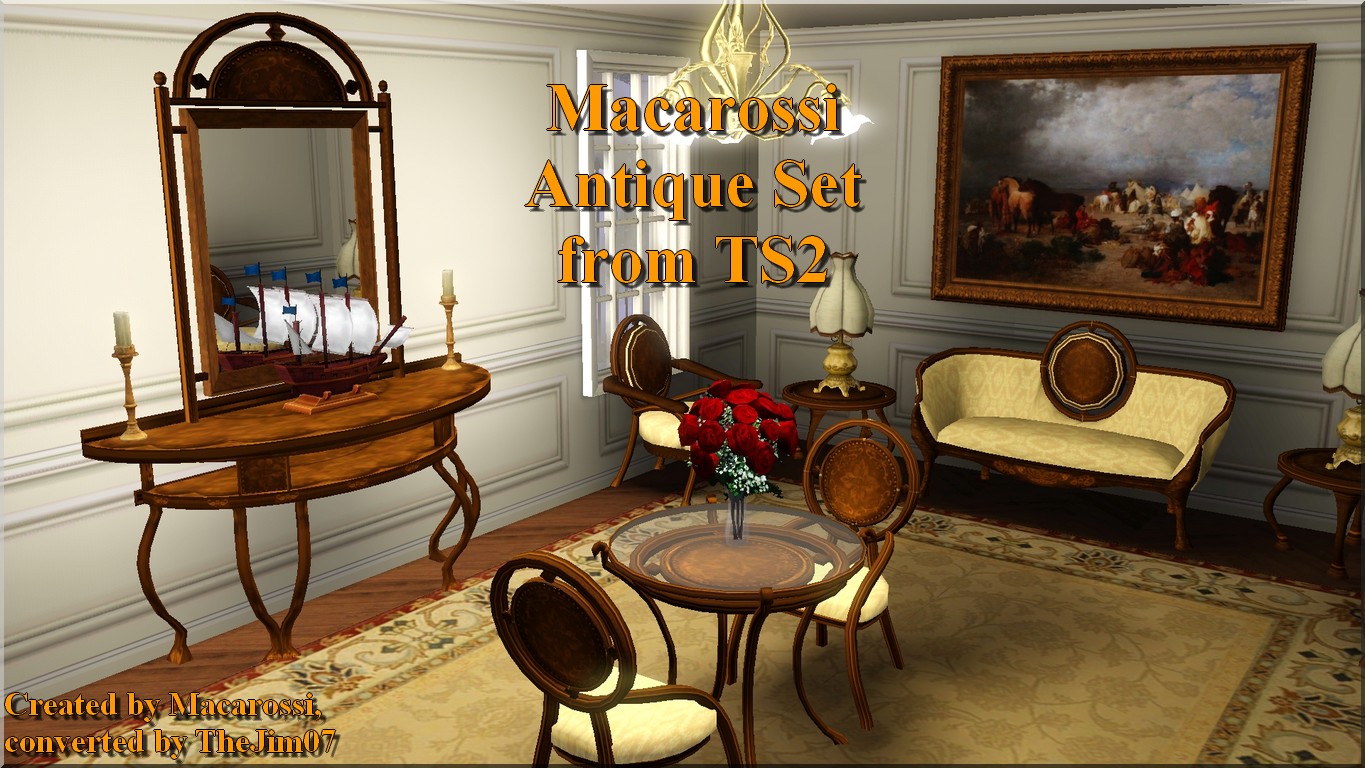
Macarossi created in 2007 this Antique Set for TS2.
I converted this set for TS3. It contains 7 objects :
- Macarossi Loveseat (900§) - 2 channels
- Macarossi Armchair (900§) - 2 channels
- Macarossi Dining Chair (790§) - 2 channels
- Macarossi Coffee Table (400§) - 1 channel
- Macarossi Side Table (250§) - 1 channel - 11 slots
- Macarossi Dining Table (95§) - 1 channel
- Macarossi Wall Mirror (160§) - 2 channels - can be moved up and down
I hope you will like these objects ^^.
Jim.
Polygon Counts:
Macarossi Loveseat = 1459/1458
Macarossi Armchair = 1323/1322
Macarossi Dining Chair = 1215/1214
Macarossi Coffee Table = 813/812
Macarossi Side Table = 1145/1144
Macarossi Dining Table = 1557/1556
Macarossi Wall Mirror = 499/498
This is a new mesh, and means that it's a brand new self contained object that usually does not require a specific Pack (although this is possible depending on the type). It may have Recolours hosted on MTS - check below for more information.
|
TheJim07_MacarossiAntiqueSetfromTS2.rar
Download
Uploaded: 8th May 2016, 859.5 KB.
13,210 downloads.
|
||||||||
| For a detailed look at individual files, see the Information tab. | ||||||||
Install Instructions
1. Click the download button, or the filename, to download the file to your computer.
2. Extract the zip, rar, or 7z file. Now you will have either a .package or a .sims3pack file.
For Package files:
1. Cut and paste the file into your Documents\Electronic Arts\The Sims 3\Mods\Packages folder. If you do not already have this folder, you should read the full guide to Package files first: Sims 3:Installing Package Fileswiki, so you can make sure your game is fully patched and you have the correct Resource.cfg file.
2. Run the game, and find your content where the creator said it would be (build mode, buy mode, Create-a-Sim, etc.).
For Sims3Pack files:
1. Cut and paste it into your Documents\Electronic Arts\The Sims 3\Downloads folder. If you do not have this folder yet, it is recommended that you open the game and then close it again so that this folder will be automatically created. Then you can place the .sims3pack into your Downloads folder.
2. Load the game's Launcher, and click on the Downloads tab. Find the item in the list and tick the box beside it. Then press the Install button below the list.
3. Wait for the installer to load, and it will install the content to the game. You will get a message letting you know when it's done.
4. Run the game, and find your content where the creator said it would be (build mode, buy mode, Create-a-Sim, etc.).
Extracting from RAR, ZIP, or 7z: You will need a special program for this. For Windows, we recommend 7-Zip and for Mac OSX, we recommend Keka. Both are free and safe to use.
Need more help?
If you need more info, see:
- For package files: Sims 3:Installing Package Fileswiki
- For Sims3pack files: Game Help:Installing TS3 Packswiki
Loading comments, please wait...

Uploaded: 8th May 2016 at 3:15 PM
#thejim07, #macarossi, #conversion, #ts2, #antique, #set, #loveseat, #armchair, #living chair, #dining chair, #mirror, #dining table, #end table, #side table, #coffee table
-
-
*UPDATED* Cozy Cottage Dining Set
by cmomoney 13th Nov 2009 at 9:59pm
-
Socialite dining set from the Sims 2 - Work with PETS
by TheJim07 11th Mar 2010 at 5:40pm
 30
50.8k
135
30
50.8k
135
-
Luxury set from the Sims 2 (chair, table, desk and ceiling light) - Work with PETS
by TheJim07 12th Mar 2010 at 8:59pm
18
32.5k
50
-
by Lisen801 updated 12th Oct 2012 at 4:25pm
17
46.5k
142
-
by kithri 8th Aug 2012 at 3:44pm
23
31.5k
122
-
-
-
-

-
-
Simple Paneling with Crown and Baseboard Moulding
by TheJim07 6th Dec 2019 at 7:34am
Hi everyone ! more...
 1
20k
55
1
20k
55
-
Hall of Mirrors Alcove and Statues
by TheJim07 14th Jul 2012 at 3:19pm
Hi everyone :), To build the Hall of Mirrors from Versailles, you will certainly need this alcove more...
9
47.7k
102
-
The Shepherd Paris by Desmarais
by TheJim07 29th Apr 2019 at 2:05pm
Hi everyone :), Paris, son of King Priam and Queen Hecuba of Troy, appears in a more...
4
25.4k
46
-

-
-
-
Magic gnomes from The Sims 3 World Adventure
by TheJim07 22nd Jun 2010 at 8:00pm
Hi, It was a request from doctorwho999, who wanted I convert the three magic gnomes from more...
 14
32.2k
29
14
32.2k
29
-
-


About Me
I'm a French guy, born in february 1988.
As a lot of creators, I will ask you to respect a few points.
You can recolor my items, modify the meshes, etc. But if you want to share your modifications I would like you send me a PM about that and add credits in the thread concerned. A link to the original item can be appreciated.
You can too make lots with my custom content. Again, I would like you send me a PM and add credits and links in the thread.
Of course, I don't want you redistribute my work.
You can also follow me on my tumblr : https://thejim07.tumblr.com. There is exclusive content there :).
If you appreciate my work and want to support me, you can make a donation in my ko-fi page : https://ko-fi.com/thejim07
Well I think all is said. If you have any questions, or suggestions, you can send me a PM :).
Thanks for your consideration and your support.
Jim