Sign in to Mod The Sims
 Modern loft - Altea
 Modern loft - Altea
SCREENSHOTS


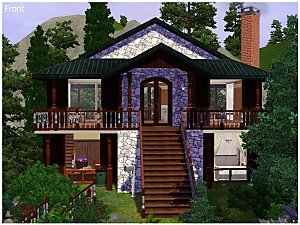
01front.jpg - width=1024 height=768
02back.jpg - width=1024 height=768
10backnight.jpg - width=1024 height=768
03mainfloor.jpg - width=1024 height=768
04firstfloor.jpg - width=1024 height=768
05kitchendining.jpg - width=1024 height=768
06lounge.jpg - width=1024 height=768
07bathroom.jpg - width=1024 height=768
08bedroom.jpg - width=1024 height=768
09gardenpatio.jpg - width=1024 height=768


Downloaded 565 times
187 Thanks
6 Favourited
22,185 Views
Say Thanks!
Thanked!
Modern loft - Altea
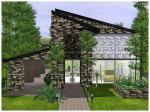
The main idea for this lot was to do something approaching a modern loft.
This house is perfect for a wealthy bachelor or couple without child.
The house is furnished and decorated but there is still some space to add more things.
The main floor is composed of the kitchen and the dining area with an door overlooking a small terrace with staircase, giving access to the garden behind the house composed by a pool and a patio.
The first floor is composed of the bedroom, the bathroom and a lounge whose bay-windows offer a magnificent view over the garden and the city.
Price Unfurnished: 45,592
Price Furnished: 64,509
Lot Size: 30x30
Lot Size: 3x3
Lot Price: 66,991
Additional Credits:
Vintage pattern for the bedroom by Albiel
( Sorry for my bad english >_< )
The main idea for this lot was to do something approaching a modern loft.
This house is perfect for a wealthy bachelor or couple without child.
The house is furnished and decorated but there is still some space to add more things.
The main floor is composed of the kitchen and the dining area with an door overlooking a small terrace with staircase, giving access to the garden behind the house composed by a pool and a patio.
The first floor is composed of the bedroom, the bathroom and a lounge whose bay-windows offer a magnificent view over the garden and the city.
Price Unfurnished: 45,592
Price Furnished: 64,509
Lot Size: 30x30
Lot Size: 3x3
Lot Price: 66,991
Additional Credits:
Vintage pattern for the bedroom by Albiel
( Sorry for my bad english >_< )
Advertisement:
|
Modern loft Altea.zip
Download
Uploaded: 15th Jun 2009, 2.19 MB.
3,057 downloads.
|
||||||||
| For a detailed look at individual files, see the Information tab. | ||||||||
Install Instructions
Quick Guide:
1. Click the filename or the download button to download the file to your computer.
2. Extract the zip, rar, or 7z file.
2. Select the .sims3pack file you got from extracting.
3. Cut and paste it into your Documents\Electronic Arts\The Sims 3\Downloads folder. If you do not have this folder yet, it is recommended that you open the game and then close it again so that this folder will be automatically created. Then you can place the .sims3pack into your Downloads folder.
5. Load the game's Launcher, and click on the Downloads tab. Select the house icon, find the lot in the list, and tick the box next to it. Then press the Install button below the list.
6. Wait for the installer to load, and it will install the lot to the game. You will get a message letting you know when it's done.
7. Run the game, and find your lot in Edit Town, in the premade lots bin.
Extracting from RAR, ZIP, or 7z: You will need a special program for this. For Windows, we recommend 7-Zip and for Mac OSX, we recommend Keka. Both are free and safe to use.
Need more help?
If you need more info, see Game Help:Installing TS3 Packswiki for a full, detailed step-by-step guide!
1. Click the filename or the download button to download the file to your computer.
2. Extract the zip, rar, or 7z file.
2. Select the .sims3pack file you got from extracting.
3. Cut and paste it into your Documents\Electronic Arts\The Sims 3\Downloads folder. If you do not have this folder yet, it is recommended that you open the game and then close it again so that this folder will be automatically created. Then you can place the .sims3pack into your Downloads folder.
5. Load the game's Launcher, and click on the Downloads tab. Select the house icon, find the lot in the list, and tick the box next to it. Then press the Install button below the list.
6. Wait for the installer to load, and it will install the lot to the game. You will get a message letting you know when it's done.
7. Run the game, and find your lot in Edit Town, in the premade lots bin.
Extracting from RAR, ZIP, or 7z: You will need a special program for this. For Windows, we recommend 7-Zip and for Mac OSX, we recommend Keka. Both are free and safe to use.
Need more help?
If you need more info, see Game Help:Installing TS3 Packswiki for a full, detailed step-by-step guide!
Advertisement:
Loading comments, please wait...
Author

Download Details
Packs:
None, this is Sims 3 base game compatible!
Uploaded: 15th Jun 2009 at 8:37 PM
Updated: 18th Jul 2009 at 9:30 PM
Uploaded: 15th Jun 2009 at 8:37 PM
Updated: 18th Jul 2009 at 9:30 PM
Number of bedrooms:
– 1 Bedroom
Custom Content Included:
– None
: No Custom Content included
Furnishings:
– Fully Furnished
: Lot is completely decked out in furnishings
Special Flags:
– Not Applicable
Tags
Other Download Recommendations:
-
by hudy777DeSign 4th Jun 2009 at 9:35pm
 16
55.4k
29
16
55.4k
29
-
by filippinokidd 12th Jun 2009 at 2:38am
14
30.8k
28
-
-
-
-
-
-
by maximinimum 2nd May 2010 at 2:32pm
+1 packs
1 4.8k 2 World Adventures
-
-


More downloads by Tinuleaf:
See more