Sign in to Mod The Sims
 Cielo Starter
 Cielo Starter


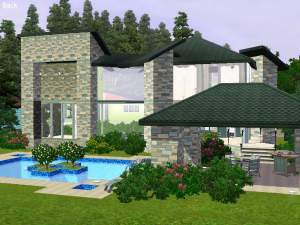
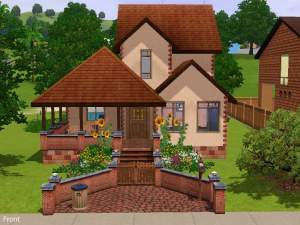
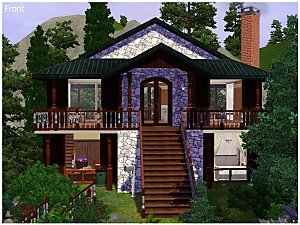
01front.jpg - width=1024 height=768
03back.jpg - width=1024 height=768
05mainfloor.jpg - width=1024 height=768
06living.jpg - width=1024 height=768
07bedroom.jpg - width=1024 height=768
08bathroom.jpg - width=1024 height=768
09kitchen.jpg - width=1024 height=768
10garden.jpg - width=1024 height=768
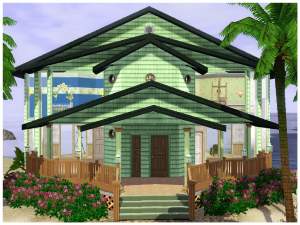
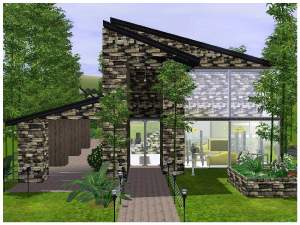
I'm glad to present you my first starter house.
I really think that there isn't enough of this kind of lots in the game's catalogue that's why I wanted to propose few ones.
So this is the first one of the serie: Cielo.
The lot is ideal for a bachelor.
The starter is fully furnished and decorated.
When you open the door, you enter the living room with a little space to take meals.
At the right there is the little kitchen.
The first door at the left is the bedroom with a study space while the second door is the bathroom.
Outside, near the entry, there is a small bench to take the air while reading a good book.
There is also a space to park a car.
The house was fully tested and I didn't encountered any problem.
I hope your sims will enjoy this house

Price Unfurnished: 11,714
Price Furnished: 15,927
Lot Size: 30x20
Lot Size: 3x2
Lot Price: 14573
|
Cielo Starter.zip
Download
Uploaded: 20th Jul 2009, 3.17 MB.
1,166 downloads.
|
||||||||
| For a detailed look at individual files, see the Information tab. | ||||||||
Install Instructions
1. Click the filename or the download button to download the file to your computer.
2. Extract the zip, rar, or 7z file.
2. Select the .sims3pack file you got from extracting.
3. Cut and paste it into your Documents\Electronic Arts\The Sims 3\Downloads folder. If you do not have this folder yet, it is recommended that you open the game and then close it again so that this folder will be automatically created. Then you can place the .sims3pack into your Downloads folder.
5. Load the game's Launcher, and click on the Downloads tab. Select the house icon, find the lot in the list, and tick the box next to it. Then press the Install button below the list.
6. Wait for the installer to load, and it will install the lot to the game. You will get a message letting you know when it's done.
7. Run the game, and find your lot in Edit Town, in the premade lots bin.
Extracting from RAR, ZIP, or 7z: You will need a special program for this. For Windows, we recommend 7-Zip and for Mac OSX, we recommend Keka. Both are free and safe to use.
Need more help?
If you need more info, see Game Help:Installing TS3 Packswiki for a full, detailed step-by-step guide!
Loading comments, please wait...

Uploaded: 20th Jul 2009 at 8:08 PM
-
-
by patul 20th Jun 2009 at 6:25am
 4
12.4k
1
4
12.4k
1
-
by swetcaramel7983 27th Jun 2009 at 11:25pm
10
11.7k
8
-
-
-
by lotra91 31st Aug 2009 at 12:20am
6
11k
8
-
-
by Ashleigh825 17th Jun 2010 at 4:07pm
+2 packs
3 8.2k World Adventures
 Ambitions
-
-
by Black Zekrom 12th Apr 2013 at 10:28am
+1 packs
8 13.5k 30 University Life