
 Sign in to Mod The Sims
 BlandCo Overhaul
 BlandCo Overhaul


pbox_cabinet-blandco-beforeafter.jpg - width=1040 height=800
pbox_cabinet-blandco-beforeafter-01.jpg - width=1040 height=800
pbox_cabinet-blandco-beforeafter-04.jpg - width=1040 height=800
pbox_cabinet-blandco-beforeafter-02.jpg - width=1040 height=800
pbox_cabinet-blandco-beforeafter-03.jpg - width=1040 height=800
pbox_cabinet-blandco-beforeafter-06.jpg - width=1000 height=800
pbox_cabinet-blandco-beforeafter-05.jpg - width=1000 height=800
pbox_cabinet-blandco-blue.jpg - width=900 height=700
pbox_cabinet-blandco-nodrop_front.jpg - width=1000 height=800
pbox_cabinet-blandco-nodrop_back.jpg - width=1000 height=800
pbox_cabinet-blandco-nodrop_cat.jpg - width=1001 height=800
pbox_cabinet-blandco-tagfix.jpg - width=1000 height=800
pbox_cabinet-blandco-beforeafter-00.jpg - width=1040 height=800


- Light fix for the cabinets (so that they are rendered like the counters)
- Additional No-drop cabinets
- Corrected colour tags for the black version
- Overrides in white and green (optional)
2015-01-28: Matching overrides for the “Sloop” bar are now available here.
Update 2014-12-21: I figured out how to make the no-drop cabinets repeatedly placeable (like the original ones – so that they don't need to be reselected from the catalogue after placing each one) and updated the zips.
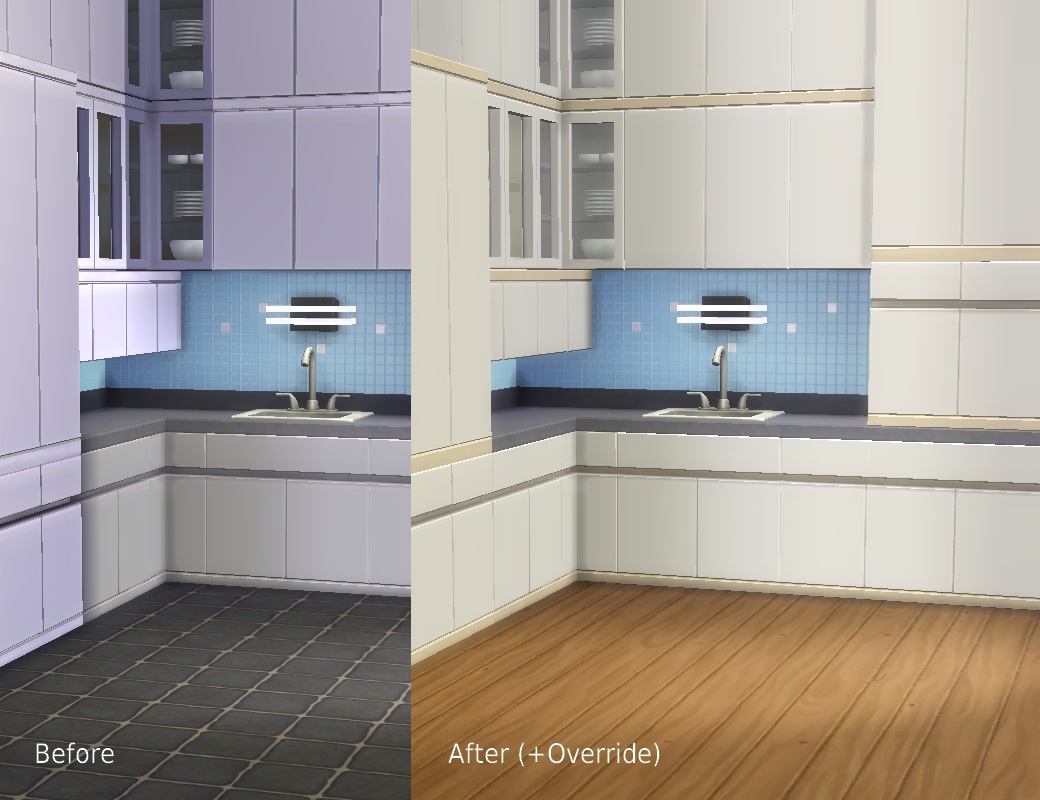
I used to think the busted lighting on the Maxis kitchens was just due to my lame graphics card, but judging from other people's screenshots, it isn't. Attached are two zips that correct various issues: one includes the overrides, the other one doesn't (in case you like that pink kitchen), apart from that they're the same. Only use one or you will likely end up with wrong catalogue swatches. I only tested / used this on Medium and High settings since my hardware won't support anything more, but since the changed shader is already in use in the game and I don't know of any problems with counters, I don't expect any real issues.
A thread on how to change the shaders used for custom objects has been started here.
What each package does:
Light Fix
- Changes the shader on the cabinets to the one that is used on the counters
- Ignores the busted LITE resource on the tall cabinet and uses the one from the regular counter instead
- Corrects the colour tags on the black counters, islands, and cabinets so that one will now find them when filtering for Colour > Black
MODL/MLOD/LITE 0x00000000-0x5C518D95A5000152
MODL/MLOD 0x00000000-0x7D7956DB8DE60189
MODL/MLOD 0x00000000-0x97F26E9E3977994B
MODL/MLOD 0x00000000-0xCB2D54A6F24B8A02
MODL 0x00000000-0xF5A402908C32560C
MODL/MLOD 0x00000000-0xFF1FB5DBD7407FC9
MODL/MLOD 0x00000000-0xFF1FB5DBD7407FDB
COBJ 0x000000000000ECE6 – tag fix
COBJ 0x000000000000ED07 – tag fix
COBJ 0x000000000000ED15 – tag fix
No Drop
- Puts a version of all cabinets in the Counters section that won't drop with walls so they won't leave strange holes when viewed from the backside. This makes them into very versatile, appropriately bland furniture for all kinds of offices, hospitals, space stations etc. They work exactly like the regular cabinets apart from that, with the pop-up model selection and all (they are the same objects, this mod is basically an alias that only changes the placement flag).
- Two flavours: the "defaultcolours" version has the Maxis colour swatches, the "overridecolours" one matches the overrides below
- Since they aren't self-contained objects like they pretend to be, you will get the usual "Script Call Failed" error when attempting to recolour them. I can't turn off the recolour thing unfortunately (that's derived from the fact they have color options (which they must have, otherwise one couldn't select them)).
Overrides
- Texture/catalogue overrides for the light grey version (white) and the pink version (tasteful avocado green). The white has the same light wood as the grey-blue one, the green has the same dark wood as the cream one, so they can easily be combined. Both overrides are for the island counters too, I only forgot to take screenshots of them. You need to delete your localthumbscache.package for the game to generate new thumbnails.
Grey > White:
0x319E4F1D-0x00000000-0x00000000000074D8
0x319E4F1D-0x00000000-0x0000000000007A8F
0x319E4F1D-0x00000000-0x0000000000007ED5
0x00B2D882-0x00000000-0x17A3F006B507FEA9
0x00B2D882-0x00000000-0x1DF3D887AFEA4666
0x00B2D882-0x00000000-0x40091D9D3EBF5C3D
Pink > Green:
0x319E4F1D-0x00000000-0x000000000000ECE0
0x319E4F1D-0x00000000-0x000000000000ED01
0x319E4F1D-0x00000000-0x000000000000ED11
0x00B2D882-0x00000000-0x17A3F006B507FEAE
0x00B2D882-0x00000000-0x1DF3D887AFEA4661
0x00B2D882-0x00000000-0x40091D9D3EBF5C3A
s4pe, HxD.
|
pbox_cabinet-blandco-overhaul_overridecolours.zip
Download
Uploaded: 22nd Dec 2014, 1.16 MB.
17,283 downloads.
|
||||||||
|
pbox_cabinet-blandco-overhaul_defaultcolours.zip
Download
Uploaded: 22nd Dec 2014, 68.8 KB.
11,573 downloads.
|
||||||||
| For a detailed look at individual files, see the Information tab. | ||||||||
Install Instructions
1. Download: Click the File tab to see the download link. Click the link to save the .rar or .zip file(s) to your computer.
Read the upload description for installation instructions. If nothing else is specified, do the following:
2. Extract: Use WinRAR (Windows) to extract the .package file(s) (if included, ts4script as well) from the .rar or .zip file(s).
3. Cut and paste the .package file(s) (if included, ts4script as well) into your Mods folder
- Windows XP: Documents and Settings\(Current User Account)\My Documents\Electronic Arts\The Sims 4\Mods\
- Windows Vista/7/8/8.1: Users\(Current User Account)\Documents\Electronic Arts\The Sims 4\Mods\
Need more information?
- Anyone can use both .rar and .zip files easily! On Windows, use WinRAR.
- If you don't have a Mods folder, just make one.
- Mod still not working? Make sure you have script mods enabled
Loading comments, please wait...


Uploaded: 20th Dec 2014 at 5:15 PM
Updated: 17th Aug 2015 at 1:57 AM
-
by plasticbox updated 7th May 2015 at 11:07am
-
No-Drop cabinets / Light Fix for “Vault” and “SCargeaux” | Update: Unlocked Colour Option Fixes
by plasticbox updated 19th Oct 2015 at 7:54am
-
-
Store Ice Cream Trays In The Fridge
by crazyspaniard updated 31st Aug 2015 at 5:53pm
-
-

by Lunula Simmer 31st Mar 2022 at 2:25pm
-

Triangular Blue Loading Screen
by Rieszky123 4th May 2022 at 11:17am
-

-
-
by link_the_bae updated 8th Oct 2025 at 2:27am


-
Galleon Bed Frame (Texture-Referencing)
by plasticbox 2nd Jan 2016 at 12:46pm
This is a frame-only version of the Maxis “Princess Cordelia’s Galleon Bed” that gets its textures from the game files, more...
 4
18k
79
4
18k
79
-
by plasticbox 11th Aug 2015 at 5:12am
This is the Maxis “CanOFlage Outdoor Trash Receptacle” deprived of its receptacling abilities (as well as the ability to be more...
4
5.8k
26
-
Newbie Road 104 -- Base Game Starter, no CC
by plasticbox updated 20th Mar 2008 at 7:37pm
No EPs required. No custom content. Description: Small house with fenced-in garden, furnished for 3 sims. more...
 9
21.7k
25
9
21.7k
25
-
by plasticbox 14th Apr 2015 at 10:25pm
An endtable that matches the nightstand and dresser from here and here that are equally boring. more...
5
23.5k
123
-
Newbie Road 129 -- Under 35.000
by plasticbox 9th Jul 2008 at 3:23pm
Requires NL and OfB. more...
+2 packs
12 13.2k 15 Nightlife
 Open for Business
-
by plasticbox 30th Jan 2015 at 11:15am
Specular fix for the high-gloss “Magic Carpet” (Maxis, Base Game) that makes it non-shiny like a carpet would normally be. more...
-
Backdoor Lane 55 -- Another Apartment Mini (3 units)
by plasticbox 24th Nov 2008 at 2:39am
Requires NL, OfB and Pets. No custom content. more...
+3 packs
19 44.4k 39 Nightlife
Open for Business
 Pets
Pets
-
Fewer Stalkbys | Impatient Stalkbys
by plasticbox updated 31st Jul 2015 at 4:03pm
This attempts to tone down the amount of visitors (both neighbours and relationships) that are stalking the active household all more...
98
97.3k
329
-
by plasticbox 2nd Oct 2014 at 1:49am
A very compact house, furnished for three sims with one spare (bed)room and an empty basement. more...
 7
12.1k
55
7
12.1k
55
-
Wee Barnoid #05 – Starter house (under 16.000§) – No CC
by plasticbox 23rd Jul 2009 at 9:46pm
A single-sim starter -- it will sleep two, but one sim alone can afford it. more...
16
23.5k
39


About Me
– Feel free to recycle, you don’t need to ask.
– For the attribution, please link to the upload you’re using wherever possible (instead of my profile). This is particularly important with edits made for/with different games or game versions.
– If you use my stuff in something you make, please upload the result to a free, accessible, noncommercial site with no more restrictions than these. Code must remain open source; meshes and other material must remain re-usable.
Please do not redistribute any unmodified files – link to the upload post instead.