
 Sign in to Mod The Sims
 TS4 Coat Converter
 TS4 Coat Converter


PaintedCat.jpg - width=658 height=556
CAP paint mode
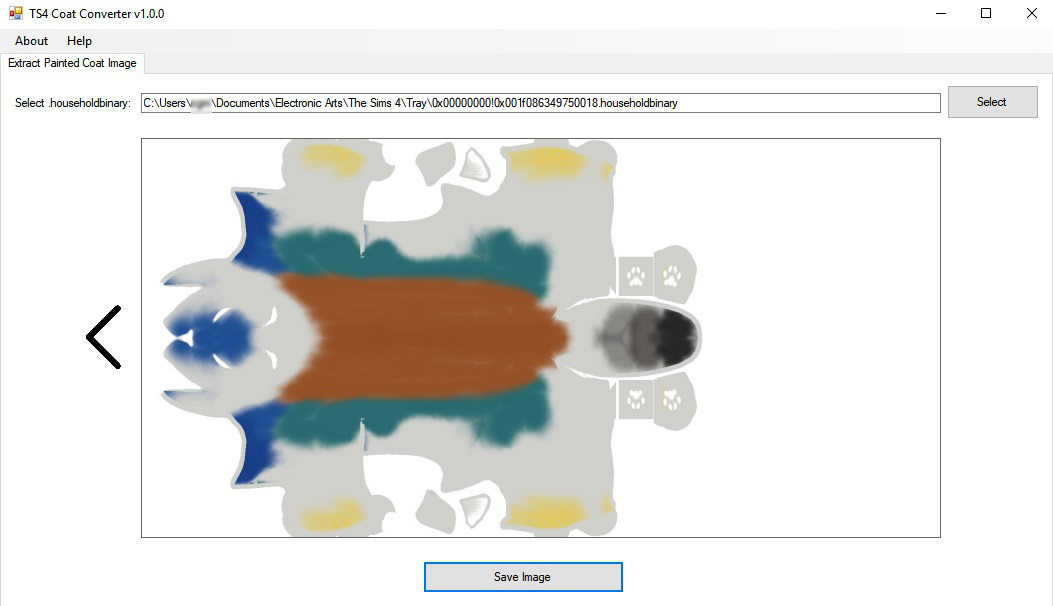
PaintedCat2.jpg - width=1053 height=606
Extracted image
PaintedCat3.jpg - width=468 height=401
CAS Part preview
PaintedCat4.jpg - width=938 height=492
Coat as pet clothing

To find an image, navigate to your \Documents\Electronic Arts\The Sims 4\Tray folder and select a .householdbinary file. The tool will search for images and display them. If it finds more than one you can scroll through them.
When making a CAS Part, you have a few choices.
Pet Clothing/Accessories:
- Clone the 'nude' body. Set the proper flags (check 'Show in CAS UI' and 'Show in InfoPanel', uncheck the 'Enable for Nude' options). Adding the FullBody tag will make it show in a clothing category - Costume value for outfits, Suits for tops, and Short Dresses for dresses.
- Clone a collar or hat and remove the mesh.
- Clone the Shoes (paws) and set the flags as above for the nude body. This will show up in the unfiltered clothing category and can be combined with other clothing/accessories.
Extract the .exe file and run it. Please report any problems!
|
TS4CoatConverter.zip
| Extract .exe file and run
Download
Uploaded: 5th Nov 2018, 61.0 KB.
3,116 downloads.
|
||||||||
| For a detailed look at individual files, see the Information tab. | ||||||||
Install Instructions
1. Download: Click the File tab to see the download link. Click the link to save the .rar or .zip file(s) to your computer.
2. Extract: Use 7zip (Windows) to extract the file(s) from the .rar or .zip file(s).
3. Cut and paste the file(s) into your Mods folder
Need more information?
- My Documents\Electronic Arts\The Sims 4\Mods\
- Anyone can use both .rar and .zip files easily! On Windows, use 7zip!
- If you don't have a Mods folder, just make one.
Loading comments, please wait...



 View with Names
Uploaded: 5th Nov 2018 at 11:24 PM
Updated: 6th Nov 2018 at 4:10 AM
-
-
-
TS4 Tuning Description Browser (Windows Only)
by scumbumbo updated 20th Sep 2018 at 11:13am
 19
54.3k
53
19
54.3k
53
-
by denton47 updated 15th Feb 2026 at 7:37am
297
69.6k
79
-
-
by MatroSka updated 13th Dec 2021 at 12:16pm
9.1k
10
-
-
XonoNight's Custom Loading Screen Tips
by XonoNight 2nd Jul 2025 at 11:25am
-


-

TS4 MorphMaker - updated to V4.5.2 on 4/19/2023
by CmarNYC updated 19th Apr 2023 at 4:23pm
A tool for making custom CAS sliders and presets more...
647
374.1k
304
-


TS4 Skininator - Version 2.6.1, 3/23/2023
by CmarNYC updated 23rd Mar 2023 at 7:54pm
A tool for the creation of custom skintones for The Sims 4 more...
345
207.9k
429
-
Metal sims skins - update 9/10/12
by CmarNYC updated 11th Sep 2012 at 12:14am
Metallic shiny skintones more...
-
-

Meshing Toolkit - version 1.4.9 uploaded 12/20/2018
by CmarNYC updated 20th Dec 2018 at 3:04pm
A set of tools for automating some of the more tedious and difficult meshing tasks. more...
 297
309.8k
296
297
309.8k
296
-

Pregnancy Progress Controller - new version 10/31/2013
by CmarNYC updated 31st Oct 2013 at 3:56pm
Who says you can't be a little bit pregnant? more...
871
912.1k
1.8k
-
Enhanced Butt Slider - updated 6/15/2022
by CmarNYC updated 15th Jun 2022 at 3:43pm
Adds up and down adjustments to the butt size slider more...
-
-
TS4 SimRipper Classic: rip sims from savegames. V3.14.2.0, updated 4/19/2023
by CmarNYC updated 19th Apr 2023 at 3:26pm
A tool to load sims from saved games and save them as meshes and textures. more...
2k
466.7k
293
-
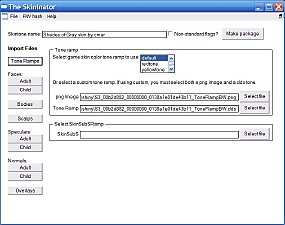
Skininator - a tool to make non-default and default custom skins - new version 1/10/2013
by CmarNYC updated 10th Dec 2013 at 3:30pm
Non-default replacement skins for the Sims 3 are here. more...
311
311k
292


Packs Needed
| Expansion Pack | |
|---|---|
| Cats and Dogs |
About Me
My policy on use of my work:
Feel free to use any of my meshes, morphs, skins, or whatever as a base. If you change, convert, or enhance my stuff you may post it without asking, but please give credit. If you use them without changes, please post a link to my downloads rather than reposting. However, you may include them with Sims or lots without asking, but with credit.
Please do not post anything using my creative work on any pay site or the Exchange, unless it's in a free section of a pay site. If you want to post your own original creation made using my tools to a pay site or the Exchange, you may do so, but give credit for the tool.
Obviously my tools are for free use by anyone, but I'd appreciate a credit if you post something created with them.
So basically: no pay site, no Exchange, give credit. Other than that, meh.
If at some time I lose interest in Sims 3, or am too busy, or die, anyone who wants to may update/modify/add to any of my work as long as they follow the MTS policy on updating broken or outdated custom content.
I don't take requests. Suggestions for enhancing work I'm doing or have done are welcome, whether or not I act on them, but please no requests for totally unrelated stuff that I probably have no idea how to do.