
 Sign in to Mod The Sims
 Poodles in Paris
 Poodles in Paris


PiP_Room.jpg - width=800 height=489
PiP_Bed.jpg - width=800 height=489
PiP_rug.jpg - width=800 height=489
PiP_Seat.jpg - width=800 height=489
PiP_Pictures.jpg - width=800 height=489
PiP_vase.jpg - width=800 height=489
PiP_Curtains.jpg - width=800 height=489
PiP_Living.jpg - width=800 height=489

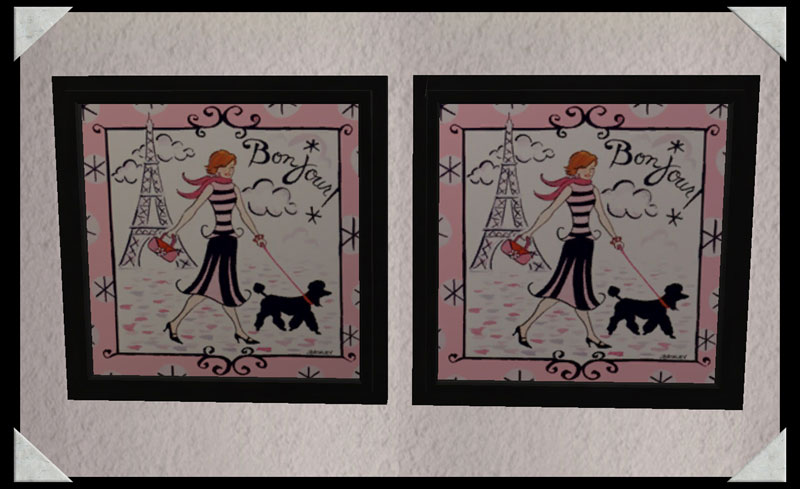
So the set was built around the two pictures, the name Poodles in Paris just fit and I started to find textures to go with it. Only after I had the pictures to use did I find a set actually called this...too late to change it now
 The poodle texture is a tilable texture made by me, the pink seating also by me, the zebra found somewhere on the web.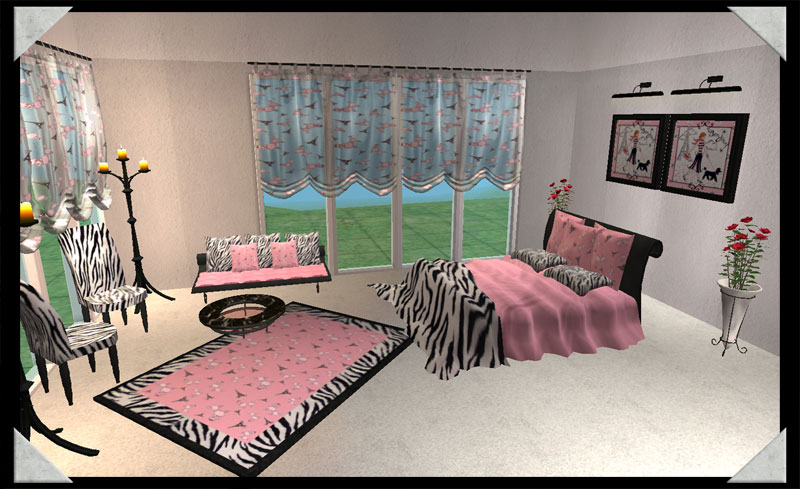
A recolor of Sims in Paris Bedroom set 5. A must have set for any sim with discerning tastes. An elegant and sylish set for any sim who must have the finer things in life.
The rug is a recolor of Echo's 3x4 rug mesh.
Ok, so I noticed that both pictures are the same
 , but there are two different ones in the zip.
Additional Credits:
Thanks to all who contributed to SimPE otherwise I wouldn't have all these cute little matching items for my sims.
HystericalParoxysm for a tutorial on how to make tilable textures.
|
HL_PiP_sip-bedroom5.zip
Download
Uploaded: 23rd Nov 2007, 894.5 KB.
45,673 downloads.
|
||||||||
| For a detailed look at individual files, see the Information tab. | ||||||||
Install Instructions
1. Download: Click the download link to save the .rar or .zip file(s) to your computer.
2. Extract the zip, rar, or 7z file.
3. Place in Downloads Folder: Cut and paste the .package file(s) into your Downloads folder:
- Origin (Ultimate Collection): Users\(Current User Account)\Documents\EA Games\The Sims™ 2 Ultimate Collection\Downloads\
- Non-Origin, Windows Vista/7/8/10: Users\(Current User Account)\Documents\EA Games\The Sims 2\Downloads\
- Non-Origin, Windows XP: Documents and Settings\(Current User Account)\My Documents\EA Games\The Sims 2\Downloads\
- Mac: Users\(Current User Account)\Documents\EA Games\The Sims 2\Downloads
- Mac x64: /Library/Containers/com.aspyr.sims2.appstore/Data/Library/Application Support/Aspyr/The Sims 2/Downloads
- For a full, complete guide to downloading complete with pictures and more information, see: Game Help: Downloading for Fracking Idiots.
- Custom content not showing up in the game? See: Game Help: Getting Custom Content to Show Up.
- If you don't have a Downloads folder, just make one. See instructions at: Game Help: No Downloads Folder.
Meshes needed
This download requires one or more meshes to work properly. Please check the Description tab for information about the meshes needed, then download them below:| MTS cannot guarantee any off-site links will be available |
| blackpearlsims.com/downloads.php?do=cat&id=186 (non-MTS link) |
Loading comments, please wait...


Uploaded: 23rd Nov 2007 at 4:29 AM
Updated: 30th Dec 2010 at 3:31 PM
-

-
Recolor Badhara the Sims in Paris
by nazariopilar 26th Oct 2007 at 6:41pm
-
by HugeLunatic 23rd Nov 2007 at 2:32pm
-
[recolor] Vincitor -living 4 Sims In Paris
by nazariopilar 26th Nov 2007 at 8:30am
-
by lovelymaa 1st Feb 2008 at 10:28am
 28
90.2k
98
28
90.2k
98
-
Sims in Paris: Bedroom3 - Recolour
by Elinesprit0327 3rd Feb 2008 at 11:10am
-
Spoiled Teen: Pink Recolour of Sims in Paris Bedroom6
by Elinesprit0327 3rd Feb 2008 at 2:11pm
-
Sims in Paris: Nursery2 Pink Recolour for Girls
by Elinesprit0327 7th Feb 2008 at 10:49am
-
-

-
Maxis Art Nouveau Open Underneath *Recolorable* Modular Stairs
by HugeLunatic 12th May 2009 at 5:34pm
Updated 19-Dec-09 - with new script file Apparently the range of numbers I have for my modular stairs conflict with more...
36
115.9k
193
-
Maxis Open **Recolorable Stairs** - Slaves
by HugeLunatic 16th Dec 2009 at 9:26pm
Updated 19-Dec-09 - with new script file Apparently the range of numbers I have for my modular stairs conflict with more...
31
99.3k
160
-
by HugeLunatic updated 24th Jun 2021 at 10:40pm
The "Sink on High" and "You Gots Feet" from K&B stuff pack, now with recolorable metal bits! more...
+1 packs
14 24.4k 44 Kitchen & Bath
-
Backyard Pyramid "Step it Up" - [Recolors]
by HugeLunatic 4th Sep 2013 at 7:23pm
Five Maxis Match wood recolors of the Backyard Pyramid "Step it Up" stair treads, plus one white recolor of the more...
+1 packs
9 29.6k 64 Bon Voyage
-


by HugeLunatic updated 12th Nov 2022 at 6:28pm
+1 packs
6 3.5k 13 Free Time
-
"Unique Separator" [LACK-Recolors]
by HugeLunatic 3rd Dec 2013 at 4:33pm
Recolors of the AL "Unique Separator" Apartment door in 7 IKEA LACK colors (black, white, yellow, red, green, blue, pink). more...
+1 packs
15 28.6k 76 Apartment Life
-
Colonial Fireplace - TS3 Conversion
by HugeLunatic updated 8th Jul 2021 at 1:57pm
A friend had asked if this fireplace from TS3 could be converted to TS2, and well with something involving fireplaces more...
40
94.5k
193
-
by HugeLunatic updated 26th Oct 2010 at 5:14am
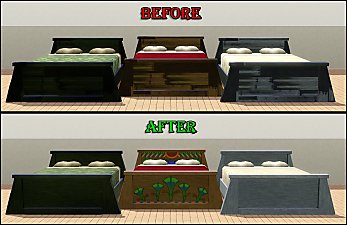
Scarab Rejuvenation Bed by Cunee Forms I would just like to say...WTF EA? This is a free store more...
-
by HugeLunatic 16th Jun 2019 at 9:57pm
Bits and bobs from the IKEA FREDRIK desk to make wall shelves. more...
+1 packs
12 11.5k 38 Ikea Home
-
by HugeLunatic 7th Mar 2016 at 5:35pm
Originally built for a hood, this is a really old house that could possibly be haunted. more...
7
15.1k
41


About Me
Pet Stories || Dog Agility Items? || Castaway Stories || Holy Simoly Extras
4esf Archive || Holy Simoly Archive || CEP-Extras List || Buyable Game Objects
lunie content from GoS/s2a
 Installation of CEP Extras
-the package with pfiles appended to the name will go into your cep extras folder where your game is installed (typically c drive, you do you)
-the other goes in CEP extra folder in documents.
The following locations are what I am aware of, beyond that you'll have to do some searching.
Downloads Folder:
C:\Users\<user>\Documents\EA Games\The Sims 2 Legacy
C:\Users\<user>\Documents\EA Games\The Sims 2 Ultimate Collection
With multiple launchers, the location for your game install will vary.
C:\Program Files\EA GAMES\The Sims 2 Legacy\TSData\Res\Catalog\zCEP-EXTRA
C:\Program Files\EA GAMES\The Sims 2\TSData\Res\Catalog\zCEP-EXTRA
C:\Program Files (x86)\EA GAMES\The Sims 2\TSData\Res\Catalog\zCEP-EXTRA