
 Sign in to Mod The Sims
 OFB International Window Extras - Part II - Arches
 OFB International Window Extras - Part II - Arches


ofbArch1.jpg - width=750 height=654
ofbArch2.jpg - width=750 height=654
ofbArch3.jpg - width=750 height=654
ofbArch4.jpg - width=750 height=654

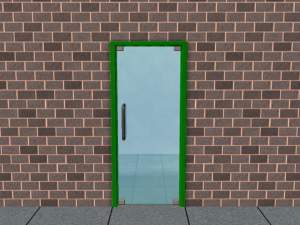
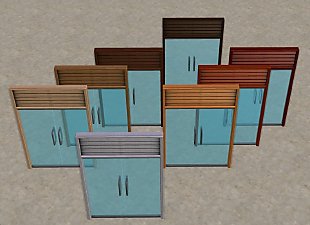
All three arches take there textures from the OFB Glimpse of Freedom short door, the same as the corresponding EA door.
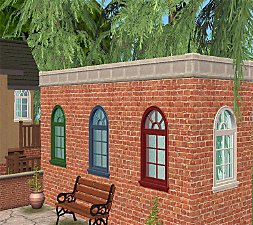
The Arches in 1-tile and 2-tile
- Glimpse of Freedom
- Barely There
- Cloudscene
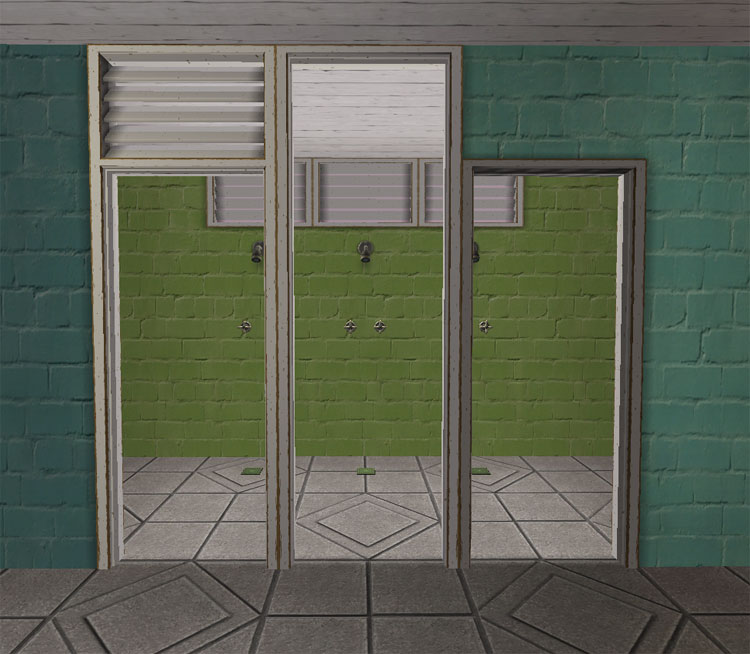
Credit: The recolor shown is by Holy Simoly.
Polygon Counts:
Glimpse of Freedom Arch/Diag - 174
Barely There Arch/Diag - 174
Glimpse of Freedom/Diag - 334
This is a new mesh, and means that it's a brand new self contained object that usually does not require a specific Pack (although this is possible depending on the type). It may have Recolours hosted on MTS - check below for more information.
|
HL_Doors Part II.rar
Download
Uploaded: 31st Jul 2009, 106.4 KB.
13,466 downloads.
|
||||||||
| For a detailed look at individual files, see the Information tab. | ||||||||
Install Instructions
1. Download: Click the download link to save the .rar or .zip file(s) to your computer.
2. Extract the zip, rar, or 7z file.
3. Place in Downloads Folder: Cut and paste the .package file(s) into your Downloads folder:
- Origin (Ultimate Collection): Users\(Current User Account)\Documents\EA Games\The Sims™ 2 Ultimate Collection\Downloads\
- Non-Origin, Windows Vista/7/8/10: Users\(Current User Account)\Documents\EA Games\The Sims 2\Downloads\
- Non-Origin, Windows XP: Documents and Settings\(Current User Account)\My Documents\EA Games\The Sims 2\Downloads\
- Mac: Users\(Current User Account)\Documents\EA Games\The Sims 2\Downloads
- Mac x64: /Library/Containers/com.aspyr.sims2.appstore/Data/Library/Application Support/Aspyr/The Sims 2/Downloads
- For a full, complete guide to downloading complete with pictures and more information, see: Game Help: Downloading for Fracking Idiots.
- Custom content not showing up in the game? See: Game Help: Getting Custom Content to Show Up.
- If you don't have a Downloads folder, just make one. See instructions at: Game Help: No Downloads Folder.
Loading comments, please wait...


-
-
by mininessie 27th Mar 2006 at 1:32pm
 +2 packs
6 14.7k 13
+2 packs
6 14.7k 13 University
 Nightlife
-
-
-
-
OFB International Window Extras - Part I Single Tile
by HugeLunatic 30th Apr 2009 at 2:38pm
+1 packs
37 60.2k 111 Open for Business
-
by leefish 3rd Mar 2011 at 5:44pm
21
35.1k
70
-
Maxis-match Recolors for OFB International Doors and Windows
by wthrwthoutyu 18th May 2011 at 11:51pm
+1 packs
24 28.7k 63 Open for Business
-
OFB International Window Build in MLC Palette Colours
by celebkiriedhel 3rd Aug 2014 at 8:12am
+2 packs
7 6.2k 8 Open for Business
 Apartment Life
-
EA/Maxis OFB Embrasure by Ergo Window - centered on 2T
by CatherineTCJD updated 6th Apr 2026 at 8:26pm
+1 packs
7 1.6k 5 Open for Business


-
by HugeLunatic 29th Aug 2020 at 8:04pm
This started as simply replacing the produce bin's wood texture to match the freezer bin's, but then I figured why more...
5
15.1k
54
-
by HugeLunatic 1st Jul 2015 at 2:10am
The "1 by 1" Designer Wall Sconce is a one shade, wall version of the base game "4 by 4" Designer Chandelier. more...
12
6.7k
23
-
by HugeLunatic 5th Sep 2020 at 4:15pm
I wanted different colors for the wood and metal bits for the hobby plaques that come with Freetime, so I've more...
+1 packs
4 6k 20 Free Time
-
by HugeLunatic 14th Feb 2014 at 9:26pm
Boomerang is a new map I made in sc4, with the intent of using this as the base for my more...
13
8.6k
20
-
by HugeLunatic 23rd Sep 2012 at 9:20pm
Minimaal Gate This gate matches the fences that came with OFB, the small red and black ones. more...
37
38.1k
90
-
by HugeLunatic updated 29th Nov 2022 at 10:30pm
+1 packs
3 2.8k 15 Free Time
-
by HugeLunatic 5th Nov 2013 at 10:38pm
Just a little thing I wanted for my game, as I actually like the door counterpart. more...
+1 packs
6 11.8k 33 Pets
Pets
-
by HugeLunatic 2nd Dec 2016 at 5:44pm
As I was building a Victorian inspired house, I discovered that the Bohemian dresser from AL didn't have two subsets more...
+1 packs
10.4k 23 Apartment Life
-
-
Green Dragon Brocade Classic Living
by HugeLunatic 21st Aug 2007 at 12:43am
I absolutely adore Crocobaura's new Classic Living meshes and have been waiting to use this texture for what seems forever. more...


Packs Needed
| Expansion Pack | |
|---|---|
 | Open for Business |
About Me
Pet Stories || Dog Agility Items? || Castaway Stories || Holy Simoly Extras
4esf Archive || Holy Simoly Archive || CEP-Extras List || Buyable Game Objects
lunie content from GoS/s2a
 Installation of CEP Extras
-the package with pfiles appended to the name will go into your cep extras folder where your game is installed (typically c drive, you do you)
-the other goes in CEP extra folder in documents.
The following locations are what I am aware of, beyond that you'll have to do some searching.
Downloads Folder:
C:\Users\<user>\Documents\EA Games\The Sims 2 Legacy
C:\Users\<user>\Documents\EA Games\The Sims 2 Ultimate Collection
With multiple launchers, the location for your game install will vary.
C:\Program Files\EA GAMES\The Sims 2 Legacy\TSData\Res\Catalog\zCEP-EXTRA
C:\Program Files\EA GAMES\The Sims 2\TSData\Res\Catalog\zCEP-EXTRA
C:\Program Files (x86)\EA GAMES\The Sims 2\TSData\Res\Catalog\zCEP-EXTRA