
 Sign in to Mod The Sims
 Default overrides for “Animal Squares” rug
 Default overrides for “Animal Squares” rug


Kinderstripes_07.jpg - width=960 height=700
Kinderstripes_09.jpg - width=960 height=700
Kinderstripes_02.jpg - width=960 height=700
Kinderstripes_03.jpg - width=960 height=700
Kinderstripes_06.jpg - width=960 height=700
Kinderstripes_08.jpg - width=960 height=700
Kinderstripes_11.jpg - width=960 height=700
Kinderstripes_05.jpg - width=960 height=700
Kinderstripes_04.jpg - width=960 height=700
Kinderstripes_01.jpg - width=960 height=700
Kinderstripes_10.jpg - width=960 height=700
Kinderstripes_12.jpg - width=960 height=700
Kinderstripes_Cat.jpg - width=870 height=350
Kinderstripes_Before.jpg - width=1000 height=750
Kinderstripes_After.jpg - width=1000 height=750
Kinderstripes_00.jpg - width=960 height=700


Update: Now with corrected colour tags, too. Thanks Inge!
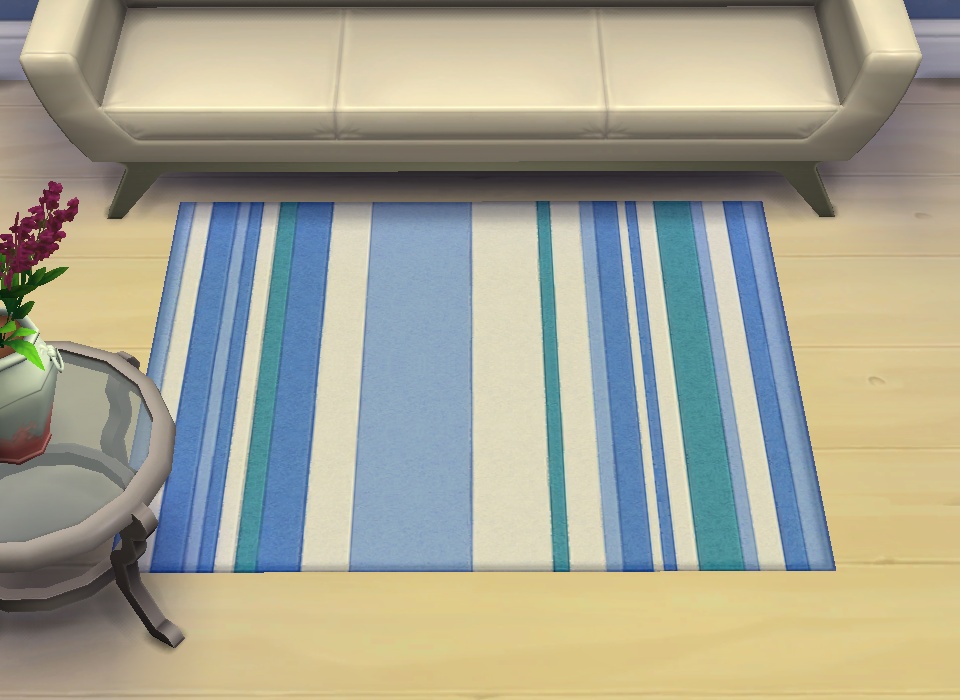
This is an actual override, thumbnails and swatches and descriptions and all (i.e. not just the textures). Found in Rugs for 70§ like the original; see the Before and After screenshots for which rug replaces which one (they were not moved between taking the screenshots, only the override removed).
S4PE with IngeWrappers, Paint.net, Hasher, Notepad++.
|
pbox_rug_override-animalstripes.zip
Download
Uploaded: 9th Dec 2014, 1.19 MB.
7,058 downloads.
|
||||||||
| For a detailed look at individual files, see the Information tab. | ||||||||
Install Instructions
1. Download: Click the File tab to see the download link. Click the link to save the .rar or .zip file(s) to your computer.
2. Extract: Use 7zip (Windows) to extract the file(s) from the .rar or .zip file(s).
3. Cut and paste the file(s) into your Mods folder
Need more information?
- My Documents\Electronic Arts\The Sims 4\Mods\
- Anyone can use both .rar and .zip files easily! On Windows, use 7zip!
- If you don't have a Mods folder, just make one.
Loading comments, please wait...


Uploaded: 2nd Nov 2014 at 8:20 PM
Updated: 9th Dec 2014 at 10:48 PM
-
by bibidoublezero updated 17th Aug 2015 at 5:29pm
 11
26.3k
58
11
26.3k
58
-
-
by _Druga_ 6th Sep 2015 at 8:32pm
9
10.3k
35
-
-
by MoonFeather 17th Jun 2021 at 7:25pm
+1 packs
1.3k 6 Snowy Escape
-
-
by harlequin_eyes 23rd Jun 2021 at 6:36am
2
3.9k
29
-
by KiyraNekochan 29th Jun 2022 at 11:43am
1
1.2k
8
-
-
by Sturmfalke 28th Dec 2024 at 11:23pm
3.8k
8


-
by plasticbox 11th Dec 2015 at 3:19am
There are loads of custom fireplaces, but I couldn't find JUST a fire. more...
17
32.8k
147
-
Newbie Road 40 [NL] - Starter House
by plasticbox 2nd Feb 2006 at 11:46am
Title: Newbie Road 40 [NL] Category: Lots & Housing > Residential > Starter Homes Cost: 19.777 Lot size: more...
 +1 packs
15 12.5k 4
+1 packs
15 12.5k 4 Nightlife
-
by plasticbox 27th Jul 2015 at 7:06am
This is a small empty vase that can hold up to three of those garden flowers that are otherwise just more...
82
44.6k
273
-
Backdoor Lane 26 [NL+OfB] -- "Bay Tree", small restaurant
by plasticbox 12th Mar 2007 at 11:56pm
Nightlife and OfB required. No custom content. more...
+2 packs
31 55.4k 68 Nightlife
 Open for Business
-
Newbie Road 174 -- Base Game Mini Starter, no CC
by plasticbox 9th Nov 2008 at 8:31pm
No EPs required. more...
8
19.2k
25
-
Newbie Road 13a - Starter house
by plasticbox 27th Nov 2005 at 2:58pm
Title: Newbie Road 13a Category: Lots & Housing > Residential > Starter Homes Cost: 19.884 Lot size: 3x2 more...
6
13.7k
7
-

by plasticbox 25th Aug 2014 at 7:19pm
Small house for up to 4 sims, built on a 15 x 25 lot. Base game content only. more...
 11
10.8k
50
11
10.8k
50
-
“Sincerity” Mesh Override ? More flexible placement
by plasticbox 19th Jun 2015 at 8:42pm
Since objects can be moved up/down on the wall but no lower than their minimum height, this mirror is basically more...
-
Newbie Road 92 -- Base Game Starter
by plasticbox 9th Jul 2007 at 3:01pm
No EPs required. more...
7
18.5k
15
-
Backdoor Lane 50 -- Fake Rowhouse -- City Starter
by plasticbox updated 27th May 2008 at 5:29am
Requires NL. more...
+1 packs
19 47.1k 37 Nightlife


About Me
– Feel free to recycle, you don’t need to ask.
– For the attribution, please link to the upload you’re using wherever possible (instead of my profile). This is particularly important with edits made for/with different games or game versions.
– If you use my stuff in something you make, please upload the result to a free, accessible, noncommercial site with no more restrictions than these. Code must remain open source; meshes and other material must remain re-usable.
Please do not redistribute any unmodified files – link to the upload post instead.