
 Sign in to Mod The Sims
 Stay Together--6 couples' poses
 Stay Together--6 couples' poses


Screenshot-20676.jpg - width=1360 height=768
Screenshot-21297.jpg - width=1360 height=768
Screenshot-21300.jpg - width=1360 height=768
Screenshot-21303.jpg - width=1360 height=768
Screenshot-21309.jpg - width=1360 height=768
Screenshot-21311.jpg - width=1360 height=768
Screenshot-21315.jpg - width=1360 height=768
Screenshot-21296.jpg - width=1360 height=768
Screenshot-21301.jpg - width=1360 height=768
Screenshot-21305.jpg - width=1360 height=768
Screenshot-21306.jpg - width=1360 height=768
Screenshot-21310.jpg - width=1360 height=768
Screenshot-21313.jpg - width=1360 height=768
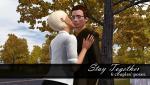


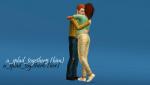
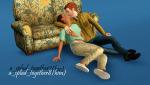
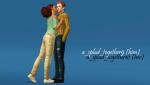
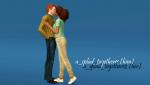
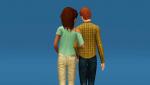
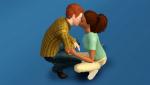

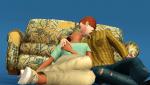
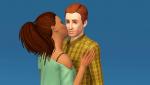
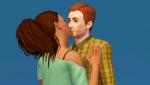
 6 adult couples' poses, pose list compatible.
 When I was originally making these poses, they were designed for a pairing in which the male sim is usually shown to be slightly taller than his girlfriend. To that end, some of the poses will stretch your sim a bit (the stretch is localized in the calf area and your sim will go back to normal once the pose is cancelled), so if your sim are already different heights, you'll want to change your camera angle to compensate. These poses are marked in their pose list description.
Pose tags are as follows:
Walking arm-in-arm.
a_splad_together1-- this pose will stretch your sim.
a_splad_together2
Kneeling kiss.
a_splad_together3-- sitting on the ground.
a_splad_together4 -- squatting.
A standing hug.
a_splad_together5 -- this pose will stretch your sim.
a_splad_together6
A laid-back kiss.
a_splad_together7
a_splad_together8
A standing kiss on the cheek.
a_splad_together9 -- this pose will stretch your sim.
a_splad_together10
A standing kiss on the lips.
a_splad_together11 -- this pose will stretch your sim.
a_splad_together12
**Known Issues**
- Pose no. 3 will sometimes turn your sim's face the wrong face. Re-entering the pose code should help.
- Poses nos. 5/6 may need to be tweaked using the alt-button and your mouse to accommodate a bigger sim/bulkier clothes.
- Pose no. 7 has the right arm modeled directly across the abdomen. Clipping will be significant with bigger sims and bigger shirt meshes--a male sim doing pose 7 will experience noticeable clipping.
And as always, you will need to use "moveobjects on" to place your sims in position and they will lump together when you are done. This is okay! Direct them to walk away from each other and all will be well.
Additional Credits:
Cmomoney for the incredible Pose Player
OrangeMittens for the excellent "Creating Your Own Custom Poses" tutorial
WesHowe for the AnimTool
Mesher for the AF/AM rigs
Inge Jones for S3PE
|
Stay Together.rar
Download
Uploaded: 30th Aug 2016, 101.5 KB.
14,248 downloads.
|
||||||||
| For a detailed look at individual files, see the Information tab. | ||||||||
Install Instructions
1. Click the download button, or the filename, to download the file to your computer.
2. Extract the zip, rar, or 7z file. Now you will have either a .package or a .sims3pack file.
For Package files:
1. Cut and paste the file into your Documents\Electronic Arts\The Sims 3\Mods\Packages folder. If you do not already have this folder, you should read the full guide to Package files first: Sims 3:Installing Package Fileswiki, so you can make sure your game is fully patched and you have the correct Resource.cfg file.
2. Run the game, and find your content where the creator said it would be (build mode, buy mode, Create-a-Sim, etc.).
For Sims3Pack files:
1. Cut and paste it into your Documents\Electronic Arts\The Sims 3\Downloads folder. If you do not have this folder yet, it is recommended that you open the game and then close it again so that this folder will be automatically created. Then you can place the .sims3pack into your Downloads folder.
2. Load the game's Launcher, and click on the Downloads tab. Find the item in the list and tick the box beside it. Then press the Install button below the list.
3. Wait for the installer to load, and it will install the content to the game. You will get a message letting you know when it's done.
4. Run the game, and find your content where the creator said it would be (build mode, buy mode, Create-a-Sim, etc.).
Extracting from RAR, ZIP, or 7z: You will need a special program for this. For Windows, we recommend 7-Zip and for Mac OSX, we recommend Keka. Both are free and safe to use.
Need more help?
If you need more info, see:
- For package files: Sims 3:Installing Package Fileswiki
- For Sims3pack files: Game Help:Installing TS3 Packswiki
Loading comments, please wait...


Uploaded: 30th Aug 2016 at 12:00 PM
#pose, #poses, #couple's poses, #cute poses, #sweet poses, #kissing poses, #hugging poses
-
-
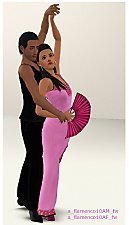
Mix & Match: Some more Flamenco (couple) Poses, Part 2
by Franniez Sims 7th Jul 2012 at 9:06pm
 15
42.4k
66
15
42.4k
66
-
-
-
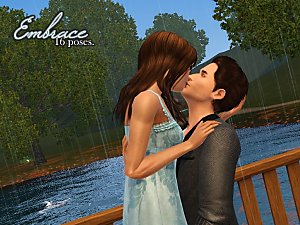
by spladoum 27th Mar 2015 at 3:08am
31
86.9k
254
-
by spladoum 30th Oct 2015 at 1:29am
14
44.1k
120
-
-
-
-
by heaven 3rd Jul 2017 at 4:43pm
11
48.6k
102

-

Bundle of Joy -- parent/infant poses
by spladoum 17th Oct 2013 at 4:42am
Ohhhh, sweet child of mine ... more...
30
68k
171
-


"Trade Kitchen Secrets" Enabled for all Sims
by spladoum 7th Dec 2014 at 10:41pm
When I first started playing Sims 3, I noticed a pretty cool interaction while bumbling in the park. more...
14
23.9k
144
-
Shorty -- an adult/teen pose set
by spladoum 9th Aug 2014 at 5:43am
She's always there when you need her <3 more...
29
54k
168
-

-
-
-
Big Gurl Luv -- a modeling pose set.
by spladoum 27th Feb 2014 at 9:56pm
*Compatible with the "Pose List" feature of the newest Pose Player!* This set came about after a friend requested more...
11
19.2k
37
-
Color of Night -- A ninja pose set
by spladoum 26th Jan 2012 at 7:09pm
Everyone was kung-fu fighting ... haaaaaaa ... more...
23
51.4k
80
-

-
Smoochies! -- A Couple's Pose Set
by spladoum 4th Feb 2012 at 3:23pm
This kiss, this kiss ... more...
30
178.6k
336
