Sign in to Mod The Sims
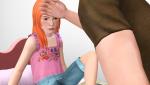
 Are You Sick, Kiddo?--5 child/adult poses
 Are You Sick, Kiddo?--5 child/adult poses


MTS Thumbnail.jpg - width=1024 height=768
Screenshot-21709.jpg - width=1360 height=768
Screenshot-21710.jpg - width=1360 height=768
Screenshot-21711.jpg - width=1360 height=768
Screenshot-21717.jpg - width=1360 height=768
Screenshot-21718.jpg - width=1360 height=768
Screenshot-21719.jpg - width=1360 height=768
Screenshot-21720.jpg - width=1360 height=768
Screenshot-21721.jpg - width=1360 height=768
Screenshot-21722.jpg - width=1360 height=768
Screenshot-21725.jpg - width=1360 height=768
Screenshot-21723.jpg - width=1360 height=768
Screenshot-21724.jpg - width=1360 height=768
Screenshot-21712.jpg - width=1360 height=768
Screenshot-21713.jpg - width=1360 height=768
Screenshot-21714.jpg - width=1360 height=768
Screenshot-21715.jpg - width=1360 height=768
Screenshot-21716.jpg - width=1360 height=768



a_splad_sick1 -- sitting in a chair holding a child.
c_splad_sick1 -- being held.
a_splad_sick2 -- lying on a couch holding a child.
c_splad_sick2 -- being held.
a_splad_sick3 -- holding a child by the side while standing.
c_splad_sick3 -- standing.
a_splad_sick4 -- holding a child while walking.
c_splad_sick4 -- being held.
a_splad_sick5 -- taking temperature with hand.
c_splad_sick5 -- sitting on bed.
Known issues:
* These poses were designed using a male rig. You can of course use a female sim, but you may notices that the hands/arms don't line up as exactly.
* Pose 2 was designed on a full-length couch. It works on a loveseat, but you may have a bit of clipping.
* Pose 3 was designed for the child sim's hands to accommodate larger pants meshes. You may need to alt-slide the adult sim to have the hands line up more exactly, depending on the camera angle you use for your photos.
* Pose 5 was designed on a single bed. It will work fine on a double, but you will need to alt-slide the sims, or the bed.
And as always, you'll need to use "moveobjects on" to manually place the Sims in the desired position. They'll tangle up and make a mess after you cancel their poses, but this is okay! Direct them to walk away and all will be well.
Additional Credits:
Cmomoney for the incredible Pose Player
OrangeMittens for the excellent "Creating Your Own Custom Poses" tutorial
WesHowe for the AnimTool
Mesher for the AM and child rig
Everyone on Tumblr who puts up with my picture spam--thank you! :lovestruc
|
Sick.rar
Download
Uploaded: 27th Nov 2016, 78.5 KB.
8,440 downloads.
|
||||||||
| For a detailed look at individual files, see the Information tab. | ||||||||
Install Instructions
1. Click the download button, or the filename, to download the file to your computer.
2. Extract the zip, rar, or 7z file. Now you will have either a .package or a .sims3pack file.
For Package files:
1. Cut and paste the file into your Documents\Electronic Arts\The Sims 3\Mods\Packages folder. If you do not already have this folder, you should read the full guide to Package files first: Sims 3:Installing Package Fileswiki, so you can make sure your game is fully patched and you have the correct Resource.cfg file.
2. Run the game, and find your content where the creator said it would be (build mode, buy mode, Create-a-Sim, etc.).
For Sims3Pack files:
1. Cut and paste it into your Documents\Electronic Arts\The Sims 3\Downloads folder. If you do not have this folder yet, it is recommended that you open the game and then close it again so that this folder will be automatically created. Then you can place the .sims3pack into your Downloads folder.
2. Load the game's Launcher, and click on the Downloads tab. Find the item in the list and tick the box beside it. Then press the Install button below the list.
3. Wait for the installer to load, and it will install the content to the game. You will get a message letting you know when it's done.
4. Run the game, and find your content where the creator said it would be (build mode, buy mode, Create-a-Sim, etc.).
Extracting from RAR, ZIP, or 7z: You will need a special program for this. For Windows, we recommend 7-Zip and for Mac OSX, we recommend Keka. Both are free and safe to use.
Need more help?
If you need more info, see:
- For package files: Sims 3:Installing Package Fileswiki
- For Sims3pack files: Game Help:Installing TS3 Packswiki
Loading comments, please wait...


Uploaded: 27th Nov 2016 at 1:43 AM
#pose, #poses, #child poses, #sick poses, #carry poses, #comfort poses
-
by spladoum updated 6th Jun 2011 at 6:12pm
 22
70.7k
109
22
70.7k
109
-
-

by spladoum 27th Mar 2015 at 3:08am
31
86.4k
253
-
by spladoum 30th Oct 2015 at 1:29am
14
43.9k
120
-
-
-
by jessesue 23rd Aug 2025 at 3:48pm
639
1
-
by jessesue 7th Sep 2025 at 2:22pm
2
843
1
-
Child Cough - Sick Child Poses
by jessesue 23rd Sep 2025 at 3:15pm
-
by jessesue 23rd Sep 2025 at 5:25pm
1.5k
2

-
Smoochies! -- A Couple's Pose Set
by spladoum 4th Feb 2012 at 3:23pm
This kiss, this kiss ... more...
30
178.4k
336
-

-
-
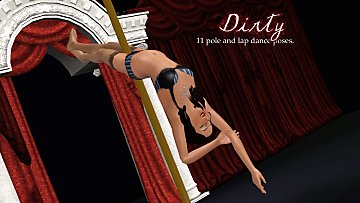
Dirty -- 11 exotic dancing poses
by Puss 'N Heels 22nd Jul 2014 at 11:24am
Shake it, shake it, shake it like a Polaroid picture! more...
13
80k
146
-


-


-
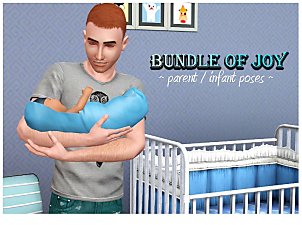

Bundle of Joy -- parent/infant poses
by spladoum 17th Oct 2013 at 4:42am
Ohhhh, sweet child of mine ... more...
30
67.9k
171
-
-
Stay Together--6 couples' poses
by spladoum 30th Aug 2016 at 12:00pm
This is another set that I made for a couple of sims in one of my stories that I decided more...
9
33.7k
67
-