
 Sign in to Mod The Sims
 -Sports Bra for Grandma- Old Swimsuits Recycled as Undies, Default Replacements
 -Sports Bra for Grandma- Old Swimsuits Recycled as Undies, Default Replacements


BlueUndies.jpg - width=263 height=397
YellowUndies.jpg - width=263 height=397
PinkUndies.jpg - width=263 height=397
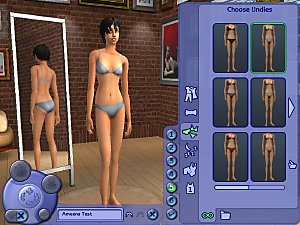
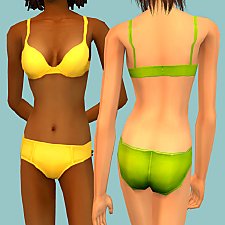
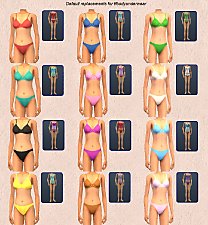
I don't think I need to say anything about Maxis only giving us three undies for grandma, and them all being the same relatively ugly style. To remedy this problem, I took three of grandma's ugly swimsuits and recycled them into undies. The install is a bit complicated, so listen closely. First, you can have some pics:


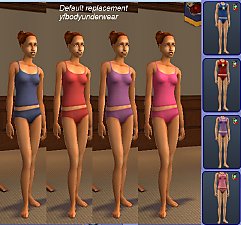
These are DEFAULT REPLACEMENTS, meaning, when you place them in your downloads folder, they will act as Maxis clothing, completely replacing their counterparts. This includes sims currently wearing them. If you want to remove mine and return to the maxis versions, just delete my package from your downloads folder. Btw, if you want your clothing catalog images to reflect these changes, delete your thumbnails folder: C:\Documents and Settings\(yourname)\My Documents\EA Games\The Sims 2\Thumbnails. The game will generate new ones. If you want not default versions, check out this thread of mine.
 Install Instructions:
Inside the .rar are 2 folders. You don't need the folders but I gave them helpful names to remind you where to put things. The two files need to go in different places!! One of the files goes in your regular downloads folder. This one changes the outfit. It will make the swimsuit look like the picture. The other file moves the outfit into the underwear section. You need to put the file here:
C:\Program Files\EA GAMES\The Sims 2 Bon Voyage\TSData\Res\Catalog\Bins (or whichever is your highest expansion pack folder).
You can put this file in your Downloads folder, but if you do, the delete button will be enabled in CAS and Body Shop. Do NOT delete them in CAS or Body Shop. Doing so may corrupt some of your game files. To remove the outfits from your Underwear bin, delete these package files from where you installed them to.
Enjoy!
-Phaenoh
P.S. I love reading comments! Leave me a couple?
Additional Credits:
To May (my model), she fainted when I told her I wanted to do underwear shots next. She is getting over her modesty, but its a sad thing to see such a proper lady fall. I feel bad about it.
| Filename | Type | Size |
|---|---|---|
| Phaenoh-efSwimUndies-FREETIME.rar | rar | |
| Phaenoh-efBlueSportsBra.package | package | 43187 |
| Phaenoh_CatalogEditMoved-efSportsBra.package | package | 2016 |
| Phaenoh_DEFAULT_efSportsBra.package | package | 2796768 |
| Phaenoh-efSwimUndies-FreeTime.rar | rar | 121979 |
|
Phaenoh-efUndiesDecustomized.rar
Download
Uploaded: 16th Oct 2008, 97.1 KB.
821 downloads.
|
||||||||
|
Phaenoh-efSwimUndies-FREETIME.rar
Download
Uploaded: 15th Mar 2008, 236.0 KB.
1,108 downloads.
|
||||||||
|
Phaenoh-efSwimUndies.rar
Download
Uploaded: 24th Sep 2007, 113.3 KB.
1,851 downloads.
|
||||||||
| For a detailed look at individual files, see the Information tab. | ||||||||
Install Instructions
1. Download: Click the download link to save the .rar or .zip file(s) to your computer.
2. Extract the zip, rar, or 7z file.
3. Place in Downloads Folder: Cut and paste the .package file(s) into your Downloads folder:
- Origin (Ultimate Collection): Users\(Current User Account)\Documents\EA Games\The Sims™ 2 Ultimate Collection\Downloads\
- Non-Origin, Windows Vista/7/8/10: Users\(Current User Account)\Documents\EA Games\The Sims 2\Downloads\
- Non-Origin, Windows XP: Documents and Settings\(Current User Account)\My Documents\EA Games\The Sims 2\Downloads\
- Mac: Users\(Current User Account)\Documents\EA Games\The Sims 2\Downloads
- Mac x64: /Library/Containers/com.aspyr.sims2.appstore/Data/Library/Application Support/Aspyr/The Sims 2/Downloads
- For a full, complete guide to downloading complete with pictures and more information, see: Game Help: Downloading for Fracking Idiots.
- Custom content not showing up in the game? See: Game Help: Getting Custom Content to Show Up.
- If you don't have a Downloads folder, just make one. See instructions at: Game Help: No Downloads Folder.
Loading comments, please wait...


Uploaded: 24th Sep 2007 at 12:24 AM
Updated: 16th Oct 2008 at 4:45 AM
#elder, #swimsuit, #undies, #underwear, #default replacement, #sports bra
-
-
-
-
Granny Makes a Splash! - Swimwear / Undie DEFAULTS, New Swimwear
by CatOfEvilGenius 3rd Jan 2012 at 9:53am
-
-
Default replacement - University YAF undies.
by dharden 10th Jul 2015 at 6:07pm
 +1 packs
1 8.6k 14
+1 packs
1 8.6k 14 University
-
-
-
-



-
-
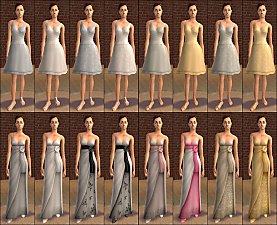
-Celebrating WHITE!- Default Replacements for Almost All Celebrations Outfits
by Phaenoh 19th Jan 2008 at 3:48am
Update: I've just added a Mesh replacement package for the toddler dress. more...
+1 packs
49 78.2k 108 Celebration
-
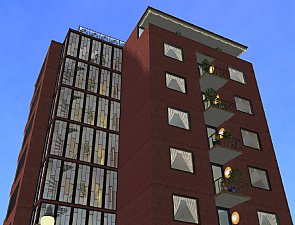
Downtown Highrise Apartments -Almost NO CC-
by Phaenoh 17th May 2014 at 7:43pm
Includes: underground parking, diner, pool, gym, laundry, conference room, restaurant, bars, roof party. 9 floors and no dummy apartments! more...
+2 packs
49 82.4k 402 Nightlife
 Apartment Life
-
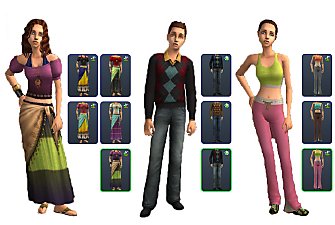
-Credit Where Its Due- Apartment Life's Stolen Clothing Conversions
by Phaenoh 11th Sep 2008 at 10:42pm
I've got Apartment Life and a working computer now, so you know what that means! Goodies!!!! more...
+1 packs
27 39.5k 26 Apartment Life
-
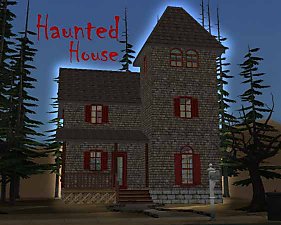
'Don't Go into the Tower' Haunted House
by Phaenoh 2nd Nov 2007 at 1:55am
Ok, so its a tad late for Halloween, but since I teased you guys with it in my Halloween Costume more...
+6 packs
26 32.7k 32 University
Nightlife
 Open for Business
 Pets
Pets
 Seasons
 Bon Voyage
-
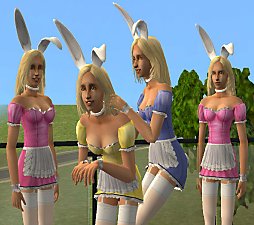
Bringing Bunnies to the Party! *2 Year Creator Anniversary Gift*
by Phaenoh 18th Jul 2009 at 6:58pm
Guess what today is! more...
76
99.6k
125
-
-
-Reworking the Maxis Workout Clothes- Default Replacements
by Phaenoh updated 2nd Feb 2008 at 4:48am
Update: I've included the black tracksuit in my default package now. more...
109
109.1k
203
-
-


About Me
- Please don't reupload my work anywhere else. Just point them back here, I'm not going anywhere! :)
- Please ask permission before using my work as a base for your project. I almost always say 'yes' and often times I will help you with your project! :bunny:
- If you make something (like a story or a video) and it has something of mine in it, send me the link, I love to see my stuff 'in action'!
- Sadly, but honestly, I can't take on requests. You can ask if it's something already related to one of my current projects, but I'm not likely to take on your project for you. MTS has lots of wonderful tutorials ;)