Sign in to Mod The Sims
 TEEN female watch
 TEEN female watch


tfWatchCAST.JPG - width=371 height=437
tfWatchCatalogue.JPG - width=322 height=395
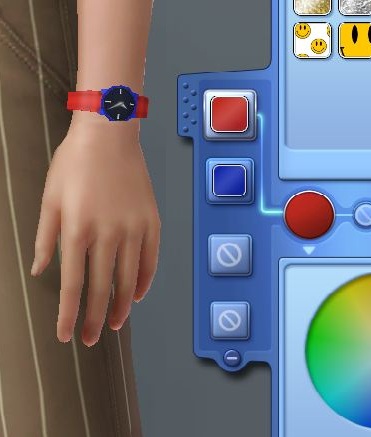
It wasn't as easy as I would have liked as the game didn't like generating thumbnails for it but that should be fixed now.
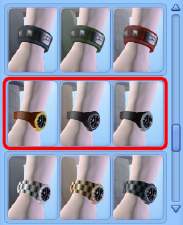
It is the adult female watch from the base game enabled for female teens and with two CASTable channels and five preset designs. It shows in ALL clothing catagories and should also work for career outfits. It is for TEENS ONLY.
NOTE: As with my other accessory uploads, there is a slight clipping issue on extremely large Sims. Enlarging the mesh doesn't seem to do much.
Please enjoy this new watch but don't redistribute the file. Thanks.
Polygon Counts:
158 on highest quality
Additional Credits:
TSR Workshop,
Milkshape,
Wes H,
Photoshop.
This is a new mesh, and means that it's a brand new self contained object that usually does not require a specific Pack (although this is possible depending on the type). It may have Recolours hosted on MTS - check below for more information.
|
MM_tfWristWatch.zip
Download
Uploaded: 7th Jan 2010, 3.84 MB.
4,501 downloads.
|
||||||||
| For a detailed look at individual files, see the Information tab. | ||||||||
Install Instructions
1. Click the download button, or the filename, to download the file to your computer.
2. Extract the zip, rar, or 7z file. Now you will have either a .package or a .sims3pack file.
For Package files:
1. Cut and paste the file into your Documents\Electronic Arts\The Sims 3\Mods\Packages folder. If you do not already have this folder, you should read the full guide to Package files first: Sims 3:Installing Package Fileswiki, so you can make sure your game is fully patched and you have the correct Resource.cfg file.
2. Run the game, and find your content where the creator said it would be (build mode, buy mode, Create-a-Sim, etc.).
For Sims3Pack files:
1. Cut and paste it into your Documents\Electronic Arts\The Sims 3\Downloads folder. If you do not have this folder yet, it is recommended that you open the game and then close it again so that this folder will be automatically created. Then you can place the .sims3pack into your Downloads folder.
2. Load the game's Launcher, and click on the Downloads tab. Find the item in the list and tick the box beside it. Then press the Install button below the list.
3. Wait for the installer to load, and it will install the content to the game. You will get a message letting you know when it's done.
4. Run the game, and find your content where the creator said it would be (build mode, buy mode, Create-a-Sim, etc.).
Extracting from RAR, ZIP, or 7z: You will need a special program for this. For Windows, we recommend 7-Zip and for Mac OSX, we recommend Keka. Both are free and safe to use.
Need more help?
If you need more info, see:
- For package files: Sims 3:Installing Package Fileswiki
- For Sims3pack files: Game Help:Installing TS3 Packswiki
Loading comments, please wait...



Uploaded: 7th Jan 2010 at 10:58 PM
-
by Shep 4th Jul 2009 at 12:43pm
 37
145.7k
204
37
145.7k
204
-
by Oaktree 21st Jul 2009 at 12:27am
44
62.8k
103
-
by ailivina 10th Sep 2009 at 2:33pm
19
48.4k
73
-
by roflor 5th Nov 2009 at 5:24pm
25
130.2k
114
-
by Menaceman44 4th Jan 2010 at 5:56pm
7
22.2k
46
-
by Menaceman44 6th Jan 2010 at 12:54pm
7
20.9k
37
-
by Menaceman44 18th Mar 2010 at 1:31am
5
18k
31
-
by Fresh-Prince 7th Dec 2011 at 5:30pm
22
49.8k
138
-
by Cure Smile 16th Jul 2023 at 1:36pm
5
4.9k
20
-


-
by Menaceman44 6th Jan 2007 at 9:55pm
Well, since MAXIS/EA decided to leave them out of the game, I thought I would create my own. more...
-
AL and M&G Duplicate Belt and Cornice Hiders
by Menaceman44 13th Oct 2009 at 2:24am
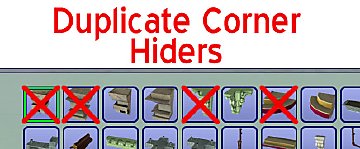
I was tired of seeing two of each decorative corner piece in the catalogue so created these files which hide more...
 6
23.6k
29
6
23.6k
29
-
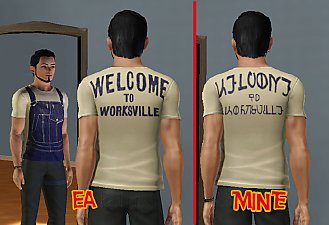
*DIESEL STUFF* Simlish CAS Defaults
by Menaceman44 11th Aug 2012 at 9:21pm
Files to replace the English text on Diesel clothing with Simlish. more...
-
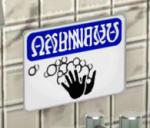
TS2>TS3 "Sims Must Wash Hands" Sign
by Menaceman44 9th Mar 2013 at 3:10pm
A conversion of the Sims 2 hand wash sign, now recolourable. more...
11
16.3k
84
-

Multi Language Network Messages Fix
by Menaceman44 9th May 2009 at 4:26pm
Does this seem familiar? With the new AL networking messages the Sim talking to you more...
+1 packs
28 32.2k 42 Apartment Life
-
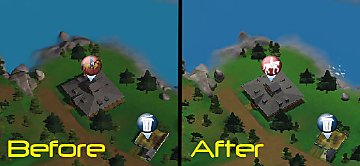

Equestrian Centre Map Tag Replacement *1.63 Compatible*
by Menaceman44 updated 26th Oct 2013 at 9:03pm
This file replaces the equestrian centre map tag icon with a white silhouette version. more...
-
'Cortinas Festivas!' and 'Traditional Curtains' Blind Fix UPDATED!
by Menaceman44 updated 15th Nov 2009 at 10:31pm
:new: Updated to be compatible with Pets and the 1.26 patch. No update is required for the default version. more...
-


Default Replacement Theatre Posters
by Menaceman44 4th Mar 2010 at 11:54pm
Ever noticed how there are six slots for posters at the Theatre but only two designs? This really bugged me. more...
22
36.2k
52
-
by Menaceman44 updated 9th Sep 2022 at 7:36pm
A door designed for use on toilet stalls. Comes in 14 colours. more...
 87
125k
472
87
125k
472
-

by Menaceman44 updated 12th Jul 2022 at 7:14pm
:!!:THIS MOD REQUIRES SCRIPT MODS TO BE ENABLED IN YOUR GAME TO FUNCTION:!!: Description A good while ago now, I was asked more...