
 Sign in to Mod The Sims
 Retaining Walls - Upd. 3rd July
 Retaining Walls - Upd. 3rd July


eg1.jpg - width=1280 height=720
eg2.jpg - width=1280 height=720
eg3.jpg - width=1280 height=720
size.jpg - width=1280 height=720
level.jpg - width=1280 height=720
diagonal.jpg - width=1280 height=720
Screenshot-506.jpg - width=1280 height=720

Are you sick of the infinitely steep slopes that terrain editing can leave you with? Are you tired of placing plants or rocks to hide the slope? Are you too lazy to try any of the aforementioned methods? Then this is most certainly the thing for you! You are in for a treat my friend, as today, I present my retaining wall:
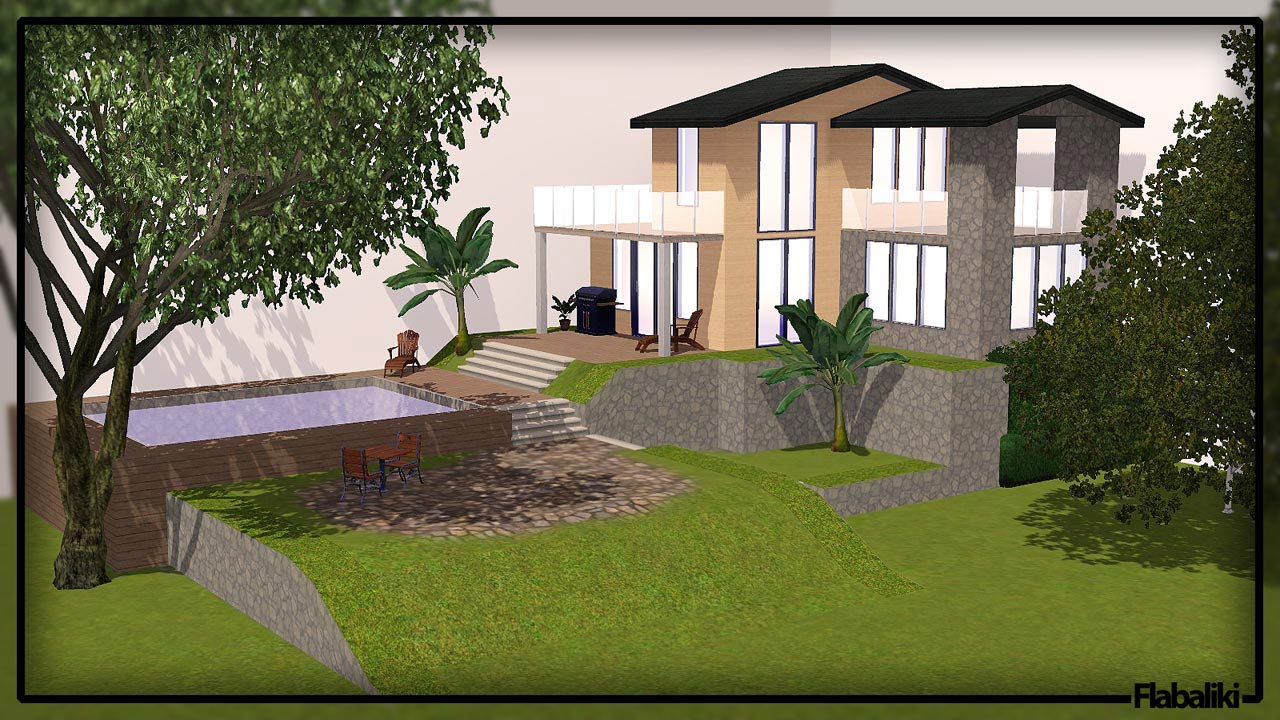
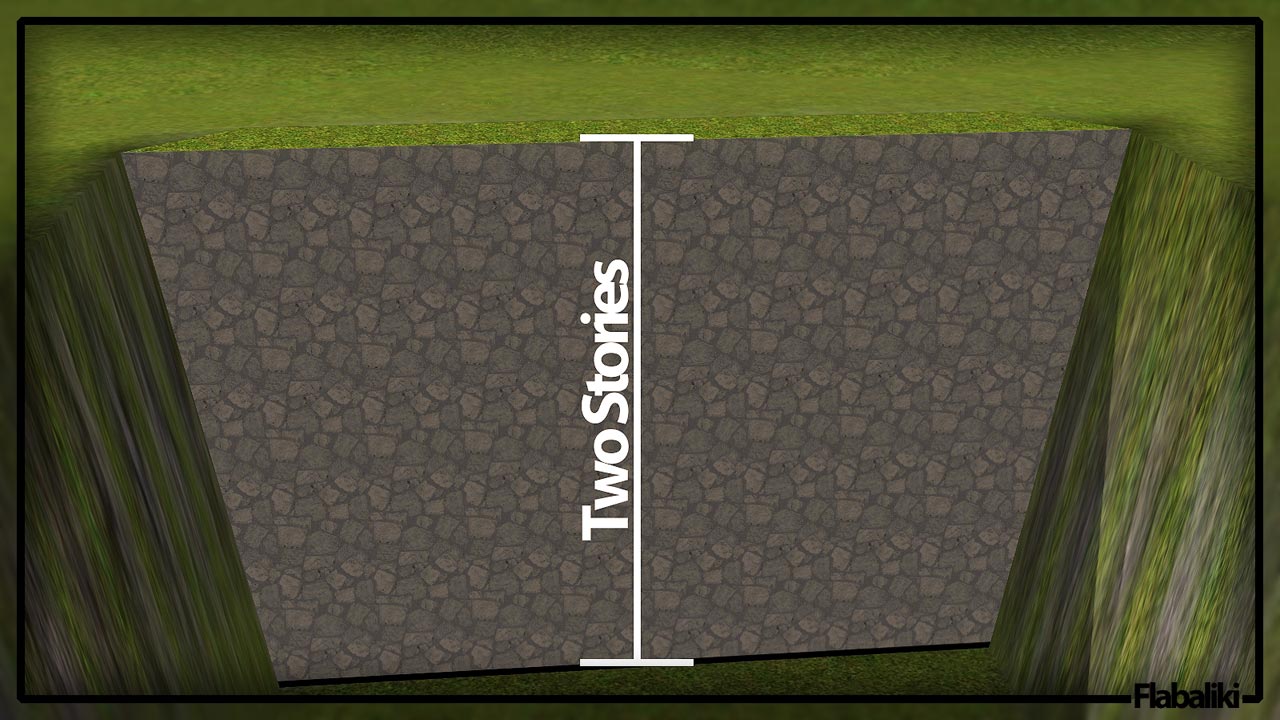
As show in the picture above, you can use the wall for a variety of different things. The beauty of using this as apposed to, foundation, is that it will not create a new level, nor will it distort or warp existing levels. This new retaining wall is nothing but a simple fence, that places negatively. By that I mean, you drag the wall along the top edge of the slop and it will appear below where you are dragging it... you know what, let me just show you some other pictures.
Object Info
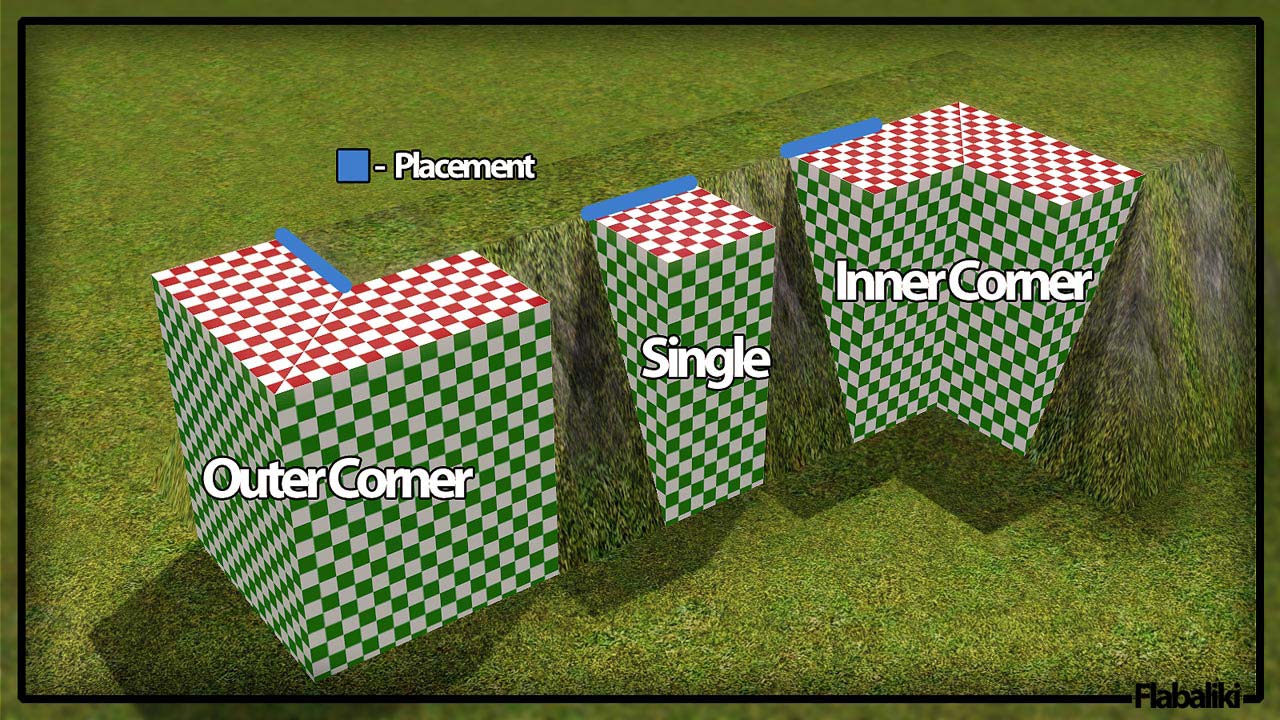
To create this effect, my retaining wall is actually three different objects. A center piece, and two different corners, inner and outer.
Single Piece
Item Name: Retaining Wall
Price: $4
Location: Build Mode > Fences
Recolorable Channels: 2
Polygon Count:
Faces: 10
Vertices: 20
Corner Pieces
Item Name(s): Retaining Wall - Inner/Outer Corner
Prices: $12
Location: Build Mode > Fences
Recolorable Channels: 2
Polygon Count:
Faces: 22
Vertices: 46
Final Notes
I spent quite a bit of time getting the walls to map 100% correctly. On the top of the wall there is 1 tile, which will match directly to floor tiles, and on the sides, there are 6 tiles vertically. Speaking of matching perfectly, the tone of the patterns are slightly off, due to game lighting, I did my best to match the colour of walls and floors, but you'll just have to tweak it a bit for yourself.
Well, enjoy!
Update - 3rd July
Okey doke, I think I may have fixed the issue. I uploaded a new version, those of you having issues, please re-download and clear your caches, then test this out.
This is a new mesh, and means that it's a brand new self contained object that usually does not require a specific Pack (although this is possible depending on the type). It may have Recolours hosted on MTS - check below for more information.
|
Retaining Wall.zip
| Updated - 3rd July 2010
Download
Uploaded: 30th Jun 2010, 303.1 KB.
19,661 downloads.
|
||||||||
| For a detailed look at individual files, see the Information tab. | ||||||||
Install Instructions
1. Click the download button, or the filename, to download the file to your computer.
2. Extract the zip, rar, or 7z file. Now you will have either a .package or a .sims3pack file.
For Package files:
1. Cut and paste the file into your Documents\Electronic Arts\The Sims 3\Mods\Packages folder. If you do not already have this folder, you should read the full guide to Package files first: Sims 3:Installing Package Fileswiki, so you can make sure your game is fully patched and you have the correct Resource.cfg file.
2. Run the game, and find your content where the creator said it would be (build mode, buy mode, Create-a-Sim, etc.).
For Sims3Pack files:
1. Cut and paste it into your Documents\Electronic Arts\The Sims 3\Downloads folder. If you do not have this folder yet, it is recommended that you open the game and then close it again so that this folder will be automatically created. Then you can place the .sims3pack into your Downloads folder.
2. Load the game's Launcher, and click on the Downloads tab. Find the item in the list and tick the box beside it. Then press the Install button below the list.
3. Wait for the installer to load, and it will install the content to the game. You will get a message letting you know when it's done.
4. Run the game, and find your content where the creator said it would be (build mode, buy mode, Create-a-Sim, etc.).
Extracting from RAR, ZIP, or 7z: You will need a special program for this. For Windows, we recommend 7-Zip and for Mac OSX, we recommend Keka. Both are free and safe to use.
Need more help?
If you need more info, see:
- For package files: Sims 3:Installing Package Fileswiki
- For Sims3pack files: Game Help:Installing TS3 Packswiki
Loading comments, please wait...



Uploaded: 30th Jun 2010 at 6:59 PM
Updated: 3rd Jul 2010 at 1:47 PM
-
4 New Stairs - Alder Stairs - Upd. 16th Dec, Now CASTable!
by Flabaliki updated 12th Dec 2009 at 1:29pm
 66
185.7k
315
66
185.7k
315
-

3 New Porch Fences - Upd. 24th Dec, Now CASTable!
by Flabaliki 14th Nov 2009 at 10:42pm
64
123.1k
314
-
Build your own Cathedral / Medieval Challenge
by Hekate999 updated 14th Apr 2011 at 10:46am
79
165.6k
230
-
2 Requests (Arch 3x1 - Big Rose Window) and 2 New Windows
by Hekate999 updated 14th Apr 2011 at 10:57am
44
88.5k
200
-
Typical Swedish? Buildset for the swedish patriot.
by Lisen801 4th Jul 2010 at 5:26pm
+1 packs
19 34.9k 26 World Adventures
-

by Victor_tor updated 15th Sep 2010 at 9:40am
22
64.3k
108
-
-
by Lisen801 updated 29th May 2012 at 10:17am
123
194.8k
355
-
Cast Iron Stair and matching Fence
by Lisen801 updated 27th May 2012 at 9:24am
+1 packs
53 86.6k 203 World Adventures
-
by Hekate999 5th Jan 2011 at 10:57am
115
228.2k
507


-
19 Rhondal Drive - Starter Home Series
by Flabaliki 13th Apr 2008 at 1:53pm
---------19 Rhondal Drive--------- Flabaliki, 13th April '08 Only Custom Content by Me & Only Requires Nightlife more...
 +1 packs
7 12.2k 14
+1 packs
7 12.2k 14 Nightlife
-
-
-
18 Rhondal Drive - Starter Home Series
by Flabaliki 13th Apr 2008 at 1:45pm
---------18 Rhondal Drive--------- Flabaliki, 13th April '08 Only Custom Content by Me & Only Requires Nightlife more...
+1 packs
10 14k 14 Nightlife
-
-
-
-
-
-
Halo 3 Bedroom Set *NL Required for Painting*
by Flabaliki 9th Mar 2008 at 2:25am
---------HALO 3 BEDROOM SET--------- Flabaliki, 9th March '08 :alarm: If you more...


