
 Sign in to Mod The Sims
 Natural Garden Edgers
 Natural Garden Edgers


bambooFence.jpg - width=1024 height=640
Bamboo Fence default
cutStumpFence.jpg - width=1024 height=640
Cut Stump Fence default
bambooFence.jpg - width=1024 height=640
cutStumpFence.jpg - width=1024 height=640
defaultTiling.jpg - width=800 height=460
fencesCASted.jpg - width=643 height=650
rockEdger.jpg - width=1024 height=640

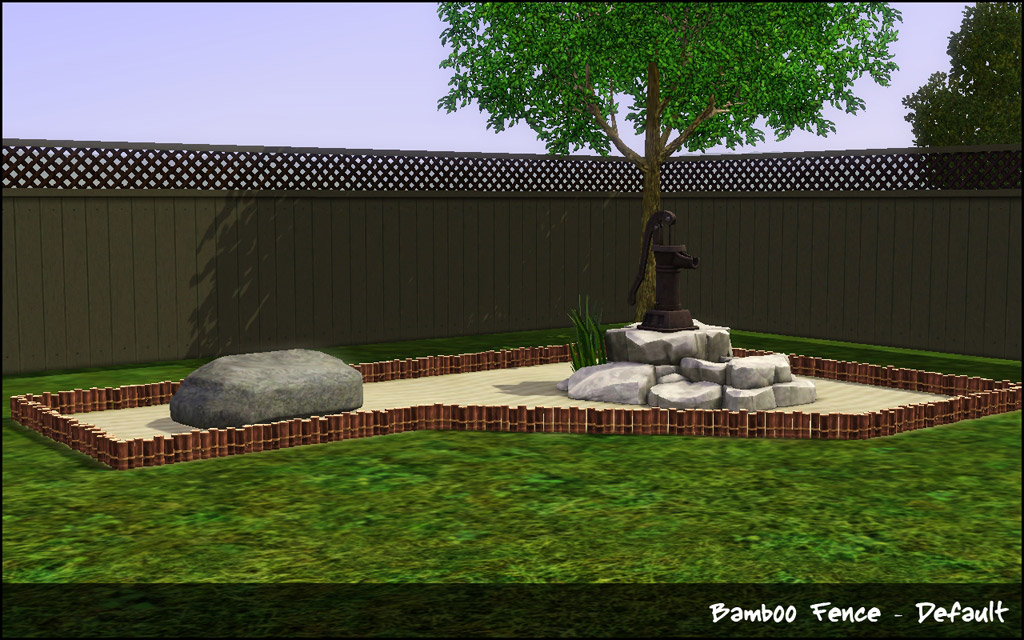
A couple of fences that I used alot in TS2 and missed for TS3. While TS3 did include a bamboo fence, it looks like some cheap plastic knockoff and doesn't resemble bamboo at all IMO. The first preset for the Cut Stump and Bamboo is an overlay that uses the texture from TS2 and is not CAStable. The second preset is CAStable but the cut stump fence has some heavy shading to keep the woodgrain and the rope on the bamboo fence is not CAStable. The third fence is a small rock edge border that has one channel and one preset.
Technical Bits
- §3 (Cut Stump & Bamboo) §4 (Rock Edger)
- Build/Fences
- 1 Channel
- 2 Presets (Cut Stump & Bamboo) 1 Preset (Rock Edger)
Polygon Counts:
Cut Stump
Straight - 267
Diagonal - 387
Post - 43
Bamboo
Straight - 691
Diagonal - 924
Post - 35
Rock
Straight - 236
Diagonal - 346
Post - 31
This is a new mesh, and means that it's a brand new self contained object that usually does not require a specific Pack (although this is possible depending on the type). It may have Recolours hosted on MTS - check below for more information.
|
HL_GardenFences.rar
Download
Uploaded: 1st Apr 2011, 359.1 KB.
45,026 downloads.
|
||||||||
| For a detailed look at individual files, see the Information tab. | ||||||||
Install Instructions
1. Click the download button, or the filename, to download the file to your computer.
2. Extract the zip, rar, or 7z file. Now you will have either a .package or a .sims3pack file.
For Package files:
1. Cut and paste the file into your Documents\Electronic Arts\The Sims 3\Mods\Packages folder. If you do not already have this folder, you should read the full guide to Package files first: Sims 3:Installing Package Fileswiki, so you can make sure your game is fully patched and you have the correct Resource.cfg file.
2. Run the game, and find your content where the creator said it would be (build mode, buy mode, Create-a-Sim, etc.).
For Sims3Pack files:
1. Cut and paste it into your Documents\Electronic Arts\The Sims 3\Downloads folder. If you do not have this folder yet, it is recommended that you open the game and then close it again so that this folder will be automatically created. Then you can place the .sims3pack into your Downloads folder.
2. Load the game's Launcher, and click on the Downloads tab. Find the item in the list and tick the box beside it. Then press the Install button below the list.
3. Wait for the installer to load, and it will install the content to the game. You will get a message letting you know when it's done.
4. Run the game, and find your content where the creator said it would be (build mode, buy mode, Create-a-Sim, etc.).
Extracting from RAR, ZIP, or 7z: You will need a special program for this. For Windows, we recommend 7-Zip and for Mac OSX, we recommend Keka. Both are free and safe to use.
Need more help?
If you need more info, see:
- For package files: Sims 3:Installing Package Fileswiki
- For Sims3pack files: Game Help:Installing TS3 Packswiki
Loading comments, please wait...


Uploaded: 1st Apr 2011 at 4:55 PM
#fence, #bamboo, #cut stump, #garden edging, #edgers
-
-
by Black0rchid 10th Oct 2009 at 12:55pm
 31
42.3k
67
31
42.3k
67
-
-
by plasticbox 11th Feb 2010 at 6:34pm
55
95.6k
228
-
Classical Chinese garden with bamboo and lotus. No CC. Fully Furnished.
by 9zlily 26th Jun 2012 at 2:47pm
+1 packs
8 19.5k 46 World Adventures
-
by sailfindragon 4th Jul 2012 at 2:54pm
19
65.1k
274
-
by TheJim07 12th Jun 2017 at 7:01pm
8
11.7k
43
-
-
by CircusWolf 19th Aug 2021 at 8:10pm
5
9.5k
31
-
by CircusWolf 28th May 2022 at 11:39pm
3
3.6k
18


-

-
by HugeLunatic 12th Oct 2009 at 5:34pm
A set of edgers to finish off the roof line when using either the M&G or AL Decorative roof pieces. more...
 +1 packs
17 31.7k 69
+1 packs
17 31.7k 69 Apartment Life
-
by HugeLunatic 30th Mar 2022 at 2:13pm
I really liked Loudini’s Chamber of Sprinkles, because...sprinkles. more...
+2 packs
4 4.3k 25 Glamour Life
 Seasons
-
by HugeLunatic 18th Nov 2018 at 5:07pm
A small mod to make the glass separately recolorable from the frame. more...
4
12.8k
26
-
by HugeLunatic 15th Oct 2009 at 9:35pm
This is my favorite bed blanket from TS2. more...
30
72.8k
211
-

Arbor Falls (aka Free Play): Neighborhood Recreation - No CC
by Hood Building Group 7th Aug 2019 at 1:54pm
Arbor Falls (aka Free Play), a Sims Pets Stories neighborhood recreated for TS2. more...
60
56.5k
154
Miscellaneous » Neighborhoods & CAS Screens » Neighbourhoods and Worlds
-

IKEA *Extras* - Updated for NEW CEP - 01 June 2009
by HugeLunatic updated 10th Feb 2025 at 2:21pm
IKEA is my favorite Stuff Pack, but there are just so many items that are single items, or just missing more...
+1 packs
102 138.6k 241 Ikea Home
-

by Hood Building Group updated 22nd Aug 2015 at 9:00pm
A small chaotic inhabited neighborhood with a mystery bigger than it's size! more...
32
45.1k
88
Miscellaneous » Neighborhoods & CAS Screens » Neighbourhoods and Worlds
-

by HugeLunatic 28th Jun 2010 at 7:31pm
:here: Redneck Hot Tub So just because your totally broke, and you live in a mixture of boxes and shipping more...
+1 packs
47 74k 187 Pets
Pets
-
by HugeLunatic 11th Apr 2011 at 10:28pm
Wallmask fix for Ambitions Federal Pediment window. more...




About Me
Pet Stories || Dog Agility Items? || Castaway Stories || Holy Simoly Extras
4esf Archive || Holy Simoly Archive || CEP-Extras List || Buyable Game Objects
lunie content from GoS/s2a
 Installation of CEP Extras
-the package with pfiles appended to the name will go into your cep extras folder where your game is installed (typically c drive, you do you)
-the other goes in CEP extra folder in documents.
The following locations are what I am aware of, beyond that you'll have to do some searching.
Downloads Folder:
C:\Users\<user>\Documents\EA Games\The Sims 2 Legacy
C:\Users\<user>\Documents\EA Games\The Sims 2 Ultimate Collection
With multiple launchers, the location for your game install will vary.
C:\Program Files\EA GAMES\The Sims 2 Legacy\TSData\Res\Catalog\zCEP-EXTRA
C:\Program Files\EA GAMES\The Sims 2\TSData\Res\Catalog\zCEP-EXTRA
C:\Program Files (x86)\EA GAMES\The Sims 2\TSData\Res\Catalog\zCEP-EXTRA