Sign in to Mod The Sims
 Hold Me -- Couple's Poses
 Hold Me -- Couple's Poses


Screenshot-7134.jpg - width=1024 height=768
Screenshot-7135.jpg - width=1024 height=768
Screenshot-7136.jpg - width=1024 height=768
Screenshot-7137.jpg - width=1024 height=768
Screenshot-7140.jpg - width=1024 height=768
Screenshot-7141.jpg - width=1024 height=768
waist collage.jpg - width=600 height=338
*Compatible with the "Pose List" feature of the newest Pose Player!*
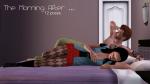
Need some lovin'? Good, it's lazy snuggle time! A small set of three couple's poses.
Pose tags are as follows:
a_splad_huggable1 -- male pose, sitting on the counter
a_splad_huggable2 -- female pose, standing in front of the counter
a_splad_huggable3 -- male pose, sitting on the couch
a_splad_huggable4 -- female pose, lying down on the couch
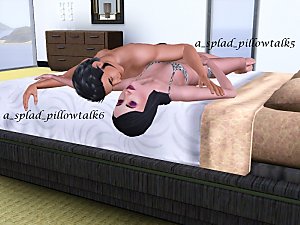
a_splad_huggable5 -- male pose, lying on the bed
a_splad_huggable6 -- female pose, lying on the bed
You will have use "moveobjects on" to place the sims in position. Once you cancel, the sim will stand in the middle of the counter, couch, or bed as though it were an object. This is okay! Just direct the sim to walk away and all will be well.
If you use an OMSP, Poses 1 and 2 may work on other surfaces, like a fence or a dresser, though Sim 1's hands will likely be ... higher.
 Please also note the types of shirts that poses 1 and 2 work well with. Shirts with bigger meshes, like the layered "Generations" tops, will likely experience mild clipping.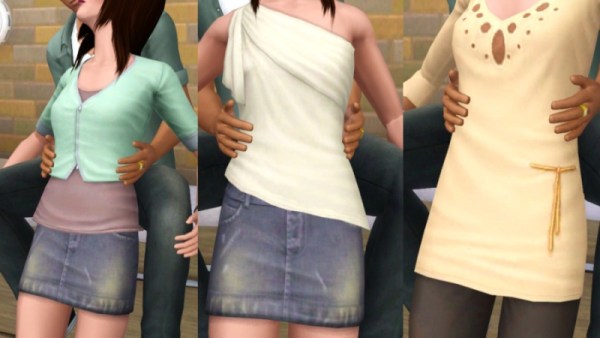
Renee's clothes are all from Late Night. Renee's hair is from the High End Loft Stuff Pack. Matthew's shirt is from Generations. Matthew's jeans are from Late Night.
Additional Credits:
Additional Credits:
Cmomoney for the incredible Pose Player
OrangeMittens for the excellent "Creating Your Own Custom Poses" tutorial
WesHowe for the AnimTool
Mesher for the AM rigs
Inge Jones for S3PE and the rest of the Sims community at large for assistance and encouragement.
|
Hold Me Poses.rar
Download
Uploaded: 7th Aug 2011, 37.1 KB.
46,016 downloads.
|
||||||||
| For a detailed look at individual files, see the Information tab. | ||||||||
Install Instructions
1. Click the download button, or the filename, to download the file to your computer.
2. Extract the zip, rar, or 7z file. Now you will have either a .package or a .sims3pack file.
For Package files:
1. Cut and paste the file into your Documents\Electronic Arts\The Sims 3\Mods\Packages folder. If you do not already have this folder, you should read the full guide to Package files first: Sims 3:Installing Package Fileswiki, so you can make sure your game is fully patched and you have the correct Resource.cfg file.
2. Run the game, and find your content where the creator said it would be (build mode, buy mode, Create-a-Sim, etc.).
For Sims3Pack files:
1. Cut and paste it into your Documents\Electronic Arts\The Sims 3\Downloads folder. If you do not have this folder yet, it is recommended that you open the game and then close it again so that this folder will be automatically created. Then you can place the .sims3pack into your Downloads folder.
2. Load the game's Launcher, and click on the Downloads tab. Find the item in the list and tick the box beside it. Then press the Install button below the list.
3. Wait for the installer to load, and it will install the content to the game. You will get a message letting you know when it's done.
4. Run the game, and find your content where the creator said it would be (build mode, buy mode, Create-a-Sim, etc.).
Extracting from RAR, ZIP, or 7z: You will need a special program for this. For Windows, we recommend 7-Zip and for Mac OSX, we recommend Keka. Both are free and safe to use.
Need more help?
If you need more info, see:
- For package files: Sims 3:Installing Package Fileswiki
- For Sims3pack files: Game Help:Installing TS3 Packswiki
Loading comments, please wait...


Uploaded: 7th Aug 2011 at 5:15 AM
Updated: 26th Aug 2011 at 7:36 PM
-
-
by spladoum 30th Oct 2011 at 8:32am
 48
88.9k
180
48
88.9k
180
-
by spladoum 11th Mar 2013 at 7:27am
22
83.8k
142
-
by cottoncandy1 22nd Jan 2014 at 11:53am
10
35k
56
-
by ayanasamurasim 27th Feb 2014 at 10:57pm
17
56.4k
90
-

by spladoum 27th Mar 2015 at 3:08am
31
86.7k
254
-
by spladoum 30th Oct 2015 at 1:29am
14
44k
120
-
-
-

-
Big Gurl Luv -- a modeling pose set.
by spladoum 27th Feb 2014 at 9:56pm
*Compatible with the "Pose List" feature of the newest Pose Player!* This set came about after a friend requested more...
11
19.2k
37
-
-
The Summertime Blues--BG-compatible separates
by spladoum 15th Apr 2016 at 5:04am
This is a combination of a bright idea I had one evening, and another one of those pesky long-term projects more...
14
79.9k
203
-

-

-
-
Patio Maternity Dress--BG-compatible!
by spladoum 20th Dec 2016 at 3:05am
Here we are with more maternity wear--this one was a happy accident. more...
11
22.1k
70
-
-
Hello Sweetie--Fairy Hair Deflowered, for toddlers through elders
by spladoum 29th Sep 2013 at 4:11pm
A classic. Without all those twigs and weeds stuck in it. more...
18
20.9k
74
Hair » Female » Young Adult
-
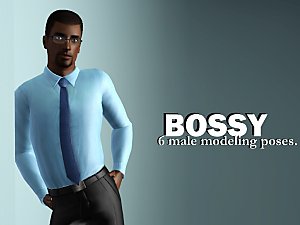

Bossy -- 6 male modeling poses
by spladoum updated 8th Dec 2014 at 10:58pm
*Compatible with the "Pose List" feature of the newest Pose Player!* I was so excited by the prospect of more...
9
28.6k
59