
 Sign in to Mod The Sims
 Updated Again: Cabin Slats Add-Ons
 Updated Again: Cabin Slats Add-Ons


cabin-slats_00.jpg - width=1220 height=900
cabin-slats_04.jpg - width=1220 height=900
cabin-slats_05.jpg - width=1220 height=900
cabin-slats_01.jpg - width=1240 height=920
cabin-slats_02.jpg - width=1240 height=920
cabin-slats_03.jpg - width=1240 height=920
cabin-slats_with-original.jpg - width=1240 height=920
cabin-slats_lite.jpg - width=740 height=560
cabin-slats_onetile-variants_v110.jpg - width=1000 height=740
cabin-slats_twotile-variants_v110.jpg - width=1000 height=740
cabin-slats_cat_v110.jpg - width=1320 height=930
cabin-slats_meshupdate20150829_combo-3.jpg - width=960 height=740
cabin-slats_meshupdate20150829_combo-1.jpg - width=960 height=740
cabin-slats_meshupdate20150829_combo-4.jpg - width=960 height=740
cabin-slats_meshupdate20150829_combo-5.jpg - width=960 height=740
cabin-slats_meshupdate20150829_detail.jpg - width=960 height=740


Update 2015-08-29: I made them all flatter and added a flat override for the original blinds as well, so that they can be combined with other curtains (and don’t clip through). This requires using moveobjects since two curtains can’t occupy the same slot. See the additional screenshots for examples.
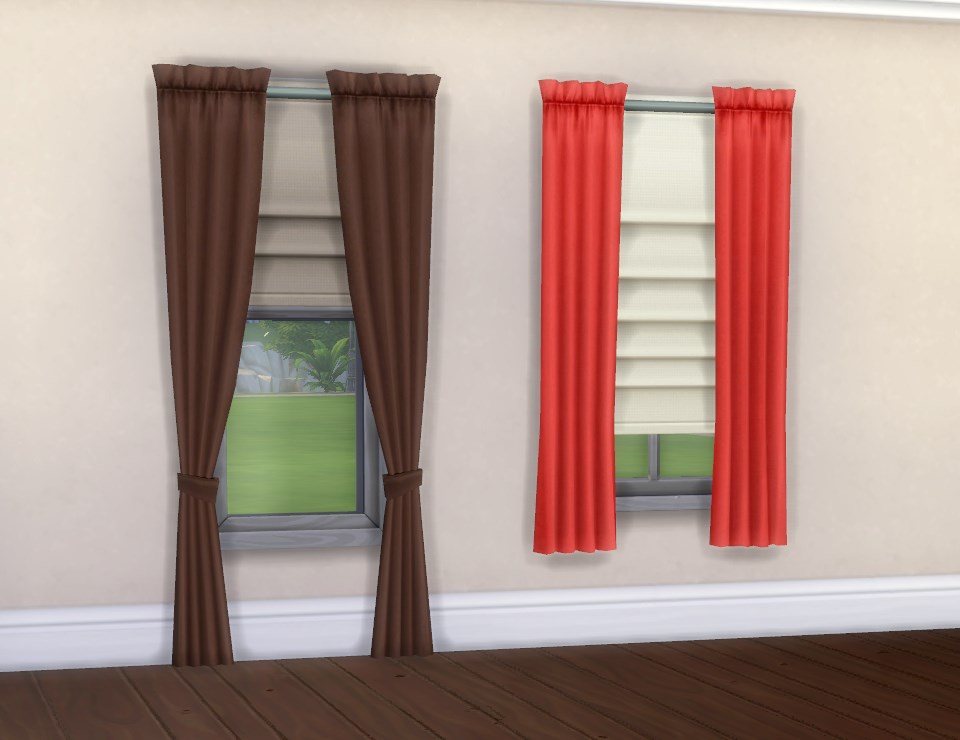
Update 2015-08-18: I put the open and closed versions in the same catalogue thumbnails now, because as of 1.10 one can switch between them with the in-game design tool. (Which means you don’t need to rebuy the blinds to open/close them; the model will only change when you let go of the tool, but it works nevertheless -- swatches are sorted with the half-open versions first, those also have a white bottom end to make them easier to distinguish.)
The LITE resource of the half-open versions is adjusted accordingly (they will let in more light than the closed ones) ‒ right now I only have a rather crappy screenshot of that (small and with no actual comparison, it only shows the edit) but I guess it'll give you an idea what it looks like.
They're available in all nine colour variants of the original; as usual the textures are referenced so no there's no unnecessary junk in the package and overrides will work too. The texture is remapped so patterns should be displaying OK; on the half open versions the middle part (three of the vertical folds) will be missing but I guess that'll look fine since the fabric would be folded in anyway.
The one-tile versions cost 60§ in game, the half open two-tile one costs 90§ like the original.
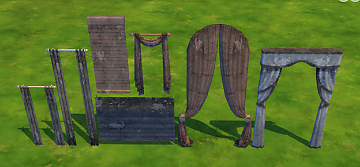
The bed and sofa on the screenshots are by myself (mesh overrides for the Maxis “Eminence” bed and “Squarely” sofa, see profile); the curtains on the picture above are from here (also by myself).
I’m also attaching the .wrk files (all three versions in the same zip) for recolouring purposes. You don’t need that if all you want is put them in your game as they are.
Polygon Counts:
Two-tile, half open:
High Poly: 118V/68F
Mid Poly: 106V/60F
High Poly Sun Shadow: 40V/68F
Mid Poly Sun Shadow: 36V/60F
One-tile, half open:
High Poly: 160V/94F
Mid Poly: 150V/82F
High Poly Sun Shadow: 40V/68F
Mid Poly Sun Shadow: 36V/60F
One-tile:
High Poly: 252V/166F
Mid Poly: 220V/136F
High Poly Sun Shadow: 64V/116F
Mid Poly Sun Shadow: 48V/86F
blender, TSRW/Milkshape, s4pe, ModdingToolkit.
This is a new mesh, and means that it's a brand new self contained object that usually does not require a specific Pack (although this is possible depending on the type). It may have Recolours hosted on MTS - check below for more information.
|
pbox_curtains_cabin-slats-add-ons.zip
Download
Uploaded: 29th Aug 2015, 34.2 KB.
17,192 downloads.
|
||||||||
|
pbox_cabin-slats_wrk.zip
| These are TSRW .wrk files for recolouring.
Download
Uploaded: 3rd Jun 2015, 36.0 KB.
5,877 downloads.
|
||||||||
| For a detailed look at individual files, see the Information tab. | ||||||||
Install Instructions
1. Download: Click the File tab to see the download link. Click the link to save the .rar or .zip file(s) to your computer.
2. Extract: Use 7zip (Windows) to extract the file(s) from the .rar or .zip file(s).
3. Cut and paste the file(s) into your Mods folder
Need more information?
- My Documents\Electronic Arts\The Sims 4\Mods\
- Anyone can use both .rar and .zip files easily! On Windows, use 7zip!
- If you don't have a Mods folder, just make one.
Loading comments, please wait...


Uploaded: 20th Apr 2015 at 4:26 PM
Updated: 29th Aug 2015 at 5:07 PM
-
-
by plasticbox updated 7th Feb 2016 at 4:13am
 6
15.7k
98
6
15.7k
98
-
by plasticbox updated 7th Feb 2016 at 4:18am
4
15.5k
91
-
-
by plasticbox 17th Aug 2015 at 5:55pm
4
24.2k
118
-
by plasticbox updated 29th Aug 2015 at 4:54am
39
62.1k
276
-
-

-
by Xetto 4th Sep 2024 at 6:15pm
3
3.6k
13
-

-
by plasticbox 6th May 2015 at 9:52pm
This is the Maxis “Mega” loveseat without the blanket. more...
5
11.8k
77
-
Shader Fix for “Immaculate” Shelf + additional colours
by plasticbox updated 11th May 2015 at 9:19pm
This is a mesh override for the Maxis “Immaculate” shelf (Base Game) that changes the shader to Counters so they more...
34
41.2k
208
-
by plasticbox 28th Apr 2015 at 4:25pm
These are two Maxis paintings (or rather, painting accumulations) ‒ “Antiqued Patent Posters” and “Study of the Human Form” ‒ more...
6
16.1k
78
-
-
Seaside Siding – Northern Edit
by plasticbox 21st Oct 2008 at 2:58pm
Weathered walls in five colours, with optional white beams on the left and right. more...
 33
35.5k
102
33
35.5k
102
-
Newbie Road 20a - Starter House
by plasticbox 8th Dec 2005 at 4:12pm
Title: Newbie Road 20a Category: Lots & Housing > Residential > Starter Homes Cost: 19.995 Lot size: 3x2 more...
7
11.1k
2
-

by plasticbox 25th Aug 2014 at 7:19pm
Small house for up to 4 sims, built on a 15 x 25 lot. Base game content only. more...
 11
10.7k
49
11
10.7k
49
-
Newbie Road 89 -- Base Game Starter, no CC
by plasticbox 16th Jun 2007 at 6:41pm
No EPs required. No custom content. more...
12
29k
26
-
by plasticbox 2nd Aug 2015 at 5:33pm
These are overrides for some of the garden plants that give them different meshes and custom textures, for more variety. more...
-
Newbie Road 183 -- Base Game Mini Budget Starter (under 10.000§), no CC
by plasticbox 29th Dec 2008 at 7:07pm
No EPs required. No custom content. more...
6
21k
25


About Me
– Feel free to recycle, you don’t need to ask.
– For the attribution, please link to the upload you’re using wherever possible (instead of my profile). This is particularly important with edits made for/with different games or game versions.
– If you use my stuff in something you make, please upload the result to a free, accessible, noncommercial site with no more restrictions than these. Code must remain open source; meshes and other material must remain re-usable.
Please do not redistribute any unmodified files – link to the upload post instead.