
 Sign in to Mod The Sims
 Little Ladies: My First Underwear Set
 Little Ladies: My First Underwear Set


LittleLadies-Main-1.jpg - width=826 height=768
LittleLadies-Main-2.jpg - width=823 height=768
LittleLadies-Main-3.jpg - width=1269 height=768
LittleLadies-Main-back.jpg - width=1000 height=671
LittleLadies-Presets.jpg - width=1000 height=565

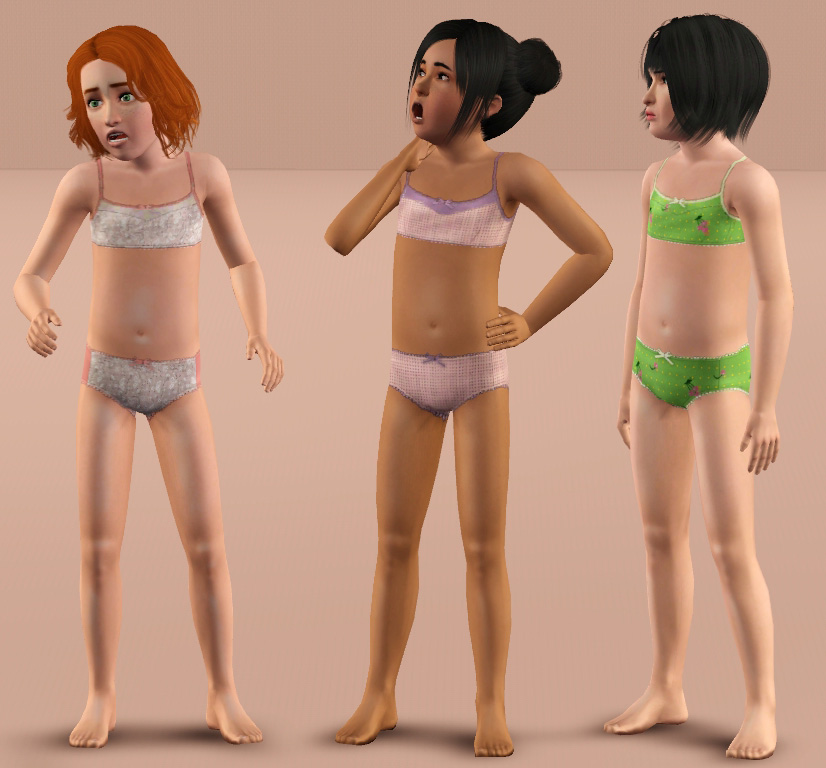
I'm sure all of the ladies out there can remember their first bra, and how proud they were of it. Well now your sim girls can share in the magic with their very own bras, too!
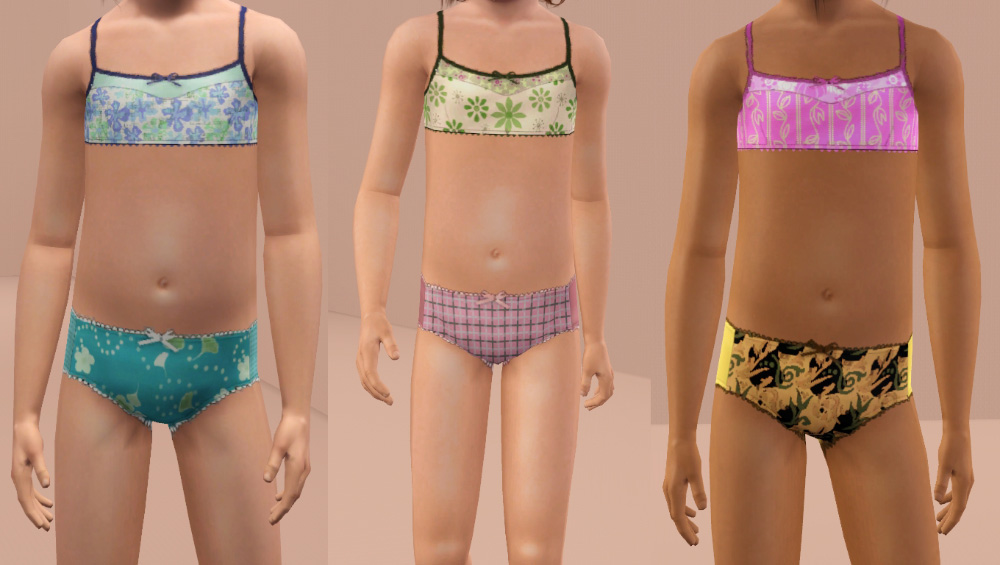
This is a simple underwear set for girls. It includes a training bra with matching lace trimmed-panties. Both are separate pieces.
They are found in sleepwear only. Hopefully EA will come out with an underwear category soon. Each comes with three cute presets (pictured above).
The channels are as follows:
Bra (3): main section, detail panel, straps/strap adjuster/trim/lace/bow
Panties (3): front panel, back panel, lace/bow
Additional Credits:
Rose Double Bun Conversion (no-accessory) by Robodl95
Bob Cut With Bangs by Tantra
Fun Kid Pose Pack by traelia
|
daluved1_littleladies_lacepanties.rar
Download
Uploaded: 4th Jun 2011, 59.8 KB.
28,547 downloads.
|
||||||||
|
daluved1_littleladies_trainingbra.rar
Download
Uploaded: 4th Jun 2011, 166.6 KB.
29,769 downloads.
|
||||||||
| For a detailed look at individual files, see the Information tab. | ||||||||
Install Instructions
1. Click the download button, or the filename, to download the file to your computer.
2. Extract the zip, rar, or 7z file. Now you will have either a .package or a .sims3pack file.
For Package files:
1. Cut and paste the file into your Documents\Electronic Arts\The Sims 3\Mods\Packages folder. If you do not already have this folder, you should read the full guide to Package files first: Sims 3:Installing Package Fileswiki, so you can make sure your game is fully patched and you have the correct Resource.cfg file.
2. Run the game, and find your content where the creator said it would be (build mode, buy mode, Create-a-Sim, etc.).
For Sims3Pack files:
1. Cut and paste it into your Documents\Electronic Arts\The Sims 3\Downloads folder. If you do not have this folder yet, it is recommended that you open the game and then close it again so that this folder will be automatically created. Then you can place the .sims3pack into your Downloads folder.
2. Load the game's Launcher, and click on the Downloads tab. Find the item in the list and tick the box beside it. Then press the Install button below the list.
3. Wait for the installer to load, and it will install the content to the game. You will get a message letting you know when it's done.
4. Run the game, and find your content where the creator said it would be (build mode, buy mode, Create-a-Sim, etc.).
Extracting from RAR, ZIP, or 7z: You will need a special program for this. For Windows, we recommend 7-Zip and for Mac OSX, we recommend Keka. Both are free and safe to use.
Need more help?
If you need more info, see:
- For package files: Sims 3:Installing Package Fileswiki
- For Sims3pack files: Game Help:Installing TS3 Packswiki
Loading comments, please wait...


Uploaded: 4th Jun 2011 at 12:20 AM
-
by Marcos_Edson updated 30th Jun 2014 at 4:14am
-
-
-
-
-
-
-
-
-

-
-
-
-
-
Dirty -- 11 exotic dancing poses
by Puss 'N Heels 22nd Jul 2014 at 11:24am
Shake it, shake it, shake it like a Polaroid picture! more...
 13
80.3k
146
13
80.3k
146
-
-
Medieval Big Water Wheel & Windmill Blades - Ye Olde Kingdom of Pudding
by The Merrye Makers 8th Dec 2011 at 1:46pm
The Quick Tick Wall Clock was used to make the Medieval Big Water Wheel and Windmill Blades actually turn. more...
19
38.3k
93
-
-

Color Burst: Mix-n-Match Plates and Bowls
by daluved1 14th Dec 2010 at 2:47pm
Add some color, make it pop! more...
8
27.9k
47
-

Teen Vintage Tees: '70s Style!
by daluved1 updated 9th Jul 2009 at 8:38pm
I'm finally about to start on the eighties set...now, I know the eighties is a lot of peoples favorites so, more...
15
29.2k
37

About Me
Because my policy is really inconsistent on my uploads, I've decided to make an official policy! So whatever you see here on my profile is my current policy. You may disregard any ''policy'' information you see on the actual upload itself.
-You may use my creations with sims
-You may use my objects with lots.
-You may retexture my meshes.
-You may include my meshes with retextures.
-You may NOT upload my creations with sims
-You may NOT upload my objects with lots.
-You may NOT upload my creations to paysites.
-You may NOT upload my creations to the exchange.
-Always credit me with a link
-I do NOT take requests!