Sign in to Mod The Sims
 Movie Night -- A couple's pose set
 Movie Night -- A couple's pose set


Screenshot-11872.jpg - width=1100 height=621
Screenshot-11871.jpg - width=1100 height=621
Screenshot-11870.jpg - width=1100 height=621
Screenshot-11869.jpg - width=1100 height=621
Screenshot-11868.jpg - width=1100 height=621
Screenshot-11863.jpg - width=1360 height=768
Screenshot-11862.jpg - width=1360 height=768
Screenshot-11864.jpg - width=1360 height=768
Screenshot-11865.jpg - width=1360 height=768
Screenshot-11866.jpg - width=1360 height=768
pose list.jpg - width=639 height=508
thumbnail.jpg - width=990 height=768
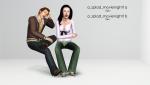
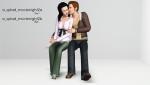
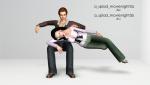
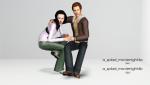
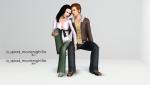
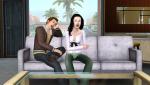
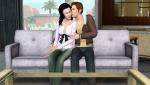
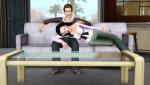
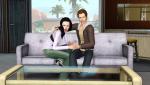
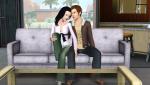
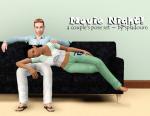
This is my first follower gift to everyone on Tumblr who thought I was worth following
 Also gave me something to look forward to after working two jobs for a week--go to first job, stare at computer, go to second job, stare at computer, go home, stare at computer. Huh. :P
So I hope you'll enjoy these poses, nothing super-fancy, just a couple enjoying their evening in, watching some TV.
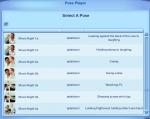
Pose tags are as follows:
Funny movie:
a_splad_movienight1a -- leaning on the back of the couch, laughing.
a_splad_movienight1b -- holding stomach, laughing.
Sad movie:
a_splad_movienight2a -- crying.
a_splad_movienight2b -- kissing cheek.
Boring movie:
a_splad_movienight3a -- leaning back against couch.
a_splad_movienight3b -- sleeping in sim's lap.
Shocking movie:
a_splad_movienight4a -- grabbing sim's hand.
a_splad_movienight4b -- holding sim's hand, arm over sim's shoulder.
Steamy movie:
a_splad_movienight5a -- hand on sim's inner thigh.
a_splad_movienight5b -- hand on sim's bottom.
Known issues:
*This set was designed using the Sofa LE from the base game, and it has a relatively high back, so keep that in mind if your sims' arms appear to be missing the couch in your photos.
*All poses except pose 3a/3b will work on a loveseat.
*Poses will probably still work if one of your sims is taller than the other one, but you may need to use Misukisu's Pose Player add-on to make them look at each other if that is the case. Likewise, the poses were designed to try to avoid clipping with clothing meshes, body sliders, and larger sims, so if your sims are very small, you may get a bit of "missing." It can be minimized with a different camera angle sometimes, but ... yeah, sorry about that.

And as always, you'll need to use "moveobjects on" to place the sims. When you cancel their posing, they'll lump up together in the middle of your sofa and look ridiculous. This is okay! Direct them to walk away and all will be well.
Additional Credits:
Cmomoney for the incredible Pose Player
OrangeMittens for the excellent "Creating Your Own Custom Poses" tutorial
WesHowe for the AnimTool
Mesher for the AM/AF rigs
Inge Jones for S3PE and the rest of the Sims community at large for assistance and encouragement.
|
Movie Night.rar
Download
Uploaded: 5th Apr 2014, 69.4 KB.
20,367 downloads.
|
||||||||
| For a detailed look at individual files, see the Information tab. | ||||||||
Install Instructions
1. Click the download button, or the filename, to download the file to your computer.
2. Extract the zip, rar, or 7z file. Now you will have either a .package or a .sims3pack file.
For Package files:
1. Cut and paste the file into your Documents\Electronic Arts\The Sims 3\Mods\Packages folder. If you do not already have this folder, you should read the full guide to Package files first: Sims 3:Installing Package Fileswiki, so you can make sure your game is fully patched and you have the correct Resource.cfg file.
2. Run the game, and find your content where the creator said it would be (build mode, buy mode, Create-a-Sim, etc.).
For Sims3Pack files:
1. Cut and paste it into your Documents\Electronic Arts\The Sims 3\Downloads folder. If you do not have this folder yet, it is recommended that you open the game and then close it again so that this folder will be automatically created. Then you can place the .sims3pack into your Downloads folder.
2. Load the game's Launcher, and click on the Downloads tab. Find the item in the list and tick the box beside it. Then press the Install button below the list.
3. Wait for the installer to load, and it will install the content to the game. You will get a message letting you know when it's done.
4. Run the game, and find your content where the creator said it would be (build mode, buy mode, Create-a-Sim, etc.).
Extracting from RAR, ZIP, or 7z: You will need a special program for this. For Windows, we recommend 7-Zip and for Mac OSX, we recommend Keka. Both are free and safe to use.
Need more help?
If you need more info, see:
- For package files: Sims 3:Installing Package Fileswiki
- For Sims3pack files: Game Help:Installing TS3 Packswiki
Loading comments, please wait...


Uploaded: 5th Apr 2014 at 9:06 PM
#pose, #poses, #couple, #couple's pose, #couple's poses, #tv, #television, #movie, #sofa poses


-
Shorty -- an adult/teen pose set
by spladoum 9th Aug 2014 at 5:43am
She's always there when you need her <3 more...
 29
53.9k
168
29
53.9k
168
-
Casual Fridays--Supernatural Jacket Edit. Base Game Compatible!
by spladoum 5th Jul 2014 at 1:47am
A casual, versatile top for guys. more...
54
65.1k
337
Male » Everyday » Young Adult
-


"Trade Kitchen Secrets" Enabled for all Sims
by spladoum 7th Dec 2014 at 10:41pm
When I first started playing Sims 3, I noticed a pretty cool interaction while bumbling in the park. more...
14
23.8k
144
-
-
Spotlight -- 6 Exotic Dance Poses
by Puss 'N Heels 4th Jan 2015 at 8:59pm
Another small set of pole dancing poses, with a focus on inversions and splits. more...
2
38.5k
74
-
Quiet Storm -- A Couple's Pose Set
by spladoum 16th Apr 2012 at 8:26am
Shake shake shake ... shake shake shake ... shake your booty ... more...
15
95.8k
167
-
-
-
Working Class Stiff -- 2 BG compatible tops
by spladoum 1st Aug 2016 at 3:17am
Back again with more office-wear type clothing for guys, because YAY OFFICE DRONES :lovestruc This time it's a more...
10
16.5k
48
Male » Everyday » Young Adult
-