
 Sign in to Mod The Sims
 “Little Sister” crib – Update 2014-08-27, Pets version available
 “Little Sister” crib – Update 2014-08-27, Pets version available
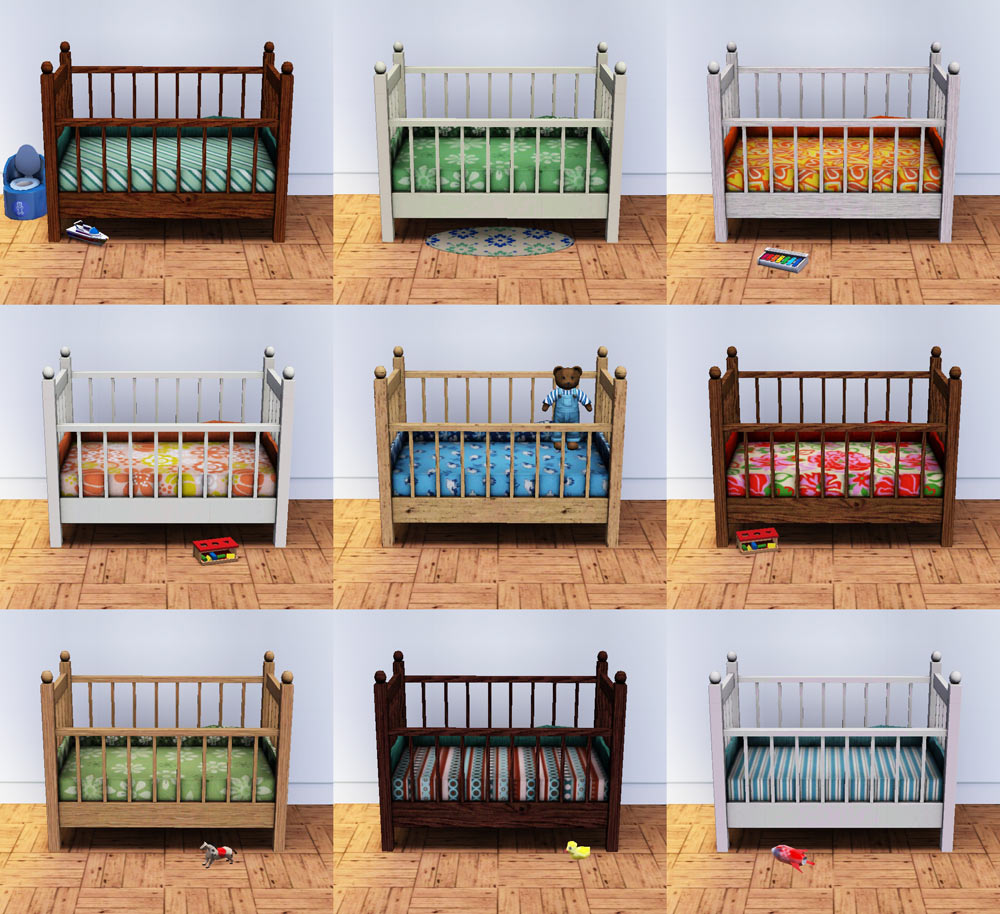


littlesister-09.jpg - width=1000 height=914
littlesister-playtest01.jpg - width=950 height=720
littlesister-playtest02.jpg - width=950 height=720
littlesister-backside.jpg - width=1000 height=720
littlesister-comp.jpg - width=900 height=640
littlesister-presets.jpg - width=1100 height=560
littlesister-knownissues.jpg - width=1000 height=760
littlesister-01.jpg - width=1000 height=750
Update 2014-08-27:
I’m extremely late to the post-Pets party, but I’ve fixed this now for Pets and later – post-Pets users, please remove the old version and use the “_rigfixed” one instead. This is confirmed to be working –*thanks to FakeHouses|RealAwesome for testing!
Update 2010-02-08:
In an attempt to get the stupid wallshadow to work, I fixed/changed a bunch of other things (but not the wallshadow, grr):
- Remeshed the mattress so that it looks less like a brick
- Reduced the poly count a little
- Remapped the whole thing:
- much less repetition
- Channel #4 now does something useful (slates on the sides/front/back now separately recolourable)
- dropshadow on the floor is now softer
- mapping on the mattress and ruffle rotated by 90° so now vertical stripes will be vertical / back-to-front (unlike in the EA crib – which also means that with the same presets, this one will look different now) - Retextured again: slidery bits for the front now look a bit more real, the one-pixel line seems to be gone, more accurate shadows due to the remapping
- Recompiled – bounding box should now be correct
- Removed lots of unnecessary cruft from the package
The indoor wallshadow is still the old one, apparently it's not known how this works. And the mapping of the low-res mesh is now more out of whack than before, due to the remapping – I can't fix this at the moment, but, again, this mesh is only visible in-game while it's still loading, not during gameplay, so I don't consider this a major issue.
If you remove the old crib, you may need to "resetsim" toddlers or babies that were using it.
One-tile version:
HugeLunatic made a very cute one-tile version of this crib; it's available here.
All of the screenshots below are showing the first version.
Comparison picture (these are the default materials, same on both cribs):
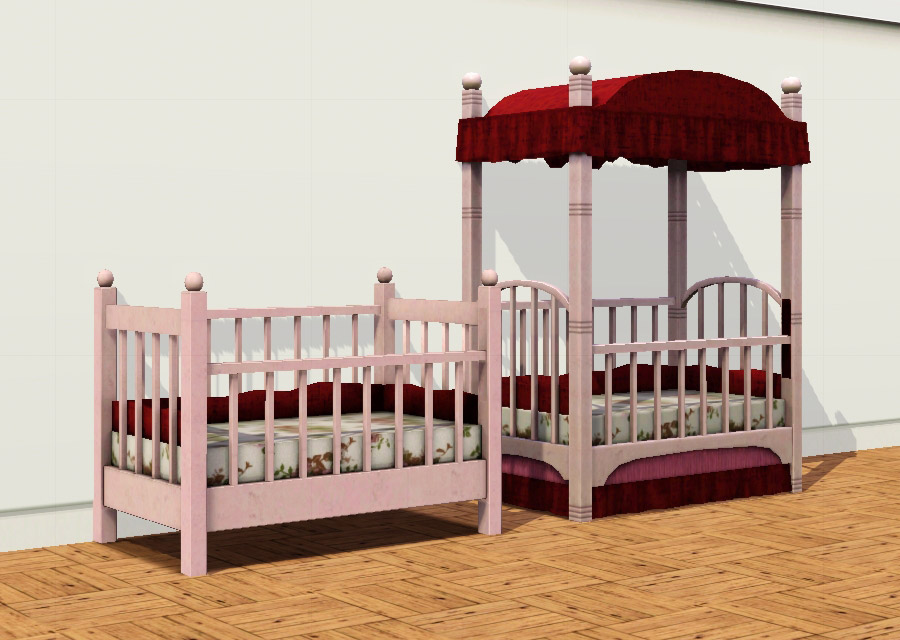
Changes I made:
- removed the paravent and dust ruffle
- swapped the curved sides and bottom bits for straight ones
- made the little knobs at the top of the legs smaller, and less pumpkin-shaped
- made those slider bits (where the front part goes up and down) the same colour as the frame, instead of black
- slightly remapped it (argh) and retextured the whole thing (double argh)
My shadow texture is slightly lighter than the EA one – I had it matched but then I thought it just looked too dull. The mapping of the mattress and ruffles around the back and sides is unchanged (which means: a bit stupid, since it's rotated at 90°, but I only noticed that when I had entirely run out of patience).
Presets are the EA ones; it costs 280§ in game and has the same stats and catalogue flags as the original. Four recolourable parts (body, mattress, ruffle, and
Made from base game 1.8.25 files.
Known issues:
- the indoor raytracing shadow is that of the original (see "knownissues" screenshot). I have no idea how to change this – if I find it too annoying on the long run, I'll either reclone it or, if I can figure out how, make it use my mesh instead.
- the low-res mesh probably has mapping issues, but you don't normally see that mesh in game anyway. I can't recompile it at the moment, so I can't change this.
Please note that some screenshots show a slightly older version – the front side does stick out the bottom in the final one (because otherwise, there'd be a gap when it's closed). All of the playtesting screenshots show the final version.
Made in blender with the help of s3pe, s3oc, Aorta, SquishDDS, Photoshop, Milkshape, and S3 Object Mesh Tool.
Polygon Counts:
The high-resolution mesh has 750 faces, 1053 vertices. The low resolution one has 308 faces, 496 vertices.
This is a new mesh, and means that it's a brand new self contained object that usually does not require a specific Pack (although this is possible depending on the type). It may have Recolours hosted on MTS - check below for more information.
|
pbox_CribLittleSister-v2_rigfixed.zip
Download
Uploaded: 2nd Sep 2014, 197.7 KB.
7,981 downloads.
|
||||||||
|
LittleSister.zip
Download
Uploaded: 5th Feb 2010, 200.4 KB.
28,325 downloads.
|
||||||||
| For a detailed look at individual files, see the Information tab. | ||||||||
Install Instructions
1. Click the download button, or the filename, to download the file to your computer.
2. Extract the zip, rar, or 7z file. Now you will have either a .package or a .sims3pack file.
For Package files:
1. Cut and paste the file into your Documents\Electronic Arts\The Sims 3\Mods\Packages folder. If you do not already have this folder, you should read the full guide to Package files first: Sims 3:Installing Package Fileswiki, so you can make sure your game is fully patched and you have the correct Resource.cfg file.
2. Run the game, and find your content where the creator said it would be (build mode, buy mode, Create-a-Sim, etc.).
For Sims3Pack files:
1. Cut and paste it into your Documents\Electronic Arts\The Sims 3\Downloads folder. If you do not have this folder yet, it is recommended that you open the game and then close it again so that this folder will be automatically created. Then you can place the .sims3pack into your Downloads folder.
2. Load the game's Launcher, and click on the Downloads tab. Find the item in the list and tick the box beside it. Then press the Install button below the list.
3. Wait for the installer to load, and it will install the content to the game. You will get a message letting you know when it's done.
4. Run the game, and find your content where the creator said it would be (build mode, buy mode, Create-a-Sim, etc.).
Extracting from RAR, ZIP, or 7z: You will need a special program for this. For Windows, we recommend 7-Zip and for Mac OSX, we recommend Keka. Both are free and safe to use.
Need more help?
If you need more info, see:
- For package files: Sims 3:Installing Package Fileswiki
- For Sims3pack files: Game Help:Installing TS3 Packswiki
Loading comments, please wait...


Uploaded: 5th Feb 2010 at 12:21 AM
Updated: 2nd Sep 2014 at 5:18 PM
-
-
A simple dining table – Update 2014-08-27: Rigfix
by plasticbox updated 2nd Sep 2014 at 8:45pm
 31
48.2k
91
31
48.2k
91
-
by HugeLunatic 14th Feb 2010 at 1:16am
94
162.1k
401
-
Canonical Kitchen Chair – Update 2014-08-27: post-Pets fix!
by plasticbox updated 2nd Sep 2014 at 8:39pm
22
51k
82
-
by Christine11778 17th Aug 2010 at 8:50am
20
110.6k
183
-
by Lisen801 21st Jan 2011 at 6:02pm
27
58.7k
129
-
-
by Morphead 23rd Jul 2012 at 3:30pm
39
106.9k
341
-
-
by TheSweetSimmer 28th Jul 2018 at 6:37pm
3
28.8k
10

-

by plasticbox updated 6th Feb 2016 at 3:13am
These are the EA teen careers -- Barista, Baby Sitter, Fast Food, Manual Labor, and Retail -- made available for more...
 312
273.8k
799
312
273.8k
799
-
by plasticbox 21st Jun 2015 at 3:15pm
This is a single crate from one of the Maxis neighbourhood objects (Wooden Crates, available for Build/Buy in this upload more...
12.4k
65
-
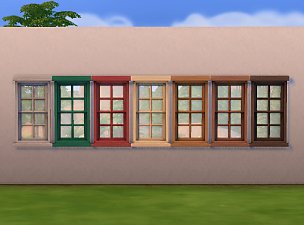
Octopane Window: White Interior
by plasticbox 10th Dec 2015 at 9:17pm
These are additional colour variants for the Maxis “Octopane” window with a white interior. more...
5
13.9k
76
-
Newbie Road 42b [NL] - Starter House
by plasticbox 27th Feb 2006 at 8:59pm
Title: Newbie Road 42b [NL] Category: Lots & Housing > Residential > Starter Homes Cost: 19.959 Lot size: 2x2 more...
 +1 packs
4 15.1k 5
+1 packs
4 15.1k 5 Nightlife
-
by plasticbox 29th Apr 2007 at 7:41am
Requires Nightlife, OfB, and Seasons. more...
+3 packs
5 7.3k 5 Nightlife
 Open for Business
 Seasons
-
by plasticbox updated 7th Mar 2015 at 2:06am
This adds some slots to the Maxis Towel Storage Rack, so that it actually works as a shelf. more...
38
53k
389
-
Backdoor Lane 60, 61 and 62 -- Three Corner Houses
by plasticbox updated 9th Jan 2009 at 12:05pm
I'm finding corner lots fiendishly difficult to build, so when I finally got something working I made three versions of more...
+3 packs
32 46.1k 59 Nightlife
Open for Business
Seasons
-
Newbie Road 40 [NL] - Starter House
by plasticbox 2nd Feb 2006 at 11:46am
Title: Newbie Road 40 [NL] Category: Lots & Housing > Residential > Starter Homes Cost: 19.777 Lot size: more...
+1 packs
15 12.5k 4 Nightlife
-
by plasticbox 14th Sep 2015 at 9:18pm
This is a small, rustic cabin suitable for 3‒4 sims (it is furnished for three). more...
10
15.5k
64
-
Newbie Road 154 -- Mini Budget Starter, no CC
by plasticbox updated 20th Sep 2008 at 6:08am
Requires Seasons. more...
+1 packs
5 19.1k 23 Seasons


About Me
– Feel free to recycle, you don’t need to ask.
– For the attribution, please link to the upload you’re using wherever possible (instead of my profile). This is particularly important with edits made for/with different games or game versions.
– If you use my stuff in something you make, please upload the result to a free, accessible, noncommercial site with no more restrictions than these. Code must remain open source; meshes and other material must remain re-usable.
Please do not redistribute any unmodified files – link to the upload post instead.