
 Sign in to Mod The Sims
 Mod 'ur Dig [custom diggables]
 Mod 'ur Dig [custom diggables]


GUIDentries.jpg - width=616 height=559
modurdig.jpg - width=1000 height=600
objectChances.jpg - width=643 height=512
objectCount.jpg - width=713 height=565
modurdigThumb.jpg - width=512 height=512

 So somewhere in the code I'm guessing is an object type limitation, probably something decorative.
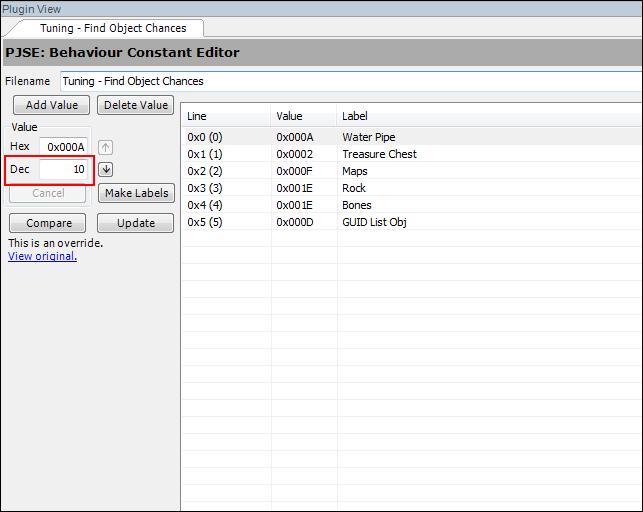
 To change the chance of digging up a particular object, you change the values in the BCON Tuning - Find Object Chances. The numbers must add up to 100.
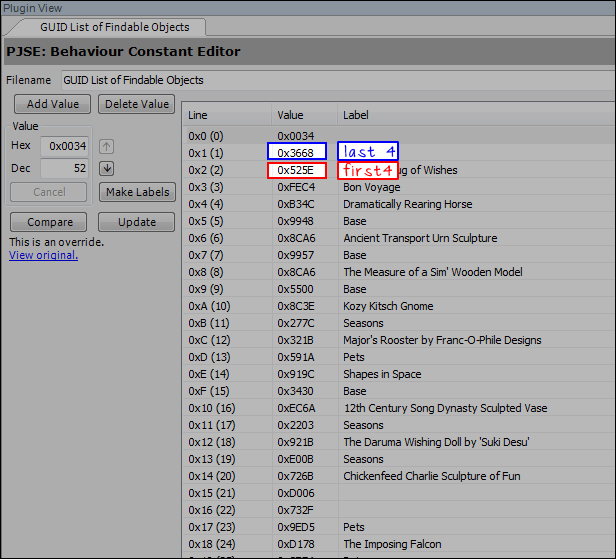
To change the objects that your sims digs up, you change the GUIDs in the BCON GUID List of Findable Objects. The very first line, 0x000, is the count of objects in the list. So if you want to lengthen or shorten your list, then change that value accordingly. To place GUIDs in the list, you place the last four digits in the first line and the first four digits in the second line.
Tutorial for customizing
|
HL_Mod-ur-Dig.rar
Download
Uploaded: 18th Aug 2014, 1.2 KB.
1,212 downloads.
|
||||||||
| For a detailed look at individual files, see the Information tab. | ||||||||
Install Instructions
1. Download: Click the download link to save the .rar or .zip file(s) to your computer.
2. Extract the zip, rar, or 7z file.
3. Place in Downloads Folder: Cut and paste the .package file(s) into your Downloads folder:
- Origin (Ultimate Collection): Users\(Current User Account)\Documents\EA Games\The Sims™ 2 Ultimate Collection\Downloads\
- Non-Origin, Windows Vista/7/8/10: Users\(Current User Account)\Documents\EA Games\The Sims 2\Downloads\
- Non-Origin, Windows XP: Documents and Settings\(Current User Account)\My Documents\EA Games\The Sims 2\Downloads\
- Mac: Users\(Current User Account)\Documents\EA Games\The Sims 2\Downloads
- Mac x64: /Library/Containers/com.aspyr.sims2.appstore/Data/Library/Application Support/Aspyr/The Sims 2/Downloads
- For a full, complete guide to downloading complete with pictures and more information, see: Game Help: Downloading for Fracking Idiots.
- Custom content not showing up in the game? See: Game Help: Getting Custom Content to Show Up.
- If you don't have a Downloads folder, just make one. See instructions at: Game Help: No Downloads Folder.
Loading comments, please wait...


 View with Names
Uploaded: 18th Aug 2014 at 7:09 PM
Updated: 29th May 2026 at 1:09 PM
#digs, #diggables, #digging, #bon voyage, #maps
-
-
by EvelynnMama 23rd Jun 2021 at 5:50pm
 +1 packs
7 17.5k 57
+1 packs
7 17.5k 57 Seasons
-
-
-
-
-
by HugeLunatic updated 14th Sep 2024 at 11:25pm
+1 packs
8 11.1k 18 Nightlife
-
-

Better Bon Voyage Part 2: Digging
by Big Woe updated 7th May 2026 at 1:18am
+7 packs
14 3.4k 6 University
Nightlife
University
Nightlife
 Open for Business
 Pets
Seasons
Pets
Seasons
 Bon Voyage
 Free Time
-

Apocalypse Challenge Mod: Journalism Restriction - Newspaper
by re_jenni 16th May 2026 at 2:14pm
+2 packs
1 1.1k Free Time
 Apartment Life


-
by HugeLunatic 1st Oct 2012 at 10:04pm
Just something a little different and fun, "Caon's Stuffed Freezer Bunny" from M&G turned into a pet pillow! more...
+1 packs
21 32.7k 87 Pets
-
-
by HugeLunatic updated 23rd Nov 2007 at 8:16am
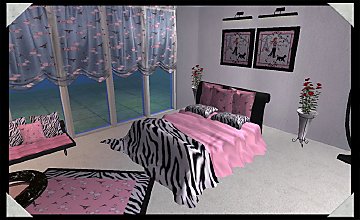
The picture that started it all...I found these two cute pictures on the web...no idea where or how I ended more...
-
by HugeLunatic 21st Sep 2010 at 1:39am
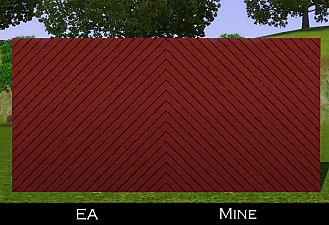
Basically EA gave us recolors of each wall template and filled up the catalog to make it look like we more...
 51
141.4k
253
51
141.4k
253
-
M&G Second Empire Architecture Roof - Halved
by HugeLunatic 4th Aug 2025 at 12:30am
+1 packs
4 2.1k 12 Mansion and Garden
-

by HugeLunatic 22nd Oct 2021 at 12:20pm
The arch from TS4 Romantic Garden made into a proper wedding arch. more...
7
6.7k
42
-
[Recolorable] - Maxis Modular Stairs - II
by HugeLunatic updated 31st Jan 2018 at 1:14pm
One last set of EAxis modular stairs made recolorable. more...
13
53.1k
103
-

by HugeLunatic 10th Apr 2011 at 3:40pm
Cleo Hwang spends her days puttering in her garden, growing fresh vegetables and herbs to cook with. more...
-
Maxis Open **Recolorable Stairs** - Slaves
by HugeLunatic 16th Dec 2009 at 9:26pm
Updated 19-Dec-09 - with new script file Apparently the range of numbers I have for my modular stairs conflict with more...
31
99.3k
160
-
by HugeLunatic 28th Feb 2016 at 2:11pm
The cute little penguin from Seasons now an indoor sculpture. more...
14
8.4k
30


Packs Needed
| Expansion Pack | |
|---|---|
| Bon Voyage |
About Me
Pet Stories || Dog Agility Items? || Castaway Stories || Holy Simoly Extras
4esf Archive || Holy Simoly Archive || CEP-Extras List || Buyable Game Objects
lunie content from GoS/s2a
 Installation of CEP Extras
-the package with pfiles appended to the name will go into your cep extras folder where your game is installed (typically c drive, you do you)
-the other goes in CEP extra folder in documents.
The following locations are what I am aware of, beyond that you'll have to do some searching.
Downloads Folder:
C:\Users\<user>\Documents\EA Games\The Sims 2 Legacy
C:\Users\<user>\Documents\EA Games\The Sims 2 Ultimate Collection
With multiple launchers, the location for your game install will vary.
C:\Program Files\EA GAMES\The Sims 2 Legacy\TSData\Res\Catalog\zCEP-EXTRA
C:\Program Files\EA GAMES\The Sims 2\TSData\Res\Catalog\zCEP-EXTRA
C:\Program Files (x86)\EA GAMES\The Sims 2\TSData\Res\Catalog\zCEP-EXTRA